
Key-Drop Promo Code STRIKEPOT — $0.50 + 20% Bonus
Use Key-Drop promo code STRIKEPOT for the advertised $0.50 starter credit and 20% top-up bonus. Check your account’s starter eligibility and apply the code before each top-up.
YOUR OFFER AT A GLANCE
$0.50 starter + 20% top-up bonus
The $0.50 starter credit is separate from the top-up bonus. Apply STRIKEPOT before every top-up.

StrikePot earns affiliate commissions through this partnership.
- Who can use it
- Eligible accounts for the starter credit; a valid promo code before each top-up for the 20% bonus.
- Where to enter it
- Deposit → promo-code field → STRIKEPOT. Read the active amount before paying.
Official site · kd.link · Offer rules checked
The 20% rule was checked on 7 November. The $0.50 welcome amount retains its 27 October observation; confirm the starter amount in your account.
CODE & OFFER
Full offer conditions
$0.50 advertised starter credit plus 20% on the next top-up with a valid promo code. Account eligibility applies.
- $0.50 starter credit depends on account eligibility. Apply the code before each top-up for the 20% bonus.
- The starter credit has separate first-use and account eligibility; read the amount shown for your account.
- The current welcome offer advertises $0.50. The help article describes a different limited $1 credit; do not add both amounts.
How to use Key-Drop’s code or link
- 1
Open Key-Drop with the button above and sign in. Then click your balance (the green wallet button) at the top right.
- 2
In the Deposit balance window, type STRIKEPOT in the Enter the promo code field, next to Boost balance. Key-Drop shows the minimum top-up there ($2.00 when we checked).

Checked by StrikePot on Key-Drop on 20 November 2026. Screenshots are ours; account names and balances are hidden.
BEFORE YOU USE THE OFFER
Check the starter credit and deposit percentage separately
Read the code confirmation and active offer before a payment. For a later top-up, Key-Drop’s instructions say to apply the valid code again.
Skin delivery has a separate requirement: Key-Drop's help says the account must have received at least $2 in top-ups and have a Steam Trade URL configured. A $2 balance alone does not meet that top-up requirement. Check the selected skin's availability before requesting Collect.
- Golden Codes award Gold Coins and use a separate entry. STRIKEPOT is an affiliate promo code.
- A welcome amount shown in another currency can differ from the USD figure.
- The starter credit is a separate component from the deposit percentage and is not an independently withdrawable-cash promise.
Game formats on Key-Drop
Two bonus components, with different checks
The current welcome offer on the STRIKEPOT link advertises a $0.50 starter credit alongside a 20% top-up bonus. Keep the one-time amount separate from the percentage: a code being present does not prove both parts are available to every account.
| Promo code | STRIKEPOT |
|---|---|
| Advertised starter credit | $0.50, subject to the account’s current welcome eligibility. |
| Deposit percentage | 20% on the next top-up after applying a valid code. Apply the code again before each later top-up. |
| Before a payment | Read the actual code confirmation, starter amount and qualifying conditions. |
Read both parts of the offer
Starter credit
Check the amount and first-use eligibility separately.
Top-up percentage
Read the 20% offer attached to the intended payment.
Code confirmation
Apply STRIKEPOT in the promo-code field before the top-up.
A listed benefit is not a promise of withdrawable cash.
StrikePot illustrationWhy the welcome amount differs from the help article
Key-Drop’s 19 May 2026 promo-code help describes a limited 1 USD credit at first use for eligible accounts with an active Steam account. The current welcome offer instead advertises 0.50 USD, which can be displayed in a local currency.
This page uses the current advertised welcome amount. The two figures are not two credits to add together. Read the amount and eligibility actually shown for your account before relying on either description.
A promo code is different from a Golden Code
Use the promo-code field in Deposit for STRIKEPOT. Golden Codes have a separate entry and provide Gold Coins for the Gold Area; an affiliate code does not turn into a Golden Code when pasted into that box.
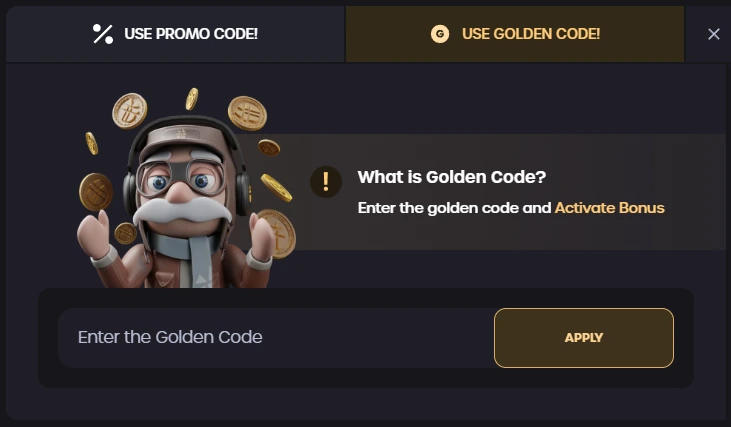
Key-Drop’s published help example separates USE PROMO CODE and USE GOLDEN CODE. The blank Golden Code field shown here is not where an affiliate promo code becomes a Gold Coin reward.
Open the full-size image to read small interface details.Code accepted, but the amount is different?
Keep the exact code response and identify the component that differs: a starter credit, the payment percentage or a payment that has not been credited yet. Those observations lead to different checks.
For a completed payment, retain its original reference and method. Read the applicable conditions and ask official support about that same record; a new payment is not needed to make the question precise.
For an owned skin, follow Collect to Steam
Key-Drop’s withdrawal help starts at My Account, the on-site inventory and Show items set to Active. Collect requests a Steam skin transfer; Sell turns an item into on-site balance instead.
The help requires a configured Steam Trade URL and at least 2 USD actually added to the account. A displayed balance of 2 USD by itself does not show that condition. Check the account’s existing history and the item’s current status.
Follow the item, not just the balance
Active inventory
Find the exact skin in the site inventory.
Collect
Read the request status after choosing the skin action.
Steam offer
Match the received offer with the original item.
Credit, an owned item and a received Steam offer are separate records.
StrikePot illustrationSources for this Key-Drop guide
- Code record
- StrikePot partner code
- Instructions
- Public claim instructions documented
- Public source check
- Official offer details
Key-Drop code details
Also listed as: KD.Link, KD Link, KeyDrop. These names lead to the same partner guide.
- Manual code
STRIKEPOTCopy and apply this code- Visit method
- Referral link
- Link destination
- kd.link
- Directory category
- CS2 code guides