THE QUICK ANSWER
Give support one reference, one timeline and the exact error. Add new evidence to the same case when possible.
01
Gather the details
- Name the service and the specific action involved.
- Include its order, trade or transaction reference, if one exists.
- Write the timestamp and time zone, rather than only saying “today.”
- State the status or error exactly as shown.
- Attach relevant screenshots after removing unrelated personal information.
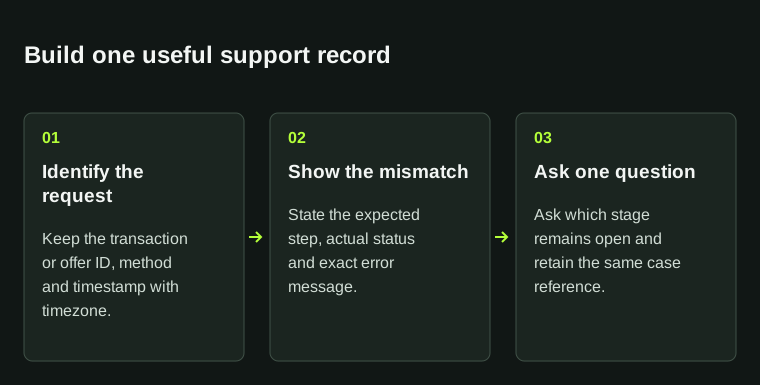
References, observed status and a precise question make a clearer support case than several contradictory messages.
02
Say what you expected and what happened
Describe the expected result and the result you can see. For example: “The item is visible in Steam, but the website shows no eligible items.” Name the affected item and avoid guessing why it happened.
List the checks you tried and what each showed. Ask support to explain the current status or identify the next step. If you do not know the cause, say so.
03
Copy the template
Replace the brackets in your own message. Nothing is submitted from this page; the button only copies the text.
04
Keep follow-ups in the same case
Keep the ticket reference and add new evidence to the same conversation where possible. Record any estimate from support with its date, time zone and conditions. This template does not promise an answer time or outcome.
05
For withdrawals, identify the delayed stage
For a skin sale, record the marketplace order, Steam offer, release of proceeds and external payout separately. Give each stage its own reference and time. If no payout was created, say so; a Steam trade ID is not a bank payment reference.
Use the exact balance or payment status: unavailable, processing, failed or sent. Keep any arrival estimate with the date you saw it and any business-day condition. Start timing the bank stage from the payment event, rather than from the day you listed the skin.
Ask which stage remains unfinished and what action is needed. Hide account numbers and identity documents in general screenshots. If documents are requested, provide only what is needed through the service’s verified private process.
| Marketplace record | Order ID, item, status, timestamp and time zone. |
|---|---|
| Steam transfer | Offer ID and its actual active, cancelled or completed state. |
| Sale proceeds | Balance label and displayed release notice, if relevant. |
| External payment | Payout reference, method, net currency and provider status, if created. |
BEFORE YOU CONTINUE
Quick checklist
- Reference and timestamp included.
- Observed result described without guessing the cause.
- Passwords, codes and recovery information removed.
Official sources
Read the official documents below for the service’s rules and account instructions.
The additional calculation or evidence workflow is original StrikePot editorial guidance, not a quoted platform procedure. Platform-specific requirements are linked separately.
Need the details for a particular website?
The code directory records each partner’s code, referral method and offer status. Use the relevant partner page when your question also involves one of those details.
Partner pages may include affiliate links. A listing does not confirm a reward or account eligibility.