THE QUICK ANSWER
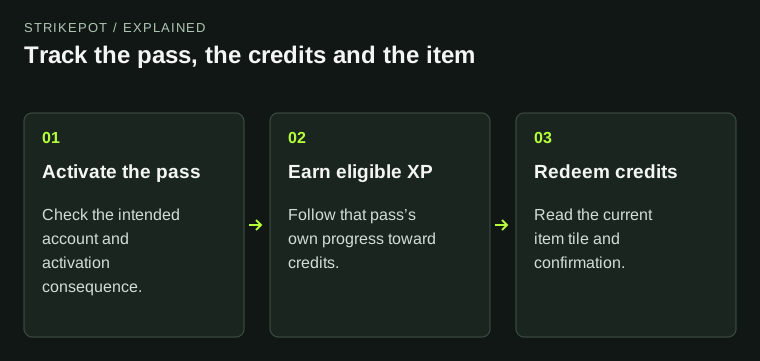
An activated pass can earn 40 credits through eligible play. If credits are missing, check the match and the pass before trying an item redemption.
01
Check that the pass is activated
Valve’s support page makes activation a requirement for earning Armory Credits. Owning a purchased pass is a different state from having it active. The pass is available to Prime accounts in-game; check the pass on the same account where you are playing.
Activation also changes refund eligibility: Valve says an unactivated Armory Pass can be refunded, while an activated one cannot. Check that consequence before activating a pass bought by mistake. Passes cannot be gifted, traded or sold on the Steam Community Market.
02
Expect credit progress from play, not an activation gift
Each active pass supports 40 earned credits, and the FAQ allows progress on up to five active passes at once. Credits are earned through XP on official Valve servers; they are not a balance you can purchase directly.
Older launch instructions can be misleading. Valve’s November 2024 update removed the credit previously granted immediately on activation. All 40 credits are earned through play. A newly activated pass with no immediate credit is therefore different from a completed eligible match that gave no progress.
The support FAQ also separates Armory progress from weekly profile XP. Use the pass’s own progress and credit balance when describing a problem, rather than estimating an expected credit from your profile rank alone.
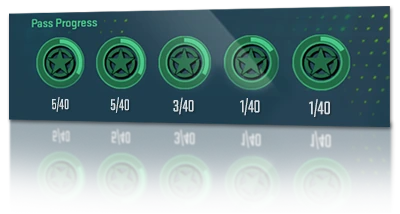
Valve’s October 2024 launch illustration: five Armory Pass progress counters, each out of 40.
Open the full-size image to read small interface details.03
Check the three documented reasons for missing progress
Valve lists three situations where a match does not grant Armory progress: the match was non-Prime, you left before completion XP was issued, or irregular gameplay by you or a party member caused cancellation. Identify which description fits the match before treating the credit balance as a lost reward.
For a report, keep the match time and the observed pass progress before and after it. State whether the match completed and whether a cancellation notice appeared. Do not substitute a later purchase or another pass activation for that missing record.
Why the match may not grant progress
Non-Prime match
Check the match’s eligibility.
Left before XP
Check whether completion XP was issued before leaving.
Canceled match
Record any irregular-gameplay cancellation affecting the party.
Original map of the three exclusions listed by Steam Support. It does not diagnose an individual account.
StrikePot illustration04
A completed pass and an expiring item have different clocks
After a pass has earned its full 40 credits, Valve says you can clear the completed pass in-game to make room for a new active pass. Check completion before looking for further progress on that pass.
The FAQ says Armory Passes do not expire. A Limited Edition item instead uses the duration shown on its own tile. Keep that distinction when planning a redemption: an unfinished pass remaining available does not establish that a particular item will stay in the catalog.
05
Read the current tile before spending credits
Review the item or collection named by the current Armory tile, its credit cost and its confirmation. Catalog content changes: Valve’s July 2026 update added weapon and sticker collections and removed earlier ones. A launch screenshot is not a current availability list.
Check the reward description for what you will actually receive. Once you have made a redemption, compare the credit change with the delivered item record. A remaining pass-progress bar and an owned skin are different evidence.
Three states to check separately
Pass progress
How far this active pass has progressed.
Credit balance
Credits available to redeem.
Reward record
The item received, or the exact redemption error.
Original explanation for a missing reward report; the illustration is not a software screenshot.
StrikePot illustration06
If item redemption fails, save the exact error
Valve’s June 2026 notes specifically mention an inventory-full error for Armory redemptions. If that message appears, address inventory space and review the original redemption state before trying again. Avoid deleting a valued item merely to test the error.
For an unresolved case, keep the tile name, credit balance, time and exact message together. This distinguishes a pass that is not earning progress from an item redemption that could not complete.
BEFORE YOU CONTINUE
Quick checklist
- Check the correct account and activated pass.
- Use the pass’s own progress and credit balance.
- Check match completion and the documented exclusion reasons.
- Clear a pass only after identifying its completed state.
- Review the current reward tile and any inventory-full error.
Official sources
Official guidance checked on 27 October 2026. Dated updates below explain changes to earlier instructions.
- Steam Support · CS2 Armory Passes and Credits · reviewed
- Valve · Removal of immediate Armory activation credit, November 2024 · reviewed
- Valve · Armory catalog changes, 8 July 2026 · reviewed
- Valve · Inventory-full redemption error, 10 June 2026 · reviewed
- Valve · Original Armory campaign page (historical launch text) · reviewed Historical launch page; its activation-credit statement was superseded in November 2024.
Keep exploring skins & trading
Find practical guides for inspecting CS2 skins, understanding Rust cosmetics and comparing TF2 items.