
THE QUICK ANSWER
Choose what you expected to receive, record what the website says and build one clear message for support. The summary stays in this page until you choose to download it.
01
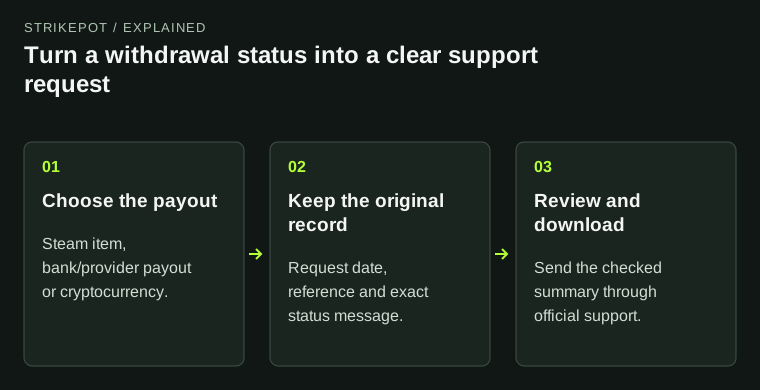
Start with the original withdrawal request
Use the form below when you have a withdrawal to trace and want to explain it clearly. You do not need to connect an account. Enter the website name, the type of payout and the date of the original request. Add the amount or exact item name if it helps identify the request.
Copy the status from the website rather than interpreting it. Pending, rejected and complete describe different stages, and complete can mean something different at the website and the payment provider. If no clear status is shown, keep that choice instead of guessing.
Use a request ID or a redacted reference. Leave passwords, login codes, recovery information, identity documents and full bank or card details out of the form. Support can request sensitive documents through its own secure process when they are actually needed.
Try it with your own details.
This tool keeps your input in this page. It does not upload it, add it to the address or save it. Downloads happen only when you choose them. Reset the form when you finish.
02
Use the evidence for the payout you chose
For a Steam item, record the game and the original offer ID or offer status. An offer that was never sent, one waiting for acceptance and an accepted exchange need different checks. Open Steam directly and compare its trade history with the website request. Read the restriction on the actual item; a CS2 rule is not automatically a Rust or TF2 rule.
For a bank or payment-provider payout, use the provider reference if you have one. A website approving a request does not by itself show that a bank has received it. Ask which record proves the payout was sent and which processing window applies to the method you selected.
For a crypto payout, keep the exact network recorded by the sender and the public transaction hash. A request still in the website's queue may not yet have a blockchain transaction. If a hash exists, match its network before opening an explorer. The separate explorer-link tool helps prepare that link; this summary builder does not look up a transfer.
A different record for each payout
Steam item
Original offer, game and item status.
Bank payout
Website request and payment-provider reference.
Crypto transfer
Exact network and public transaction hash, if broadcast.
Match the evidence to what you were expecting to receive. These are record types, not proof that a payout completed.
StrikePot illustration03
Review the question before sending it
Prepare my support summary produces a plain-text record and a question matched to the payout type and the status you chose. Read it before sharing it. Remove any details that are unnecessary, correct anything you entered from memory and keep the wording of the original status message where possible.
For example, a bank payout marked complete produces a question about whether complete means approved or sent, the provider reference and the delivery window. It does not label the payment lost. A rejected request produces a question about the exact blocker and the action required through official support.
The tool does not submit a ticket, contact the website, verify the transaction or set a delivery deadline. Use the operator's official support route to send the reviewed message. If you already have a ticket, keep the same reference so the history stays together.
Ask about the missing stage
No clear status / pending
Ask which stage the request has reached and whether an action is required.
Failed or restricted
Ask for the exact blocker and the official next step.
Complete, but missing
Ask for the record proving delivery through the selected method.
The question follows the status you enter. It does not diagnose the account or predict a payment date.
StrikePot illustration04
Add only the supporting records that help
If several events need explaining, build a dated transaction timeline and attach it to the message. If support needs a screenshot, use a flattened redacted copy that hides private details while leaving the status, amount and relevant reference readable.
Keep the original records privately. The downloaded text contains whatever you chose to enter, so review the file before attaching it to a ticket or forwarding it. The form does not save your input; reset it when finished, especially on a shared device. A completed summary is an organised account of the issue, not confirmation that a payout was sent or received.
BEFORE YOU CONTINUE
Quick checklist
- Choose the actual payout type, not the balance displayed on the website.
- Keep one original request reference and its exact status.
- Read and correct the generated summary before sharing it.
- Use the operator's official support route and keep the existing ticket reference.
- Review the downloaded file and reset the form when finished.
Official sources
This page describes StrikePot's summary builder and its output. The references explain the browser download mechanism and Steam's own trade records.
- MDN — FormData and the fields submitted by a form · reviewed
- MDN — Blob, used for the local text download · reviewed
- Steam Support — Steam Trade Offers · reviewed
Review the downloaded summary before sharing it, and use the operator’s official support route.

