THE QUICK ANSWER
Start with the message you actually received. Code acceptance, payment eligibility and reward credit are separate steps; another deposit does not tell you which step failed.
01
Record the result before trying another code
Copy the code exactly and keep the name of the field you used, the time and the response. An invalid-code message is different from an accepted code with no visible reward. A link opening the correct website is not proof that an account accepted its referral attribution.
Check the current partner guide for the correct field and reward. Some services distinguish affiliate codes, gift codes and separate reward currencies. Repeatedly changing the spelling does not resolve a code-type mismatch.
02
Make sure the field belongs to that reward
Key-Drop directs affiliate promo codes to Deposit, while its Golden Codes use a separate entry and award Gold Coins. Putting STRIKEPOT in a Golden Code field does not convert it into that reward type.
Keep the original source of the code beside its expected result. This gives support a precise record of the offer you intended to use instead of a screenshot with no context.
Find the correct reward path
Affiliate promo code
Read the deposit offer and its code field.
Golden or reward code
Use the field and currency named by that reward.
Referral link
Check attribution separately from the page opening.
A shared word such as code does not mean the rewards use the same field.
StrikePot illustration03
An accepted code can still have an ineligible payment
Read first, next and later literally. CaseHug documents different first and subsequent top-up rates. Key-Drop says to apply a valid code before each top-up. A code appearing somewhere in the account is not evidence that every later payment has the same benefit.
Match the current payment method, payment-history position, cap and any deadline to the actual offer. Do not create another account or send another payment to reproduce a first-use condition.
04
Identify which component is missing
A one-time credit and a deposit percentage may have different conditions. Write down each expected component separately, then compare it with the exact credited amount. Do not add an old help-page amount to a newer welcome amount unless the current terms explicitly combine them.
If the payment qualifies but the total differs, check a stated cap, excluded payment method or separate credit condition before calling the whole code broken. The credit-comparison tool can organise the arithmetic from the terms you enter.
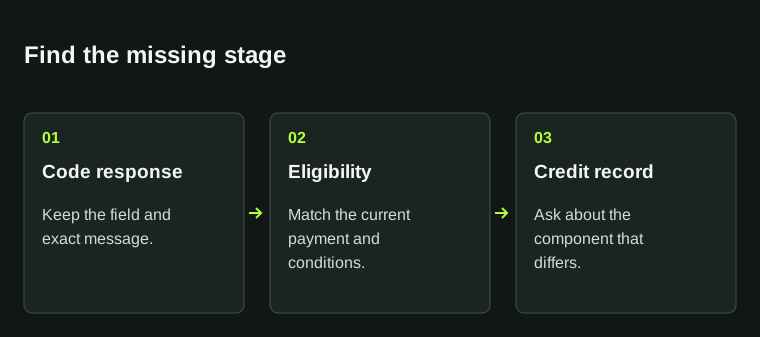
Locate the first missing stage
Code response
Accepted or rejected?
Payment condition
Eligible under the current terms?
Reward record
Which component was actually credited?
Use the observed status instead of assuming a new payment will solve it.
StrikePot illustration05
Ask support about the first unfinished stage
Use the official support route opened from the partner site and keep an existing ticket reference. A clear record can be prepared without making a new payment. Remove passwords, login codes and unrelated financial details from screenshots.
- Identify the correct website and code field.
- Keep the exact acceptance or error message.
- Record the original payment reference only if a payment already exists.
- List the reward component, its conditions and the amount actually credited.
- Ask which condition or processing stage explains the difference.
BEFORE YOU CONTINUE
Quick checklist
- Exact error and date retained.
- Current promotion page identified.
- No account secrets included.
Sources & related reading
The partner examples are tied to their published instructions. Read the actual code response and offer for your account.
- Key-Drop — What is a Promo Code? · reviewed
- Key-Drop — Golden Codes · reviewed
- CaseHug — first and subsequent promo-code top-ups · reviewed
Need the details for a particular website?
The code directory records each partner’s code, referral method and offer status. Use the relevant partner page when your question also involves one of those details.
Partner pages may include affiliate links. A listing does not confirm a reward or account eligibility.