THE QUICK ANSWER
Keep both the net payment quote and the Steam item record. A finished trade can still be waiting for payment availability.

01
Choose selling or trading
Choose selling for a payment, trading for other items, or buying. For a cash payout, compare the selling quote and payment method. An item-exchange value does not tell you how much money reaches a payment account.
Before comparing services, check whether each quoted value still has payment fees or currency conversion to deduct.
02
Read the final payment quote
SkinSwap’s current selling instructions distinguish CS2 and Rust selection, the payout method, recipient details and Steam acceptance. Keep your own final quote and read the separate payout-method fees and minimums before confirming.
Save the item quote, fee, currency and final amount from your own confirmation screen. A method shown in the help article or another user’s screenshot may not be available to your account or region.
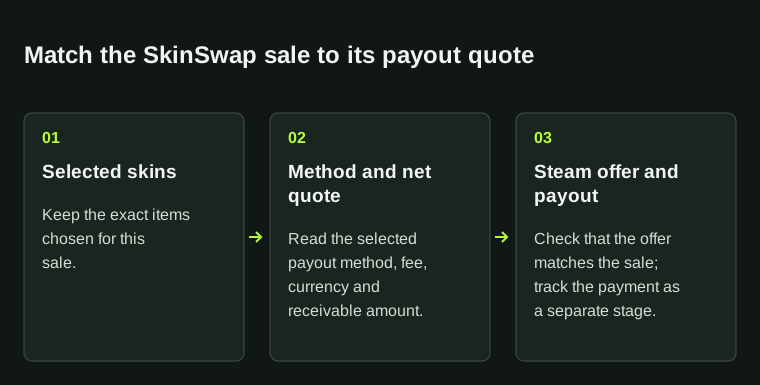
Save both the item selection and the net payout quote before confirming. A completed trade and an available payment are separate updates.
| Items | Exact skins selected for this sale |
|---|---|
| Payment method | The method selected in the checkout |
| Fees | The fee line displayed for that method |
| Net total | The amount and currency shown as receivable |
03
Read the fee and floor for the selected payout route
SkinSwap’s payout table gives different charges and minimums for different receiving routes. The values below are the published USD amounts; they do not show a method’s availability or receiving currency for your account. Start with the method actually selected on the confirmation.
A floor is an eligibility figure, not a promised amount arriving after deductions. The public table does not fully define every percentage’s before/after arithmetic base or the fee rounding. Keep the final quoted fee and receiving total rather than filling those gaps with an assumed zero.
The active sell bonus is another inclusion check. SkinSwap’s selling help says its 3% benefit is already inside displayed prices when Bonus Active is shown. Do not add it to the quote again before subtracting the method charge.
| Crypto: USDT/USDC/ETH/LTC/BTC | No SkinSwap charge; network fee remains. USD 5 minimum. |
|---|---|
| ACH | 1.9% + USD 1.50; USD 5 minimum. |
| Debit card | 1.9% + USD 2; USD 5 minimum. |
| Wire | 1.9% + USD 25; USD 5 minimum. |
| PayPal | 2.9% + USD 0.25; USD 1 minimum. |
| Venmo | 2.4% + USD 0.25; USD 1 minimum. |
| Pix | 1%; USD 5 minimum. |
| SEPA | 0.4% + USD 0.12; USD 10 minimum. |
04
Match the Steam offer to the sale
Open the Steam offer from the sale you started and compare the exact skins and intended recipient with the details shown on SkinSwap. A matching avatar alone does not identify the destination.
If the recipient, items or requested action differ, stop and contact official support. Keep the sale reference and Steam offer ID. Do not accept an unsolicited replacement suggested in chat.
05
Check when payment becomes available
SkinSwap describes Rust payouts as sent immediately and CS2 payouts as sent after Steam’s seven-day Trade Protection period. Arrival depends on the receiving method. Check Pending Payouts under Profile → Transactions for your sale’s sending time.
For a delay, give support the trade acceptance time, protection or sale status, payment method and quoted total. Hide payment credentials. A code or reward claim does not show that sale proceeds have been paid.
06
Separate selling fees from payout charges
Read the current payout-method fee, minimum, currency and final amount. A network or payment-processing deduction is separate from the item quote. Use the method actually offered to your account rather than an old numerical example.
Keep a cash sale separate from a sale for site balance. SkinSwap’s current help says balance cannot be withdrawn as cash. CS2 balance sales first enter escrow; Rust balance can be used on the Market immediately.
07
If the status is Payment Failed
If the status is Payment Failed, use the dedicated guide to locate the existing support case. Keep that payment’s references and evidence instead of creating another sale to test the problem.
BEFORE YOU CONTINUE
Quick checklist
- Confirm that you are selling rather than trading.
- Compare the selected method’s net total and currency.
- Match the Steam sender and items to the sale page.
- Save the sale reference, offer ID and current payout status.
Official sources
Read the official documents below for the service’s rules and account instructions.
Need the details for a particular website?
The code directory records each partner’s code, referral method and offer status. Use the relevant partner page when your question also involves one of those details.
Partner pages may include affiliate links. A listing does not confirm a reward or account eligibility.