THE QUICK ANSWER
Use the quoted net amount and its balance type. Subtract a fee only if the quote has not already included it.
01
Read the whole quote
Steam’s Market FAQ explains its transaction and game-specific fees. Other services set their own rules, so use that service’s terms and confirmation screen for your sale.
- The starting price and currency.
- Every fee or deduction displayed.
- Whether a fee is already included in the quoted number.
- The resulting balance type and final amount.
02
Example: two fixed deductions
In a fictional $100 quote, separate deductions of $4 and $2 leave $94: 100 − 4 − 2 = 94. These invented amounts explain the arithmetic; they are not any partner’s rates.
If the quote already gives an amount after fees, do not subtract them again. Ask the service to explain any unclear wording before you rely on the total.
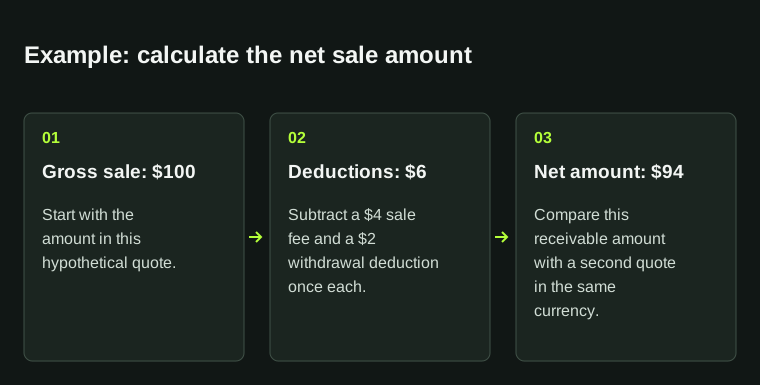
Illustrative calculation: $100 − $4 − $2 = $94. These figures explain the method; they are not a platform's advertised fees.
| Starting amount | $100 |
|---|---|
| Deduction A | $−4 |
| Deduction B | $−2 |
| Net amount | $94 |
03
Keep the quote for this sale
Save the quote, currency, time and conditions together. If there is a dispute, a later quote for another transaction will not show what you agreed to.
04
Check what each percentage applies to
Find out whether each percentage applies to the sale price, the balance after an earlier deduction or the payout amount. Follow the basis shown by the service. Two fees do not necessarily use the same starting value.
For example, a fictional sale of 100 units with a 4% sale fee leaves 96. A further 2% fee on that remainder removes 1.92, leaving 94.08. Taking both percentages from the original 100 would leave 94. Neither calculation is a partner’s fee rule.
Compare currency and rounding as well as percentages. Save the gross amount, each deduction and the final net, then use your actual figures in the sale planner. A larger inventory reference value does not guarantee a larger payment.
| Example gross | 100.00 units |
|---|---|
| 4% of gross | 4.00 deducted; 96.00 remains |
| 2% of the remainder | 1.92 deducted; 94.08 remains |
| Important limit | These are invented inputs, not CSFloat, Skinport or another service's rates. |
05
Report a subtotal when a deduction is still unknown
A fee you have not confirmed is different from an explicitly quoted zero charge. If you know the sale amount and one deduction but not the network cost or receiving conversion, you can calculate a subtotal before those unresolved costs. You cannot label it the complete amount received.
For a fictional 100-unit quote with a known fixed deduction of 0.25, the subtotal is 99.75 before the unresolved network charge. Writing zero for that missing charge would turn the same subtotal into an unsupported final payout. Keep “unknown” visible until you have the actual quoted deduction or a receiving amount already net of it.
An estimate also needs its label. SkinCashier’s crypto guide says its displayed fee estimates network cost, while actual network cost and conversion apply when sent. SkinSwap separately publishes no SkinSwap fee for crypto while retaining a network charge. Neither statement proves a zero all-in cost.
Before comparing two results, mark each charge as included, separately known, estimated or unknown. If one quote is a complete receiving amount and another still lacks a deduction, show their different completeness rather than naming a winner from the larger displayed subtotal.
| Included in the net quote | Keep it in the explanation; do not deduct it twice. |
|---|---|
| Separately known | Apply its amount and confirmed base once. |
| Estimated | Label the result as an estimate and retain what can change. |
| Unknown | Show a subtotal before unresolved deductions; do not replace it with 0. |
BEFORE YOU CONTINUE
Quick checklist
- Fees are itemized.
- No fee counted twice.
- The final amount and balance type are clear.
Official sources
Read the official documents below for the service’s rules and account instructions.
- Steam Support · Community Market fees
- SkinCashier — estimated network fee and conversion at sending · reviewed
- SkinSwap — no provider crypto fee with separate network cost · reviewed
The calculations and record-keeping suggestions are StrikePot editorial examples. Platform-specific requirements are linked separately.
Need the details for a particular website?
The code directory records each partner’s code, referral method and offer status. Use the relevant partner page when your question also involves one of those details.
Partner pages may include affiliate links. A listing does not confirm a reward or account eligibility.