THE QUICK ANSWER
Contact official support immediately if exclusion does not activate or the account remains usable. Ask for an account restriction and written confirmation; do not keep playing while waiting.

01
If activation fails, contact support now
Public reports cited in the earlier review describe exclusion-link and closure problems. They prompted this guide but do not measure how often the process fails; they were not freshly reverified for this edit. Check whether your own restriction took effect.
If no email arrives, the link errors or access is unchanged, open official live support from rainbet.com. Say you are requesting self-exclusion and the confirmation route is failing. Ask for an immediate account restriction and its activation time in writing. Report the failure immediately, without waiting for the closure process.
02
Rainbet’s published email steps
The reviewed help article starts at Responsible Gaming in the footer, then Self-Exclusion and Request Self-Exclusion. The registered-email confirmation activates the first restriction. After a 24-hour cooldown, a second email lets you choose a duration; Rainbet says the account and activities are blocked during the selected period.
Note the request time and which email stage failed. Check spam, trash and the registered address if you can do so without using the account further. Give support the exact link error. Following the sequence alone does not prove the restriction is active.
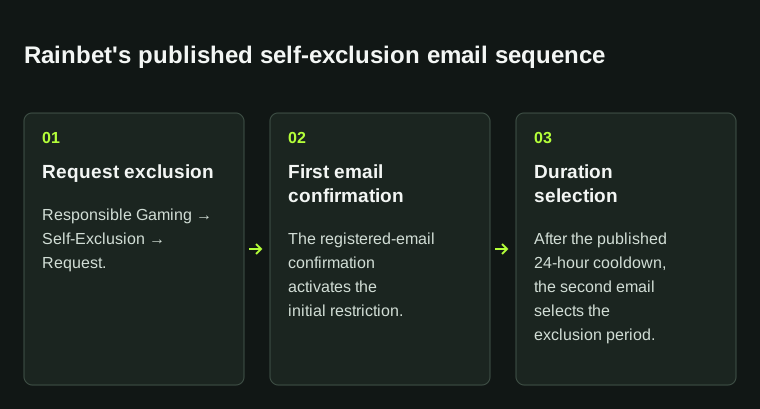
If any step fails or the account remains usable, contact official support immediately to request restriction and written confirmation.
03
If you also want permanent closure
Rainbet’s published permanent-closure policy requires the initial 24-hour cooldown, then a 90-day exclusion, followed by a final support request. This is its policy, not a universal legal rule or a reason to postpone help with a failed exclusion.
Ask support to restrict access now and confirm the active duration. Also ask it to record any permanent-closure request and explain that process in writing. Handle a remaining balance in the ticket; no further deposits or wagers are needed to ask about it.
04
Keep the restriction confirmation
Save the request time and time zone, email subject, exact error and case number. Remove clickable confirmation tokens before sharing screenshots outside official support. Keep login details and full identity documents out of public complaints.
Ask support which restrictions cover access, deposits and gameplay, their start time and duration. Save its reply with the request. If access remains open or confirmation is unclear, follow up promptly in the same case and repeat the immediate-restriction request.
BEFORE YOU CONTINUE
Quick checklist
- Contact official support promptly if activation fails.
- Record which email stage and link produced the error.
- Request written confirmation of the active restriction.
- Keep permanent closure and balance questions explicit and separate.
Official help and player reports
Official help describes the published process. The linked player reports prompted this topic; StrikePot’s troubleshooting steps use the records you can check in your own account.
- Rainbet: how to self-exclude
- Player reports: exclusion and closure requests
- Further player reports: Rainbet account closure
We could not check these player reports again on 24 October 2026, so treat them as older reports. They describe individual experiences, without establishing frequency or cause; the operator must address the current account-specific decision.
Keep a record of your request
Save the request time, the error and the operator’s reply. These guides help you write a clear support message and share only the information needed for the case.