
A Steam game offering more than one operating-system version does not automatically promise shared saves or identical multiplayer access between them. Three things must line up: access to a supported build, compatibility of the progress you want to continue, and support for the online mode you intend to use.
Check those questions separately before replacing a working Windows setup with Linux or macOS, or before assuming that a second device can join your friends exactly as the first one did.
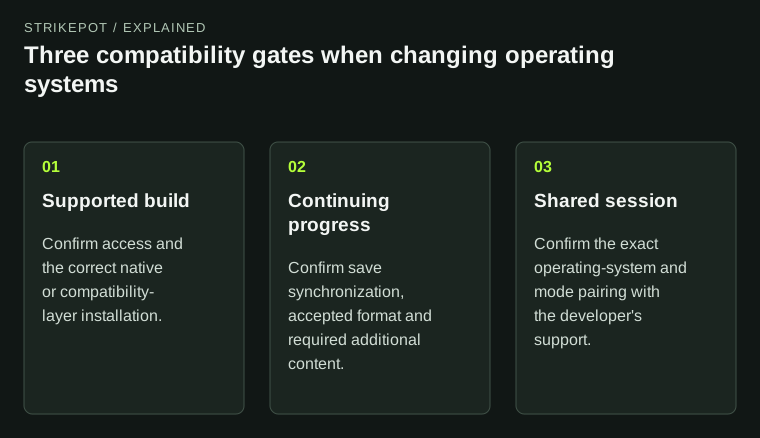
Passing the installation gate does not automatically establish save continuity or multiplayer interoperability.
One game entry can deliver different software
Steam organizes downloadable files into groups called depots. Valve's depot documentation includes operating-system, architecture and language rules. A game's Windows installation and its native Linux or macOS installation can therefore contain different files even when they belong to the same title.
The license and the installation are also different concepts. Valve's package documentation describes which applications and content a purchased entitlement permits. Read the actual product and platform support rather than assuming that a similar title on a different store is included.
For a hypothetical game with supported Windows and Linux builds, the two computers need the appropriate software for their operating systems. Copying the Windows executable into the Linux installation is not evidence of a valid native setup. If a Windows build runs through Proton, identify that arrangement explicitly; it is different from using the developer's native Linux build.
A shared save requires more than a shared name
Steam Cloud's cross-platform documentation shows that developers configure platform synchronization and save locations. Some rules can restrict files to a particular operating system. A Cloud-enabled title should therefore not be assumed to exchange every save between every supported platform.
There are two questions to ask the developer: does the desired save reach the other platform, and can that platform's build load it correctly? A file arriving and a file being accepted are different observations. A successful download of something called save01 does not establish that it represents the campaign you wanted.
Imagine a fictional game with a Windows campaign at chapter six. Its Linux build runs successfully, but opens a new campaign. That observation alone does not tell you whether the save is absent, the wrong slot was selected, a different account was used or the build uses an incompatible format. Preserve the original progress and identify the missing link before creating more saves.
Match the game version and additional content
Operating system is only one part of the environment. The game branch, release version and installed additional content can also matter. A saved campaign created with an expansion should be checked against the expansion set available on the destination installation.
For an illustrative comparison, suppose a developer documents cross-platform saves for the current release, while one of your computers remains on a historical branch. The documented current-release feature would not, by itself, establish compatibility with that older build. Read the version scope of the statement you rely on.
The DLC guide separates ownership, installation and in-game access. If the move also changes the family copy supplying access, the family-copy guide adds another relevant check. Changing operating system should not cause those independent differences to disappear from the comparison.
Cross-platform multiplayer is a separate promise
Valve supplies several multiplayer tools, but the Steamworks multiplayer documentation leaves developers different architectural choices. A working friends list or an invitation does not establish that every operating-system build can participate in the same session.
Ask about the exact combination: Windows Steam build with native Linux Steam build, for example. That is more precise than asking whether a game has crossplay, a term that might instead describe consoles, different storefronts or another specific pairing.
In a hypothetical co-op game, a public statement might confirm Windows-to-Linux sessions while saying nothing about a console edition. That statement answers the first pairing. It should not be extended to the second merely because all versions share a game name.
Also identify the mode you need. Joining a community-hosted server, using official matchmaking and playing a local campaign can involve different requirements. Use the developer's current compatibility and service information for that mode, rather than inferring support from a successful main-menu launch.
Make a small compatibility record before moving
| Layer | Record for the original device | Confirm for the destination |
|---|---|---|
| Access and build | Owning account, platform and branch | Supported installation and intended entitlement |
| Progress | Desired slot and last completed session | Documented transfer and accepted save format |
| Content | Required expansion or mod environment | Matching supported content |
| Online play | Exact mode and friends' platforms | Developer support for that combination |
This record does not need every technical detail about the computer. It needs the facts that would change the answer. A clear pair of versions and a named save slot are more useful than a long hardware list when the actual issue is a missing cross-platform save rule.
Keep a separate copy of important progress using the game's instructions before trying a migration. The save-versus-installation backup guide explains why a game-file archive is not automatically a campaign backup. If Steam presents a conflict, use the Cloud conflict guide before choosing a replacement.
Verify the outcome you intended
A useful migration test ends with the actual result: the expected campaign slot loads, the required content is available, and a supported session works with the intended platform pairing. Simply seeing the game in a Library or reaching its title screen is a narrower check.
If one part fails, report that part precisely. The Linux build launches but does not find the Windows chapter-six save is an actionable description. Separating installation, progress and multiplayer lets you keep the parts that work while investigating the specific compatibility promise that remains unproven.