
Steam Deck Verified tells you that a game passed Valve's compatibility review for the device. It is useful evidence about the default experience, including controls and the software needed to run the game. It does not mean that the developer released a native Linux version, or that every personal graphics target and accessory setup has been tested.
The badge becomes more useful when you open its details and compare them with how you actually plan to play. A handheld campaign on the sofa and competitive multiplayer on a docked display can have different requirements even when they start from the same Library entry.
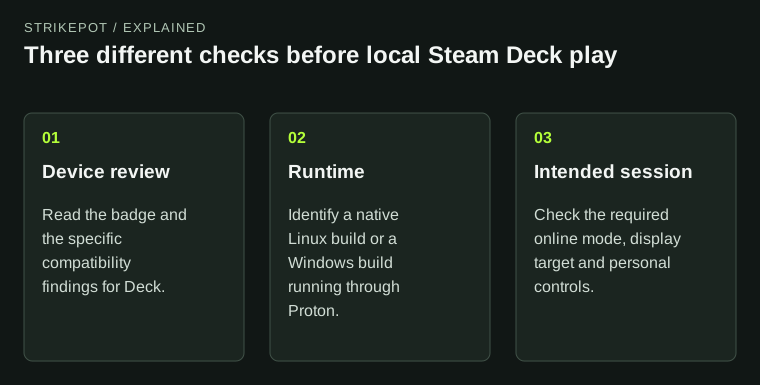
A compatibility category, runtime type and personal play requirement answer different questions.
Read the four labels as different kinds of information
Valve's Deck Verified page presents four categories. Verified indicates a game suited to the standard Deck experience. Playable indicates that some manual action may be needed. Unsupported identifies a currently nonfunctional experience under the program. Unknown means the compatibility review has not been completed.
Unknown is particularly easy to misread. It is an absence of a completed assessment, rather than a failed test. Equally, a stranger saying that an Unsupported title launches is not enough to establish that all its required features work. A game reaching its menu and a game completing the intended online session are different outcomes.
Treat Playable as an invitation to read the specific issue. A launcher requiring a touch interaction may be acceptable to one player. A small text issue can matter much more to someone relying on handheld play. The category is a summary; the detail helps you decide whether the compromise affects your use.
Verified and native Linux answer different questions
A native Linux build is software prepared for Linux. Proton is a compatibility layer that lets Windows games run on Linux. Valve's Proton documentation explains that distinction. A Windows game can therefore be compatible with Steam Deck through Proton without having a separate native Linux release.
That gives you two separate facts to record: what build is running, and what the device review found. Neither fact should be silently substituted for the other. A Linux symbol on a store page does not explain every handheld interaction. A Verified badge does not tell you that the executable was compiled as a native Linux program.
For a hypothetical comparison, Game A provides a Linux build but expects several keyboard interactions during setup. Game B provides a Windows build and works through Proton with its default controls. Their platform labels alone do not settle which is easier to use in your hands. Compatibility details are the more relevant evidence for that question.
The review is broader than whether the executable starts
Valve's compatibility review documentation examines the default configuration, controller access, text input, launchers and relevant Proton support. The consumer page also highlights readable text and display support. These criteria address a complete usable path into play, rather than just a successful process launch.
That helps explain why apparently minor details appear in a review. A game that runs beautifully after you enter a character name can still create a difficult first session if entering that name requires an awkward workaround. A separate launcher is also part of the experience when the player has to pass through it every time.
If you prefer custom controls, separate your preferences from the review result. You may choose a different layout even in a Verified game. That is a personal change to the reviewed starting point. The Steam Input guide explains the distinction between game actions and emulated keys when you need to understand a layout.
Online requirements still belong to the game
A compatibility badge is not permission to join every multiplayer service. The game can have its own server requirements, account conditions and supported modes. Proton support for anti-cheat middleware also depends on implementation: Valve documents cases where developers must enable or configure it for their build.
For a player considering a multiplayer shooter, the useful question is specific: can the intended mode be used on this setup under the developer's current support? An offline training area launching does not, by itself, answer that. Do not make a purchase decision from a clip that stops before the relevant login or matchmaking stage.
If someone demonstrates access by streaming from another computer, identify that arrangement. Remote Play runs the game on a host; it is different from running the game locally on Deck. A streamed success does not establish local compatibility.
A badge is not your personal performance benchmark
The review uses defined device criteria and a default configuration. Your target may involve an external display, a different resolution, particular graphics settings, a modded installation or a frame-rate preference beyond the default experience. Those conditions need their own evidence.
Imagine that your plan is to connect a monitor and use high settings for a long session. A handheld compatibility label does not establish the resulting battery life, image quality or frame pacing in that arrangement. A useful performance report should identify the device, settings, mode and game version, rather than offer a bare claim that the game runs well.
This does not make the badge unhelpful. It makes the badge a sensible first filter. It reduces uncertainty about the reviewed experience while leaving room for you to check the conditions that matter to your own session.
Make the decision around the session you want
Before installing a large game, read the current compatibility details, identify whether you expect local play or streaming, and name the mode you want. Then consider any required manual action and your display or control needs. For travel, also check the game's internet requirements separately; the Offline Mode preparation guide covers that preparation.
Keep comparisons concrete. A report saying the default campaign works locally, but a named online feature is unsupported, is more useful than either runs or broken. The badge and its details give you a shared starting point. Your actual play plan supplies the questions that remain.