
Two computers can both run Steam, display the same game title and still have different software in use. Steam's own client updates separately from the game. The game can have multiple branches, each pointing to a build, while operating system and language choices affect the files installed. Subscribed Workshop content adds another update stream.
“We are both up to date” therefore needs a little definition. It might mean both Steam clients restarted this morning, both games downloaded something, or both players selected the same game branch. Those statements describe different layers. Identifying the relevant one makes a comparison useful before anyone starts changing settings.
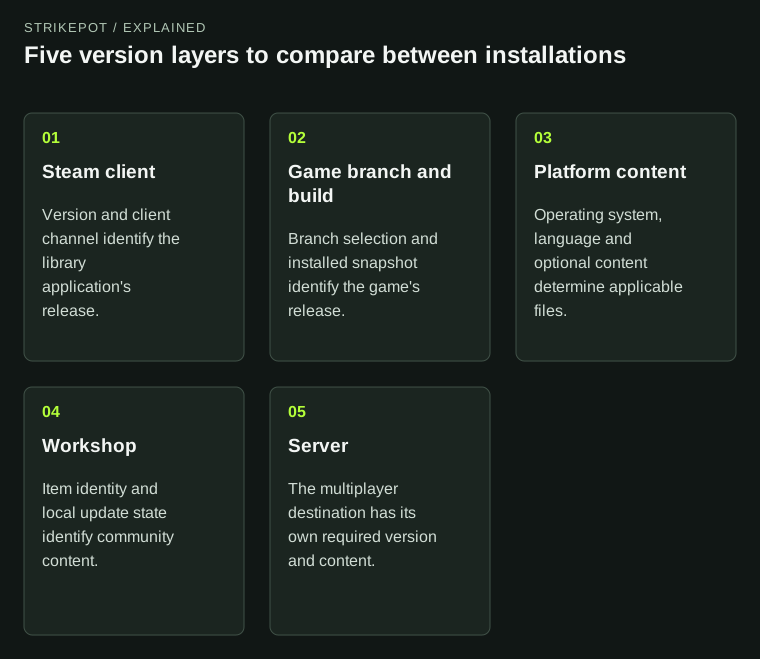
A mismatch matters when it explains the observed behavior. Matching one layer does not establish that the others match.
A client channel and a game branch name different software
The Steam client is the application that manages your library, downloads and other Steam features. Valve's Client Beta offers pre-release client features. A game's beta branch is a distribution choice for that particular game. A player can run the normal Steam client with a game's experimental branch, or a beta Steam client with the game's normal public branch.
For an overlay or library interface difference, the client version may be relevant. For a game reporting that its multiplayer version differs from a server, the game and server versions are the more direct starting point. Neither observation establishes the cause on its own, but it identifies which software should be compared first.
The Steam client channel guide explains the client participation control. A client channel change does not, by itself, select a different branch for every game in the library.
A branch is a destination; a build is what the developer puts there
Valve documents game branches as a way to make different builds available, including restricted test branches. The normal default branch can receive successive builds over time. A stable-sounding branch name is consequently not a permanent version number: the publisher can move that branch forward.
A build is a snapshot of one or more file groups, called depots. Developers upload builds and then separately choose when to make a build live on a branch. An announcement about work being finished, an uploaded build and a release currently distributed to players are not interchangeable events.
For players, this explains two common comparisons. First, selecting the same branch today does not mean two machines installed its latest release at the same moment. Second, remembering that both machines used the same branch last month says little about the files installed today. Changing branches also downloads the corresponding game content; it is a material change to the comparison.
Compare the layers explicitly
| Layer | What to record | What a mismatch may explain |
|---|---|---|
| Steam client | Client version and participation channel | Different library, overlay or client behavior |
| Game distribution | Selected branch, installed build or game version, update status | Different game code or content revisions |
| Platform content | Operating system, language and relevant optional content | Different files or installation sizes |
| Workshop content | Subscribed items and their local update state | Different community content despite matching base games |
| Multiplayer environment | Server identity, advertised version and required content | A mismatch between a local installation and its destination |
This is a reporting framework, not a promise that every game exposes all those values in the same place. Use the identifiers the game or Steam actually provides, and mark unavailable information as unknown.
Two hypothetical PCs and one misleading conclusion
Imagine two Windows PCs joining the same fictional game's server. The desktop has game Build 430 installed. The laptop last installed Build 410 and has a pending update. Both players selected the default game branch, while only the laptop uses the Steam Client Beta. These numbers are invented to illustrate the comparison.
The first visible difference might be the client beta label, but the relevant evidence already includes different game builds. Saying “the beta client broke multiplayer” skips that evidence. Complete the intended game update, confirm the installed state, and repeat the same join attempt before changing the client channel too.
If the game download does not complete, continue with the specific download symptom; the Steam download troubleshooting guide covers that separate problem. If a server reports a mismatch after the clients agree, preserve the server's message and version information. A server may require its own update or a particular supported branch. The label “updated” on a player's PC cannot establish the server's state.
Different download sizes do not establish different release versions
Now consider a second hypothetical comparison: a Windows desktop and a Linux laptop both use the publisher's intended public release, but their installed sizes differ. Steam depots can distribute different operating-system, language and optional-content files. Equal titles and release labels need not produce byte-for-byte identical directories.
The useful question is whether each installation has the intended files for its platform and content selection. It is not whether their folder sizes match. The Steam language guide helps distinguish client language from a game's own language choice when that difference is relevant.
Platform differences can also matter beyond installation size. A shared branch label does not establish identical save formats, supported multiplayer combinations or rendering behavior. Look for the game's explicit support statement for the particular comparison instead of deriving those promises from the store title.
Matching the base game leaves community content to check
Workshop content can update separately from a base game. A subscription identifies content the account follows; it does not by itself prove that two local installations currently have identical item files. Some games additionally support branch-aware Workshop versions. That makes “same mod name” less informative than the item identity and compatible local version.
Keep the report narrow. If the difference occurs only with a particular community item, name that item and the relevant game branch before drawing conclusions about Steam as a whole. The Workshop subscription and ownership guide explains the account-level distinction behind subscriptions.
A useful comparison might read: “Both PCs use the default game branch; the desktop reports Build 430 and the laptop Build 410 with an update pending. The same server rejects only the laptop. Client channels also differ, but have not yet been tested.” That records the evidence, preserves the uncertainty and gives the next investigation a concrete place to begin.