
A 600 MB Steam download does not mean Steam only has to write 600 MB to your drive. The network transfer is one part of an update. Rebuilding changed game files, checking content and making room for replacement files can require much more local work.
There are four useful quantities to keep separate: bytes downloaded, bytes processed on disk, the finished installation's size and the temporary space needed while the update is being assembled. None is a universal substitute for the others.
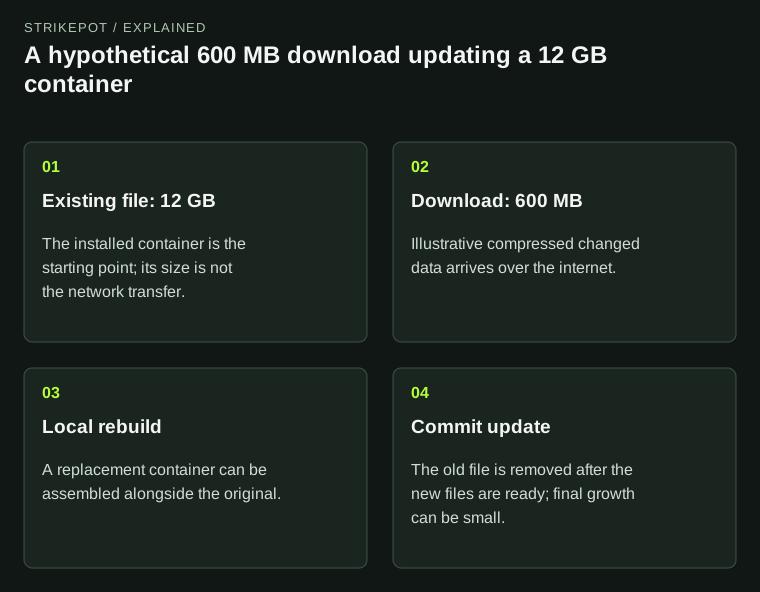
Illustrative sizes explain why transferred bytes, temporary room and completed installation size differ; they are not measurements of any game.
Why the download can be smaller than the files it changes
Valve's SteamPipe documentation explains that Steam divides content into chunks and compresses it for delivery. During an update, unchanged chunks can be reused. The download can therefore contain only the parts needed to turn an existing installation into the new version.
That is different from downloading an entirely new copy of every affected file. It also explains why a connection-speed estimate is only an estimate for the transfer stage. Once the required data arrives, Steam still has to produce the files the game will use.
For a hypothetical example, assume a game has a 12 GB asset file, and its update needs 600 MB of new compressed download data. Those two figures describe different things. The first is an installed container; the second is the data required over the network for this particular starting installation. Neither says how long your storage device will take to assemble the result.
A replacement file can coexist with its old version
Valve documents a patching method in which SteamPipe builds a new pack file alongside the old one, then removes the old file when the update is committed. Even a small change can consequently involve copying much of a large existing file.
Continue the hypothetical example with deliberately simplified numbers. Suppose that 12 GB container is replaced by another 12 GB container. Before completion, the drive may need to accommodate both the existing file and its replacement, as well as other update data. At the end, the game may still occupy roughly its previous total size.
That is why an update's temporary storage demand can be substantial without permanently adding the same amount to the game. Do not turn the example into a fixed formula such as every patch needs double the game size. Real games organize files differently, and several files or stages can be involved. Use the actual client's space requirement for the update in front of you.
Disk activity is not the same as more internet usage
If the network graph drops while disk activity continues, the observation can be consistent with local work. It does not automatically mean your connection stopped functioning. Equally, visible activity alone does not certify that an update will finish successfully; the final state and any displayed error still matter.
Consider two illustrative devices receiving the same 600 MB transfer. Device A has a fast connection and slower storage. Device B has a slower connection and faster storage. A might finish downloading first but finish the whole update second. That result would be possible without either client downloading the game twice.
When comparing reports, ask which stage each person timed. Download finished in one minute and ready to play in six minutes are different observations. A useful note records both, together with the amount transferred and whether local processing continued. It avoids treating a single download-speed figure as a complete measure of update performance.
Different installed content changes the comparison
A Steam game can contain several file groups called depots. Valve's depot documentation describes delivery rules for operating system, language, architecture and downloadable content. Two installations with the same game title can therefore have different content sets.
This is one reason to be careful when a friend says their update was smaller. Before treating that as evidence of a fault, compare the installed version, selected content and starting point. A computer that has missed several updates is also answering a different question from one already close to the new build.
Language can matter without anything being broken. If you intentionally change a game's spoken language, the client may need a different set of audio files. The language-settings guide explains why game content, Steam's interface language and store preferences should be checked separately.
Use the message to distinguish slow work from a failed update
Steam Support's installation-error reference says that the message includes a specific reason for the failure. Preserve that reason. A disk write error and a download that is still processing locally should not be described as the same problem.
The existing 0 B/s download guide covers the practical checks for a stalled-looking transfer. For an explicit write error, use the library-folder guide. The conceptual explanation here is a way to interpret the work, not a reason to ignore a repeated error.
Avoid deleting installation files simply because a progress number seems larger than the download. First record the game's current state, available space and exact message. An action that discards useful files can turn an update into a much larger fresh download without resolving the original storage problem.
Plan around completion, not one headline number
For a session with friends, allow time for the transfer and the local update to finish before your planned start. On a nearly full drive, use the current required-space information and leave room for the job to complete. If you need to relocate an installation, follow the existing move-game procedure rather than rearranging files during an active update.
Afterward, judge the outcome by the finished installation and a normal launch. A small download followed by larger disk work can be ordinary patch behavior. The clearer question is whether Steam completed the requested build, or stopped with a specific reason you can investigate.