
A screenshot answers “what was visible?” A clip adds “what happened before and after?” A game demo can offer replayable match data, while a save preserves whatever game state its developer chose to store. An inventory or transaction record answers a different question again: what the account system recorded. Choosing the right material early makes a report easier to investigate and prevents a convincing image from carrying a claim it cannot establish.
This matters when one incident produces several competing accounts. A weapon appears in a video, a match looks different in replay, or a completed quest disappears after changing computers. The useful record depends on the question being asked, not on which file looks most dramatic.
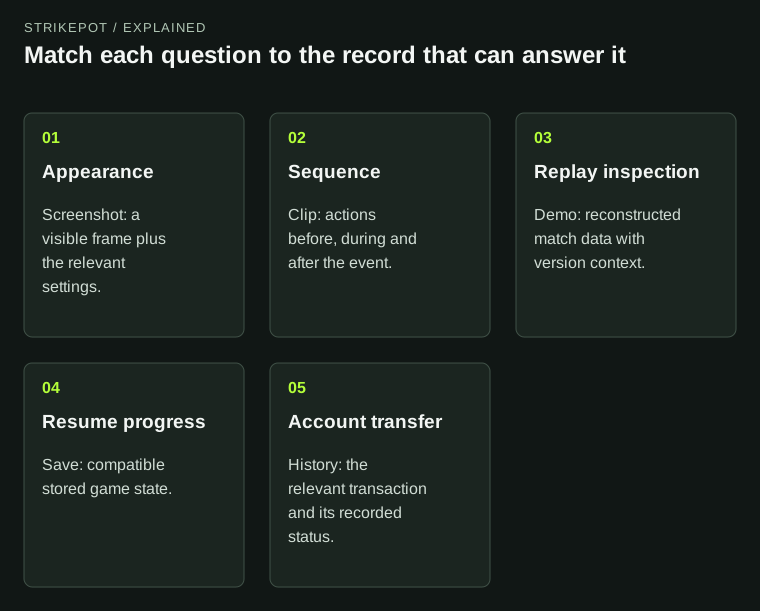
Formats preserve different kinds of information. Their limitations determine which claims a report can support.
Start with the claim, then choose the record
| Question | Most useful starting material | Main limitation |
|---|---|---|
| Was a label overlapping another element? | Screenshot with relevant display settings | One frame cannot show how the screen reached that state. |
| Which action triggered the problem? | Clip including the preceding actions | A cropped clip can omit a necessary earlier step. |
| What happened elsewhere in a recorded match? | Supported game demo or replay | Playback reconstructs events and may differ from the original rendered view. |
| Can the game resume this progress? | Compatible save and game version | The save may exclude achievements or server-managed state. |
| Did an item move between accounts? | Relevant transaction or trade record | An offer, an image and a completed transfer are different records. |
These are practical reporting distinctions, not a universal ranking of file formats. A clear screenshot can resolve a layout bug faster than a long recording; it cannot reconstruct an entire session.
A screenshot is strongest when the surrounding conditions are known
Consider a hypothetical player whose purchase button overlaps an item description at a particular interface scale. They send a screenshot of the full affected panel, name the resolution and interface scale, and describe which menu they opened. Another person can now try the same conditions. A close crop of the overlapping letters alone would show the defect but hide the context needed to reproduce it.
Steam's screenshot system supports local captures and Community uploads. An uploaded image is a sharing destination, not an automatic certificate of the underlying account state. The picture may faithfully show a screen while still leaving unanswered which account, build, mode or time produced it. Include those details in accompanying text when relevant.
Keep an untouched original if you plan to add arrows or crop a copy. Before sharing, inspect the frame for private chats or personal information. The existing Steam screenshot guide covers finding captures; the editorial decision here is which frame actually supports the claim.
A clip preserves sequence, provided the relevant sequence survives
For a hypothetical menu freeze, start the useful excerpt before the button press and end after the visible failure. A ten-second clip beginning with an already frozen screen provides less diagnostic value than a slightly longer one showing the trigger. Write down whether the issue happened once or repeatedly rather than letting the clip imply a frequency it cannot demonstrate.
Steam Game Recording distinguishes temporary background footage from saved clips. Background footage can be overwritten as its storage allocation fills, so an interesting moment still sitting in that buffer is not the same as a retained clip. Its game capture also does not promise video of the entire desktop or other applications. Other-application audio can be included, which warrants checking the sound before sharing.
If the event involved switching to an external launcher, a game-only recording may therefore omit the decisive screen. State the gap plainly. For creating and preserving the excerpt itself, use the Game Recording guide.
A demo is a replayable account of game events
A game demo is useful when the question requires another viewpoint or a later inspection of the match. It should not be described as a recording of the exact pixels the player saw. Valve's TrueView announcement illustrates the distinction: its CS2 demo playback uses prediction to bring the reconstructed view closer to the original client experience, while documenting remaining differences and version-related restrictions.
Suppose a hypothetical player notices an effect at a different moment in a demo than in their live clip. That mismatch alone does not establish that either file is fabricated. The two formats represent different stages of the experience. Record the game version, playback mode and relevant timestamp, then describe the discrepancy without promoting an interpretation into an observed fact.
A demo and a clip can be useful together: the clip preserves the original visible sequence, while supported replay controls permit further inspection. The demo playback and TrueView guide explains those controls.
A save is for resuming state, not documenting every account event
Imagine a hypothetical campaign screenshot showing a completed chapter, followed by another computer loading an earlier checkpoint. The screenshot supports the statement that completion was visible during the earlier session. It cannot make the second computer resume that state. The relevant next material is the game's save information, the affected machines and the timing of the sessions.
Steam Cloud synchronizes the files configured by the developer. That scope should not be expanded into a promise that every achievement, inventory item or server-side decision lives in the same save. A save file also needs compatible game software to interpret it. Follow the Cloud conflict guide before resolving a conflicting-save prompt; avoid overwriting the only useful state simply to create a cleaner screenshot.
For delivery questions, read the account record
Finally, consider a hypothetical item-delivery dispute. A video showing a cosmetic equipped establishes its appearance in that session. It does not establish when that particular copy arrived, which transfer delivered it or whether an outstanding offer completed. Steam's economy documentation separates trade history from trade-offer records, reflecting that these answer different questions.
Use the relevant account's official record and the service's transaction reference to investigate the claimed event. The trade history versus offer history guide explains which history to inspect. Share only the relevant entry and redact unrelated information; credentials and authentication codes do not help establish a delivery.
A useful evidence package is usually small: a precise claim, the matching record, the time and conditions, and a clearly stated limit. “This clip shows the item equipped at this time” is a stronger report than attaching the same clip and asserting an entire transfer history it never recorded.