
An unlocked Steam achievement can remain visible while a restored save puts you before the event that earned it. That is possible because the achievement record and the campaign save are different records. Loading an earlier save does not, by itself, instruct Steam to undo an achievement.
The reverse mismatch can also require investigation: a game may display progress without the expected Steam unlock. Neither mismatch should be treated as proof that every part of your account has synchronized or that the visible campaign is your newest save.
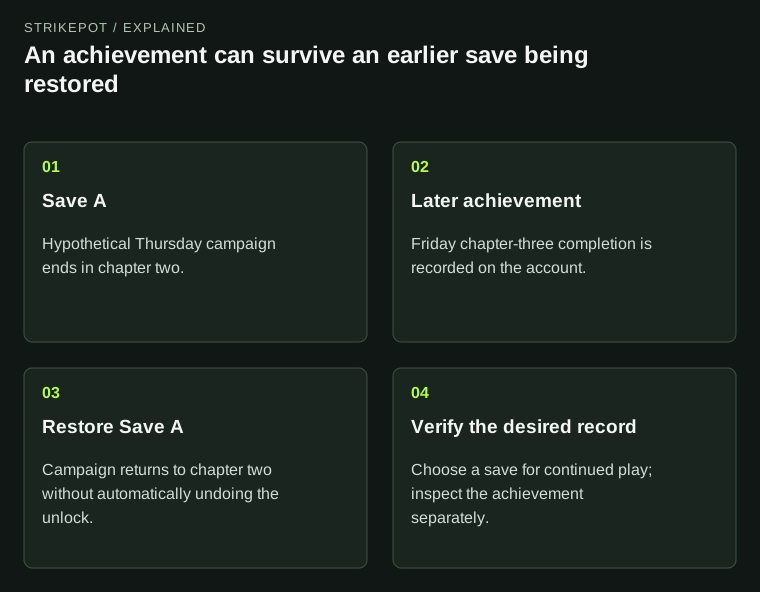
This hypothetical timeline shows why account achievements and a loaded campaign can validly describe different points in play history.
Two records can describe two true parts of your history
Valve's achievement documentation describes account-associated, application-specific tracking. A campaign save instead represents the state the game loads for continued play. The save might include a position, completed objectives or a particular character. What it contains is decided by the developer.
Those descriptions can both be correct even when they disagree in appearance. You may once have completed an objective and later chosen to load an earlier point. The achievement records the first fact. The loaded save represents the second.
This distinction is especially useful during recovery. An achievement can provide a clue that you reached a milestone, but it is not a substitute for the campaign file that contains your desired position and equipment. It cannot tell the game where to place you unless the developer has explicitly built such a feature.
Follow an illustrative rollback from start to finish
Suppose a fictional game has an achievement for completing its third chapter. On Thursday, Jamie saves near the end of chapter two. On Friday, Jamie finishes chapter three and the game records the achievement. On Saturday, Jamie deliberately restores Thursday's save to try a different choice.
The campaign now opens in chapter two, while Steam still lists the chapter-three achievement. There is no contradiction in that timeline. The restored file did not erase Friday from the account's history; it changed the state the game is currently loading.
| Moment | Campaign state | Achievement state in this example |
|---|---|---|
| Thursday save | Chapter two | Chapter-three objective not yet earned |
| Friday session | Chapter three completed | Achievement recorded |
| Saturday rollback | Thursday's chapter-two save loaded | Previously recorded achievement still present |
This is a constructed example, not a report about a specific game's save implementation. A developer can design its own reset, import or progression behavior. The point is that you should not assume the two systems always move backward and forward together.
Cloud success answers a file-transfer question
Steam Cloud synchronizes the files configured by a developer. Steam's achievement service handles a different kind of state. A successful transfer does not certify that the transferred file contains the progress you intended to keep.
For example, Jamie might later synchronize the restored chapter-two save to a laptop. The laptop could accurately receive that file and still display the chapter-three achievement. The transfer could have succeeded while carrying the deliberately earlier campaign.
If your actual problem is choosing between divergent local and remote saves, use the Cloud conflict guide. Establish the session you want before accepting a file. Achievement dates can contribute context, but they should not overrule a known save history or replace preservation of the available files.
Offline updates have their own handover
Valve documents local caching for Steam statistics and achievements during offline use, with pending changes handled when the user returns online. This describes the Steam service's integration behavior. The game still has to recognize the qualifying event and implement its achievement logic correctly.
That means an offline session should be described precisely. Record the account, game, relevant action and when the device next connected. Avoid the blanket conclusion that all games award every achievement offline or that a delayed profile change means no progress was saved.
Imagine a player who completes an objective while disconnected and checks the public profile from a phone before reconnecting the PC. Those are two different observation points. The phone view cannot prove that the offline client had no pending update. Equally, a player's recollection of completing an objective does not prove that its exact qualifying conditions were satisfied.
The game's unlock rule is more specific than a milestone name
The Steamworks statistics interface exposes explicit operations for achievement unlocks, storing changes and resets. The game decides when to invoke the relevant operations. Its own conditions can be more detailed than a short achievement title suggests.
Keep developer support instructions in view if an unlock appears absent. A requirement could concern a mode, difficulty or other condition; do not assume one without documentation for the actual game. Repeating an entire campaign before checking the rule can waste a great deal of time.
Nor should a player-facing new game option be assumed to reset Steam achievements. Valve describes its general reset operations chiefly in a testing context. Use the game's documented behavior rather than treating any local reset button as a promise about account-wide records.
Give each missing thing its own evidence
If you need to investigate, name the mismatch in a single sentence: the profile lists the achievement, but this save loads chapter two; or this character meets the documented condition, but the Steam unlock remains absent. Add the last device, session order and the exact save or slot involved.
Keep game installation, campaign state and inventory separate too. A file-integrity check concerns installed content, while a missing Steam cosmetic needs its own acquisition and inventory checks. Neither is demonstrated by a profile achievement.
The next useful verification is the one connected to your goal. For continued play, establish the desired save and load it carefully. For an achievement discrepancy, compare the account record with the game's documented qualifying event. A matching icon and a matching campaign are related pieces of history, but they are not the same evidence.