
A CS2 skin screenshot records an appearance from one viewpoint under particular conditions. It can show that a graphic occupies a visible part of the weapon, that a sticker is partly obscured, or that a surface looked bright in that frame. It does not independently establish the item's full identity, its present ownership, every hidden surface, or the circumstances in which the image was made.
The useful question is therefore specific: what claim are you trying to check? A picture can be excellent evidence for one claim and almost irrelevant to another. Treating every screenshot as either complete proof or worthless advertising loses that distinction.
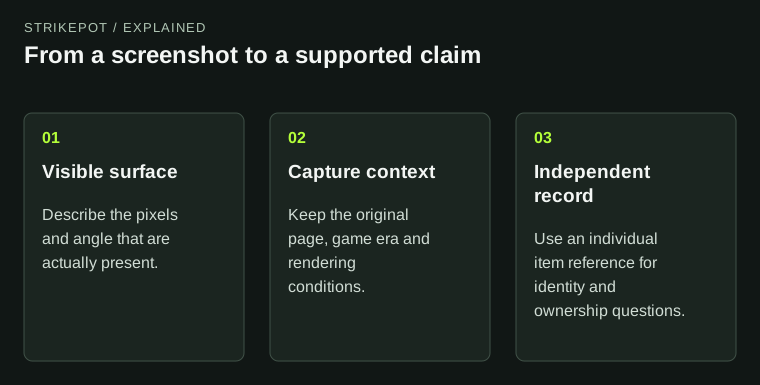
The diagram separates appearance evidence from context and item identification.
Describe what the frame actually contains
Begin with observations that another reader could confirm without trusting the caption. The left side has a large blue region. A particular panel has visible scratches. A holographic design changes color across the visible surface. These statements describe the image rather than inventing a history for the object.
Then mark what falls outside the frame. The reverse side may be hidden; a hand may cover part of the grip; a charm may sit outside the crop. A clean side panel does not establish that the entire weapon is equally clean. A dramatic inspect angle can also give a large amount of screen space to a detail that occupies little of the normal playing view.
This is why a close-up and an in-hand image answer different questions. One can document a tiny mark. The other helps you decide whether that mark or illustration will matter during ordinary use. Neither replaces the other.
A promotional render and a game capture have different jobs
Valve's finish presentation guidance distinguishes images showing the design in the game from optional promotional artwork. That is a useful distinction for readers too: an image made to communicate a theme may deliberately emphasize a color, composition or imaginary setting.
Look for a statement of origin. Was this captured in CS2, exported from an external renderer, made from a Workshop preview, or cropped from an older announcement? None of those labels automatically makes the image dishonest. They simply establish different contexts. A creator's preview is evidence about a proposal; it is not evidence that the pictured finish has been officially released.
A logo or inventory-shaped border does not resolve the question. Preserve the original page or file when possible. A repost removes context more easily than it removes pixels, and a caption added by a later account may describe a different object from the original creator's work.
Similar pictures can represent different items
Many copies share the same weapon and finish name. A screenshot needs an individual reference before it can reliably be connected to one of them. Valve's randomization documentation explains why generated placement and visible wear can vary. Recognizing the design family is a useful first step, but it is not individual identification.
Suppose a hypothetical image shows a distinctive red shape near a magazine. A second listing displays the same shape elsewhere. Both could belong to the same general finish while showing different applications. Conversely, two nearly identical pictures need not represent the same inventory object. The design may simply repeat or vary too subtly to tell from a small image.
Use the float, wear and pattern guide when you need to interpret the corresponding fields. The fields and picture should support each other; neither should silently substitute for the other.
Color differences need a controlled comparison
A brighter image does not, by itself, prove a brighter version of the item. Consider light direction, scene color, view angle, exposure and any editing before attributing a difference to the finish. Reflections make this especially important on materials that respond strongly to their surroundings.
Imagine comparing an image made beside a bright window with one taken against a dark background. If both the weapon and the scene have changed, you cannot isolate the cause of the difference. Matching the pose alone leaves several other variables unresolved. A stronger comparison uses the same environment and angle, then changes the item.
For old images, keep the capture date or at least the game era. A historical image may be accurate evidence of an earlier presentation without being a dependable forecast of the current client. Do not erase that uncertainty by calling one image the definitive color.
Build a small evidence record
A practical record has three parts: the original image, the context in which it was captured, and the claim it supports. Add an item reference when the question concerns a specific copy. Keep visual observations separate from the creator's or seller's description.
- For a layout question, preserve views of the relevant surfaces.
- For a color comparison, preserve the scene and viewing conditions.
- For an identity question, preserve the individual item reference and displayed properties.
- For a historical claim, preserve the original publication and its date.
This record can remain short. The aim is to make the reasoning repeatable, not to collect every available image. If the real question concerns a purchase, continue with the individual-item inspection workflow, which follows the listing through to the final offer.
Let the evidence set the size of the conclusion
A careful conclusion might be: this image shows the illustration clearly from the left side, but we still need an in-hand view and an individual reference. That is more useful than claiming the whole item is perfect or assuming that every missing detail conceals a problem.
Ask for the missing evidence that would change your decision. A reverse-side image answers a hidden-surface question; a receipt or inventory reference answers a different one. Once those questions are separated, screenshots become easier to use well without asking them to prove more than they contain.