
Steam does not merge two accounts into one. Valve also says that purchased game subscriptions and activated keys cannot be moved or reset onto another account. If your games are divided between an old account and a newer one, there is no general consolidation button that combines both histories and libraries.
There can still be useful ways to organize the situation. The first step is to separate the things you want to bring together: game access, ownership, inventory items and progress. They do not all follow the same rules.
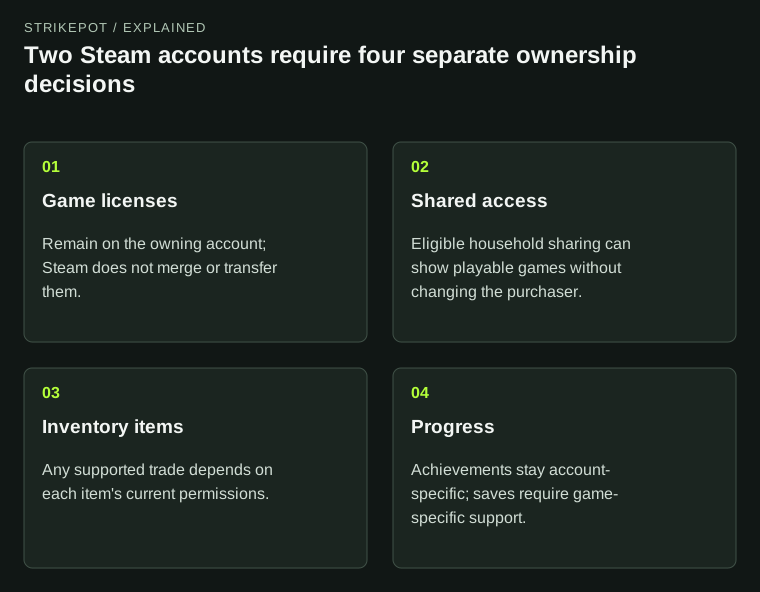
The practical plan follows the type of record instead of treating an account as one movable container.
A familiar display name does not combine the accounts
Valve's account and merging FAQ gives a direct answer: accounts cannot be merged, and game entitlements cannot be transferred between them. Changing how a profile looks does not change which account holds its games.
For a hypothetical example, you played TF2 on one account for years, then bought other games on a second account after getting a new computer. Giving the second profile the old nickname might make the new profile look familiar. It would not move the first account's purchases, achievement history or inventory records.
Use the correct-account guide if you are uncertain which account a service or purchase belongs to. The purpose is to identify the two records clearly. It is not a way to turn them into a single owner.
Installation files are not transferable game permission
A game installed on a shared computer can make the problem feel simpler than it is. The files are physically present, so it may seem that signing into another account should be enough. But files and permission answer different questions: what software is on the drive, and which account can use it?
Copying or moving an installation addresses the first question. It does not prove the receiving account owns the game. Likewise, a key that was already activated on the old account is not an unused second copy that can be redeemed on the newer one.
Before planning a download, make a small ownership list. Name the game, owning account and whether your intended account has its own access. The activation-key guide explains why an access code should be checked as a product entitlement rather than as a Steam inventory delivery.
Shared household access still leaves two owners and histories
Steam Families can provide shared access to eligible games within its intended household use. Valve says ownership remains with the purchaser. That is a sharing arrangement, not a merge or a reassignment of the purchase.
If you already use Steam Families, keep the existing copy and DLC guide in view. It covers which copy supplies shared content. Setting up a family purely because two accounts exist is not a guarantee that every desired title is eligible, or that a particular account can join.
The practical distinction is between seeing more playable games in a Library and acquiring those games on that account. A combined-looking list can be convenient while the underlying purchases remain separate. Do not use a shared entry as evidence that a subscription or item moved.
Inventory items require an item-by-item decision
A tradable inventory item has a different mechanism from a nontransferable game license. For games using Steam's Inventory Service, Valve's schema documentation explicitly distinguishes tradable and marketable permissions. Other game-specific item systems must still be checked under their own rules.
That means the answer cannot be simply move the inventory. One item might permit a trade, another might be bound to its account, and another might have a temporary restriction. An item's ability to appear on the Community Market is also a different question from its ability to be included in a direct trade.
In an illustrative two-account inventory, imagine three entries: one eligible for a current trade, one permanently nontradable and one with a displayed future restriction date. Those entries would need three different decisions. The existence of a route for the first would say nothing about moving the game license or the other two items.
If an eligible transfer is something you independently intend to make, use the trade-offer checking guide and the current item restrictions. There is no need to send an item to a stranger who offers to perform an account merge that Steam does not provide.
Progress does not follow a Library's appearance
Achievements are tied to individual Steam accounts. Valve's Families FAQ also distinguishes that account history from game-dependent saved games. Shared access does not retroactively combine achievements earned under two accounts.
For saves, use the developer's documented support for the exact game. A local file being copyable does not prove that the game accepts it under another account, merges it with another character or preserves online progress. Avoid overwriting either account's useful data based on a general promise about Steam.
Suppose the old account has a long-running campaign and the newer one has a different short campaign. Even if a game supports importing a save, importing and merging are different actions. You would need to know which state is loaded and what happens to the other state. Keep the original accounts and their records identifiable until that question is answered.
Build a plan that matches the result you actually need
| Your goal | What to establish |
|---|---|
| One owner for both libraries | Steam does not provide account merging or game-license transfers. |
| Convenient access within a household | Check the actual Steam Families eligibility and sharing arrangement. |
| Selected items on another account | Check each item's present permissions and account restrictions. |
| Continue previous progress | Use the game's explicit save or account-progress support. |
A useful outcome may be a clearly organized pair of accounts, rather than a combined account that the platform cannot create. Record where each valuable game, item and campaign belongs, then make only the supported changes needed for your goal. That preserves a coherent ownership history and prevents a cosmetic change to a Library view from being mistaken for a transfer.