
THE QUICK ANSWER
A free-looking place in a Steam Family can still have a slot cooldown. Read the join message before leaving another family or sending repeated invitations.
01
Start with the exact join message
Valve lists three common barriers to joining: account activity does not establish the same household, the invited account is still on a family cooldown, or the family’s member slots are cooling down. These are separate checks. Ask the adult managing the invitation and the person accepting it to keep the exact message each sees.
Steam Families is intended for up to six close members of a household. An invitation is not evidence that every eligibility requirement has been met. Do not try to resolve a household message by exchanging credentials or creating a sequence of replacement accounts.
02
Distinguish the account from the available slot
The current rule for an adult changing families is a year from joining the previous family before creating or joining another. Separately, a family slot has a one-year cooldown before a new member can occupy it. Steam displays remaining cooldown time when you try to join.
Those clocks answer different questions: “Can this account move?” and “Can this family place accept a new occupant?” A family with five current members is not enough information to calculate either answer. Use the displayed result instead of estimating from the day someone left.
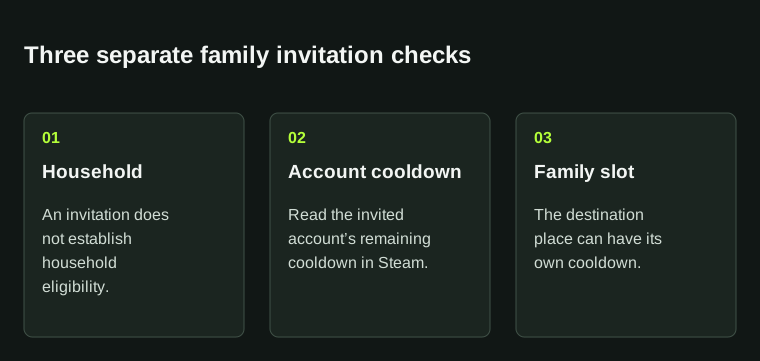
Read the actual join message before changing membership. An empty-looking slot is not proof that a new member can join.
| Account cooldown | The invited person’s previous family membership matters. |
|---|---|
| Slot cooldown | The place in the destination family may not accept a new occupant yet. |
| Household message | An apparently available place does not establish household eligibility. |
03
Check before leaving or removing anyone
Changing membership to experiment can make a simple invitation problem harder to follow. Note the account role, the intended destination family and the message before making a change. Do not remove someone merely because an invitation has not arrived.
Valve permits rejoining the last family without waiting if it has fewer than six members. Children cannot leave by themselves; an adult or Steam Support must remove them. If an adult has accidentally accepted a Child role, use Steam Support rather than assuming ordinary adult controls will appear.
04
Keep the invitation problem separate from a locked game
Once membership is accepted, a particular game can still be unavailable because eligible copies are in use or the title cannot be shared. That is a library-access question and belongs in the shared-copy guide. A failed invitation, by contrast, happens before selecting a game copy.
For unresolved membership trouble, provide Steam Support with the exact message, the account role and the relevant family history. Keep account recovery information private. Waiting for a shown cooldown and correcting an unexpected household result require different next steps; repeated invites alone establish neither.
BEFORE YOU CONTINUE
Quick checklist
- Save the exact join message.
- Distinguish invited-account cooldown from destination-slot cooldown.
- Confirm the intended household and role before changing membership.
- Use the copy/DLC guide only after membership succeeds.
Official sources
Official documentation reviewed on 7 November 2026.
Steam applies household eligibility and shows account-specific remaining cooldowns. The current FAQ says participation requirements may change.