THE QUICK ANSWER
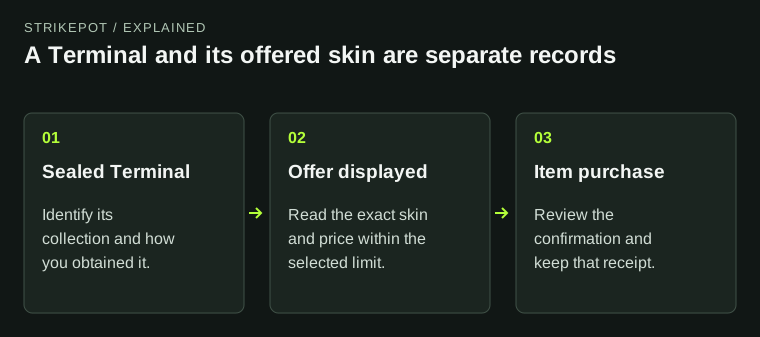
The Terminal’s offer limit controls the prices the Arms Dealer can show. Buying a sealed Terminal is a separate purchase from buying one of the items offered inside it.
01
The Terminal and its offered item are different purchases
Read the complete name before acting. A Sealed Genesis Terminal is a container, not an owned copy of every skin displayed in its contents list. Its current Valve description says it presents multiple offers and allows one item to be purchased.
If you buy a sealed Terminal on the Community Market, that Market price is for the Terminal. Keep that receipt separate from any later purchase of a weapon offered in the game. The Market FAQ treats the completed Market purchase as final.
02
Check which collection the Terminal uses
Valve introduced Genesis items through Genesis Uplink Terminals in September 2025. The Dead Hand update in March 2026 introduced a different collection, including gloves among its rare special items. Those announcements describe different content pools; one Terminal’s name and contents should not stand in for another’s.
Open the description for the Terminal you actually hold and read the offered collection. A picture of a possible item establishes neither that it has been offered to you nor that it is already in your inventory. Save the name if you later need to explain which Terminal was involved.
03
Set the maximum offer you are prepared to consider
Valve’s 4 March 2026 update added a maximum-offer setting and states that the Arms Dealer shows only offers up to that limit. Use the control in the current Terminal interface and read its currency and selected limit before proceeding.
Choose the limit from what you are prepared to spend on an offered item. Valve’s note establishes a price ceiling; it does not promise a specific rarity, finish, discount or profitable result. Lowering a ceiling should not be treated as evidence that a particular desirable item will appear.
Read the amounts on your own screen. This guide does not repeat preset numbers from another currency or an older screenshot, because those would be a poor check of your actual purchase.
What the maximum offer establishes
Selected ceiling
The maximum displayed offer price you selected.
Valve’s rule
Only offers at or below that limit are shown.
Still to review
The actual offered item, its details and its price.
Original explanation of a price ceiling. It makes no claim about reward odds or item value.
StrikePot illustration04
Compare the actual offer, not the collection artwork
A collection illustration is not a comparison of two exact skins. If wear, pattern or another detail matters to you, resolve it before the purchase. Keep the offered item record separate from the sealed Terminal’s earlier price so a comparison does not silently omit one of your purchases.
- Read the full name of the item currently offered.
- Check its exterior and any item details available to inspect.
- Record the displayed price and currency.
- If comparing another listing, match the same finish and item variant.
- Read the purchase confirmation before accepting the offer.
Keep the two purchase records apart
Sealed Terminal
Name, collection and its purchase receipt.
Offered skin
Exact item, displayed currency and purchase price.
Comparison
Match the item details and include each purchase in your own record.
Original comparison worksheet; no prices, software screens or rewards are simulated.
StrikePot illustration05
Buying one offer does not buy the contents list
For Genesis, the current item description’s one-item purchase limit is the useful boundary: the list names possible offers, not a bundle you receive. Check the description and confirmation for the exact Terminal in front of you rather than applying an assumed rule from a different container.
If you want a named skin with particular details, compare that requirement with the offer actually shown. There is no need to treat an available offer as the required next step merely because you already own the Terminal. Make the purchase decision on the item and price you can see.
06
If the result looks wrong, keep both records
Keep the Terminal’s name, the offered item’s name, the displayed price and the time of the action. For a payment or delivery question, include the relevant receipt and the exact message, without account secrets.
State whether the problem concerns obtaining the sealed Terminal, the limit shown in the game, the selected offer or an item you paid for. Those are separate stages and give support a much clearer starting point than saying that a case did not work.
BEFORE YOU CONTINUE
Quick checklist
- Identify the exact Terminal and collection.
- Separate its purchase price from the offered skin’s price.
- Read the selected maximum offer and currency.
- Compare the actual offered skin and item details.
- Keep the receipt for the stage that needs investigation.
Official sources
Official guidance checked on 27 October 2026. Dated updates below explain changes to earlier instructions.
- Valve item description · Sealed Genesis Terminal · reviewed
- Valve · Terminal maximum-offer setting, 4 March 2026 · reviewed
- Valve · Genesis collection introduction, 16 September 2025 · reviewed
- Valve · Dead Hand collection update, 11 March 2026 · reviewed
- Steam Support · Community Market purchase rules · reviewed
The one-item purchase limit cited here is documented for Genesis Terminal. Read the item description separately when using a different Terminal.
Keep exploring skins & trading
Find practical guides for inspecting CS2 skins, understanding Rust cosmetics and comparing TF2 items.