
THE QUICK ANSWER
A case result becomes Clash.gg balance, not a skin waiting in Steam. For missing credit or delivery, identify the case, deposit or withdrawal reference before contacting support.

01
Check the case credit first
Clash.gg’s Questions page says it converts a case result into balance that you can use in its store. Check the recorded result and balance before looking for the pictured skin in Steam.
Tell support which stage failed: “Case X did not credit my balance” or “Withdrawal Y has no Steam offer.” Keep the corresponding reference; an animation screenshot alone may not identify either record.
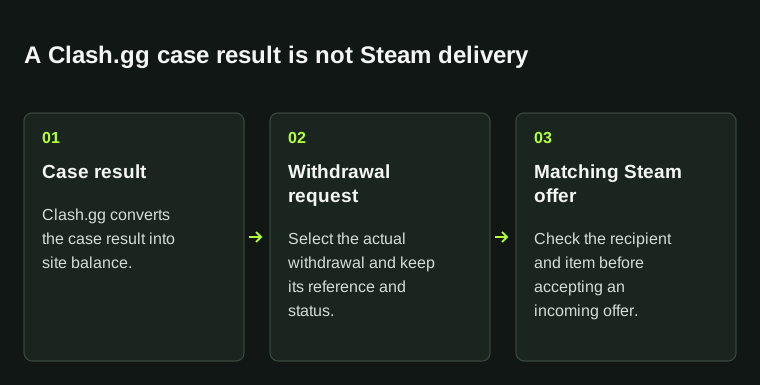
The case animation, on-site balance and Steam delivery are separate records. Start with the record for the action that failed.
02
Match the withdrawal to its Steam offer
Save the selected item, withdrawal reference, request time and displayed delivery status. When an offer appears in Steam, compare its items and sender with the details Clash.gg supplied.
If the offer differs, stop and ask official support. A familiar name or avatar is not enough to verify it. Record the exact mismatch so support can trace the request.
03
Check the deposit method
Clash.gg says Steam deposits can take a few minutes. Its FAQ also says a Steam trade hold or a mobile authenticator that has not been set up for over 15 days can prevent a deposit from completing. For crypto, it requires blockchain confirmations, which it says can take minutes to hours depending on the currency.
For skins, save the offer ID and its accepted, pending or cancelled status. For crypto, save the transaction reference and network. If you left the crypto payment page before confirmation and received no credit, the FAQ asks you to contact support with proof. Send those records privately.
04
Report the last completed step
Give support a short timeline: what completed, what you expected next and what you see now. Include timestamps with a time zone, the item or amount and the relevant reference.
Open live support or the contact route from Clash.gg’s own site. Treat unsolicited replies cautiously. Promotion questions belong to the linked code and offer record; changing a referral code cannot trace a missing trade.
| Completed step | Withdrawal requested for the selected item |
|---|---|
| Expected step | A matching Steam offer |
| Observed state | Pending request; no matching offer in Steam |
| Evidence | Request reference, time and item screenshot |
BEFORE YOU CONTINUE
Quick checklist
- Identify whether the issue is a case credit, deposit or item withdrawal.
- Save the exact reference and current status.
- Compare the actual Steam offer before accepting.
- Use the support link on the official domain.
Official sources
Read the official documents below for the service’s rules and account instructions.
Need the details for a particular website?
The code directory records each partner’s code, referral method and offer status. Use the relevant partner page when your question also involves one of those details.
Partner pages may include affiliate links. A listing does not confirm a reward or account eligibility.