
A TF2 container is an inventory object with a particular content specification. Its key is a separate tool. Neither one is the same as a finished weapon or cosmetic pictured among its possible rewards. Begin with the exact container name and series before reading anything into the artwork.
This prevents several different confusions: a regular key being mistaken for a universal opener, a reward list being mistaken for included contents and an old container page being mistaken for proof that its opening window remains available.
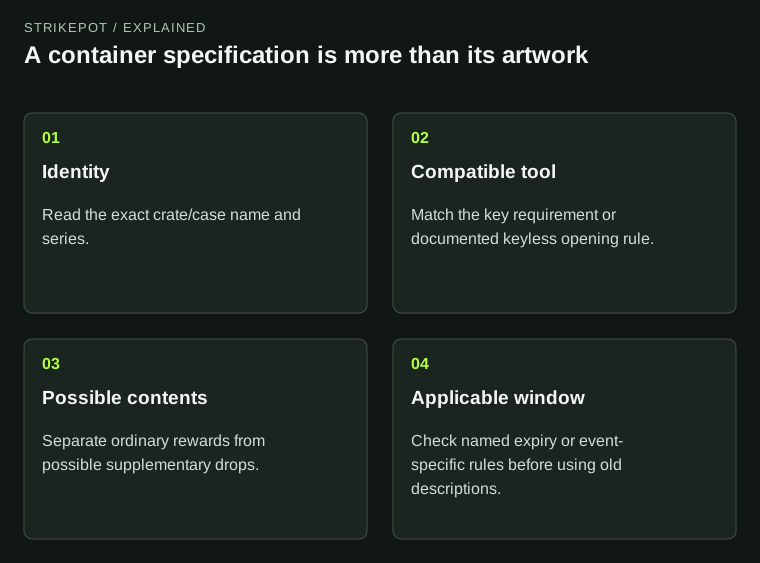
The diagram identifies a container; it does not predict or promise an opening result.
A series identifies the content specification
The official crate reference describes series-dependent contents. Two regular wooden crates can share very similar artwork while carrying different series information and different possible normal rewards.
That makes the complete name and series more useful than the thumbnail when organizing a backpack. A folder called wooden crates may be convenient visually, but it isn't a specification you can use to compare possible contents.
Imagine a hypothetical inventory sheet with three rows labeled crate and nothing else. Even if the quantities are correct, you can't use it to tell whether a requested series is present. Add the exact container name and series first; only then compare the relevant description.
This is a general identity problem rather than a price question. A rare-looking icon doesn't establish a current cash value, and an ordinary-looking box doesn't establish that two objects have identical behavior.
The key must match the particular container
The regular Mann Co. Supply Crate Key is a single-use tool for compatible regular crates. Many named cases use their own matching keys. The crate reference also records exceptions, so neither every container uses a unique key nor every key opens everything is a reliable rule.
Read the container's required-key wording and the tool's compatible target together. Similar colors, a shared event theme or the word key are insufficient. The useful comparison is between two exact object names.
| Object in an offer | What it supplies | What to check separately |
|---|---|---|
| Locked crate or case | The named container | Required key and possible contents |
| Key | A compatible opening tool | The container it actually accepts |
| Finished item | The actual weapon, cosmetic or other object | Its complete properties and restrictions |
Container-like gifts and packages can have their own opening behavior, including not requiring a key. Treat their descriptions as instructions for those objects. A package thumbnail doesn't automatically make it a standard supply crate.
For a trade, an offer containing only the container doesn't silently include its key. Check quantities and both item names in the actual Steam exchange. A chat message promising a complete pair isn't the pair itself.
A possible-content list isn't an inventory grant
A normal opening consumes the relevant key and container and produces the awarded contents. Before that action, the description lists possibilities. It does not mean the backpack already contains one copy of every pictured reward.
For a hypothetical example, a case listing several cosmetics is still one case. Recording those cosmetics as owned would overstate the inventory and hide the fact that no particular one has yet been received.
The same distinction matters when a collection screen marks designs you recognize. Familiarity with an item, its presence on a content list and ownership of a particular copy are different facts. Look for the actual finished object when the question is whether you can equip or transfer it.
Once an item exists, its own properties determine what version it is. The finished-item property guide covers that comparison. A container's general ability to produce special versions doesn't establish the attributes of an item already shown elsewhere.
Cases and crates can have different system rules
Valve's 2017 case-system announcement explicitly separated cases from crates. It described shared lists for effects and possible bonus drops, including lists that could change periodically or for events. Crates were excluded from those announced changes.
That history explains why an old case screenshot is limited evidence for the complete current specification. The ordinary collection list and a shared supplementary list need not be the same kind of data. A familiar case model doesn't prove that every surrounding event rule is unchanged.
A possible bonus also isn't a guaranteed second item. Read the distinction in the actual description instead of treating the presence of a bonus category as a fixed opening result. This article doesn't supply probabilities or estimate the return from opening containers.
If a container produces a voucher or tool rather than directly equippable gear, identify that output before deciding what you own. For example, the War Paint guide explains why the voucher and the weapon created by redemption are separate objects.
Historical availability needs a date and a scope
Some TF2 containers had an explicit usable window. Valve's 2014 Smissmas notes, for example, set a February 2015 opening deadline for that year's Naughty and Nice winter crates. The announcement remains readable long after the deadline.
Two conclusions should be kept separate: a particular series stopped dropping, and a particular container can no longer be opened. One doesn't automatically prove the other. Use the actual documented opening rule for the named object.
For an older container, record the series, its description, any deadline and its present action notice. If a restriction blocks an operation, quote that notice rather than inferring that a different key will bypass it. The item-restriction guide helps keep crafting, transfer and other action limits distinct.
A useful container record therefore has four parts: the object you own, the tool it requires, the possibilities it describes and the time or event rules that apply. That is enough to identify the inventory correctly without turning an unopened box into a promised reward.