
A Steam soundtrack is usually an album you can download, rather than a new feature inside the game. New soundtrack products use Steam's music-app format. Older purchases can still arrive as game DLC or as bonus files inside an installation, so the right expectation depends on the product you actually own.
A game title followed by soundtrack is therefore not enough to identify the delivery path. Before looking for an in-game unlock or a missing inventory item, establish whether you bought an audio album, a legacy add-on or a separate game-specific music item.
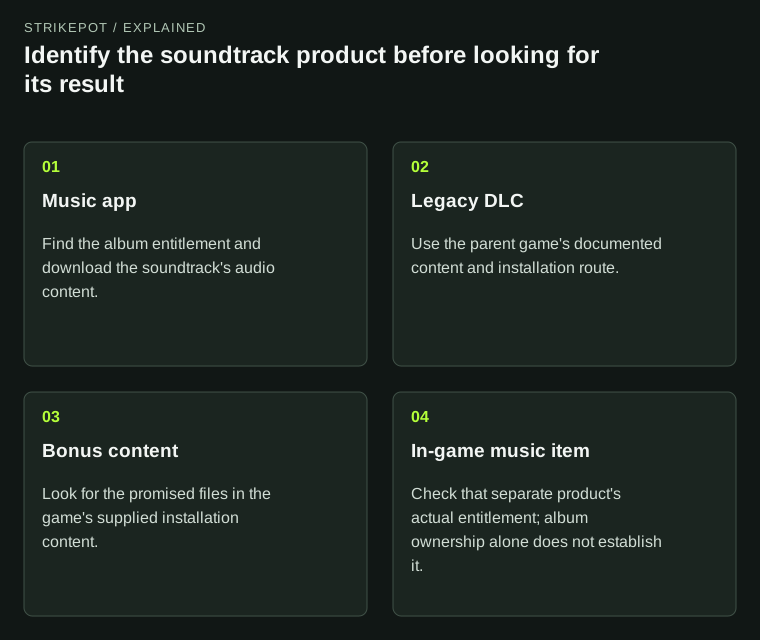
Similar music branding can describe different delivery formats and uses.
Three delivery formats can explain the same expectation
Steam Support's soundtrack FAQ distinguishes music apps, older soundtrack DLC and rare bonus-content arrangements. Those formats can all deliver audio, but their relationship to the base game's installation is different.
| Product format | What you are looking for | Base-game relationship |
|---|---|---|
| Soundtrack music app | An album entry and its downloaded audio | Uses its own soundtrack delivery |
| Older soundtrack DLC | Audio supplied through the game's DLC route | Can require the parent game and its installation |
| Bonus files included with a game | Promised music files in the installed content | Delivered with that particular game's files |
Read the listing and purchase record to establish which row applies. An old forum instruction can be correct for the legacy DLC edition while being unnecessary for the modern album app. The difference does not mean one owner received an incomplete purchase.
A connection to a game does not make the album gameplay DLC
Valve's soundtrack documentation allows an album to be associated with a parent game while remaining a soundtrack application. It also supports independent soundtracks. The album's store links and artwork can connect it closely to a game without making it part of that game's usable content.
That is useful for someone who likes a game's music but does not want to install or play the game. With the modern soundtrack format, the album can be obtained without the ownership and installation requirements of the older DLC arrangement.
For a hypothetical example, Dana owns an album for a game they played on another platform. A Steam music-app listing can provide the audio product without granting the Steam game itself. Finding the album in the Library is consistent with that purchase; expecting a playable copy of the game would be a different entitlement.
Separate an album from an item that plays music inside a game
Games can sell several products using similar themes. A downloadable album, a music-related cosmetic and an edition containing both are conceptually different purchases. Their artwork might use the same game logo, so identify the actual promised use rather than relying on the cover.
Suppose a fictional store offers an original soundtrack and a radio cosmetic. The album description promises audio files. The radio description promises a feature inside the game. Buying one would not establish ownership of the other unless the specific offer says it includes both.
This is an interpretation method, not a claim that every game uses those exact product types. Read the included-content list for the actual title. If your intended result is a Steam inventory item, use the inventory guide and the item's acquisition record. A successful album download would not prove that an inventory delivery occurred.
Owning the album and having its files are different stages
Steam Support says purchased soundtracks are added to the Library but still need to be installed. If you have an entitlement and no local audio, first identify the product format. That question comes before assuming the purchase failed.
For a modern music app, look for the soundtrack entry and the album download. For legacy DLC, follow the base game's content arrangement. For a bonus-file promise, inspect the developer's stated location and included content. The existing DLC guide covers the ownership, installation and use distinction when an older product actually uses that mechanism.
As a constructed storage example, imagine a game with a large installation and a much smaller album download. A modern soundtrack purchase may avoid installing the game merely to obtain the music. Do not assume a particular storage saving from that example: the actual file sizes and formats belong to the individual product.
High-quality audio is an optional supplied version
Valve requires MP3 content for soundtrack apps and permits additional formats, including lossless audio. Its documentation describes an optional higher-quality content group. Steam Support also says a high-quality version can be selected when the publisher provides one.
The useful pre-download question is therefore whether this album includes that version, not whether Steam uses the word soundtrack. Do not assume every listing supplies FLAC, every track exists in every format or every soundtrack contains extra artwork.
For an illustrative comparison, two albums can both contain twelve MP3 tracks while only one also offers a lossless version. Their shared track count would not establish identical downloads. Compare the stated audio formats and additional files with your intended listening setup. Choose the offered version you need rather than interpreting a missing optional format as proof that the basic album is incomplete.
Check what changed when a legacy product was converted
Steam provides a publisher tool for converting older soundtrack DLC to music apps. Valve says existing DLC owners automatically own the converted soundtrack. A changed presentation can therefore reflect a new delivery format rather than a requirement to buy the album again.
Keep the original product name and receipt when investigating an older purchase. If the title or Library grouping looks different, compare the entitlement before deciding the soundtrack vanished. The relevant question is whether the promised audio is still available through the current product.
When comparing editions, the product-delivery guide is a useful reminder to match the platform and exact included content. For music, make the final check equally concrete: album or in-game feature, modern app or legacy delivery, included tracks and formats, and installed or merely owned. That gives you a specific result to find and a much clearer question if the promised files are absent.