
Skins. Codes. Clear answers.

All Codes/CS2 code guides/CSGOCases

CSGOCases Promo Code GGE — Refcode & $1 Balance

The CSGOCases promo code listed on StrikePot is GGE. $1 of onsite referral balance in the USD view. Other displayed currencies use the site’s exchange rate.

Offer sources checked
Player offer$1 onsite referral balance
Visit CSGOCases

StrikePot earns affiliate commissions through this partnership.

THE TEN-SECOND OVERVIEW

CSGOCases at a glance

CSGOCases combines case opening, an onsite item inventory and an Upgrader. GGE belongs to the referral flow; Bonus Code campaigns use a separate menu.

Compare it for: A referral balance with a separate bonus-code menu

Important: The wallet is onsite balance; an item must be requested from the user panel for Steam delivery.

CODE & OFFER

CSGOCases offer & conditions

$1 of onsite referral balance in the USD view. Other displayed currencies use the site’s exchange rate.

  • Use the Refcode flow for GGE; Bonus Code is a separate campaign menu.
  • The USD balance is converted for other display currencies. Onsite wallet credit is separate from cash payouts.

Offer documentation checked 2026-10-15.

BEFORE YOU USE THE OFFER

Refcode and Bonus Code are different fields

  • An item can be sent to Steam or sold into the onsite wallet; these are different actions.

Game formats on CSGOCases

How to use CSGOCases’s code or link

  1. 1

    Open CSGOCases through the GGE referral button above.

  2. 2

    Sign in through Steam and follow the Refcode instructions in your account.

  3. 3

    Keep GGE in the referral flow; use Bonus Code only for the separate campaign instructions shown there.
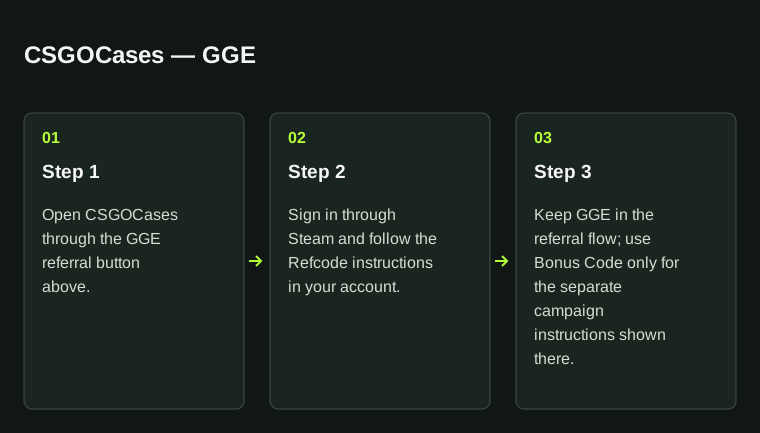
CSGOCases — GGEStep 1: Open CSGOCases through the GGE referral button above.; Step 2: Sign in through Steam and follow the Refcode instructions in your account.; Step 3: Keep GGE in the referral flow; use Bonus Code only for the separate campaign instructions shown there.CSGOCases — GGE01Step 1Open CSGOCases through the GGEreferral button above.02Step 2Sign in through Steam and followthe Refcode instructions in youraccount.03Step 3Keep GGE in the referral flow;use Bonus Code only for theseparate campaign instructionsshown there.
CSGOCases — GGE. Step 1: Open CSGOCases through the GGE referral button above.; Step 2: Sign in through Steam and follow the Refcode instructions in your account.; Step 3: Keep GGE in the referral flow; use Bonus Code only for the separate campaign instructions shown there.

CSGOCases: use GGE with the steps above. Preserve the exact spelling.

CSGOCases: Refcode & $1 Balance

Use the Refcode flow for the GGE referral. CSGOCases also has a Bonus Code menu for separate campaigns. Its recorded USD referral benefit is onsite balance, with other display currencies converted by the site. Selling an item into that wallet and sending an item to Steam are different actions.

CSGOCases: Refcode & $1 Balance
Recorded methodGGE
Key conditionUse the Refcode flow for GGE; Bonus Code is a separate campaign menu.
Additional conditionThe USD balance is converted for other display currencies. Onsite wallet credit is separate from cash payouts.

Sources for this CSGOCases guide

Code record
StrikePot partner code
Instructions
Public claim instructions documented
Public source check
Official offer details
Our verification and editorial method

CSGOCases code details

Manual code
GGECopy and apply this code
Visit method
Referral link
Link destination
csgocases.com
Directory category

Payments, delivery and account requirements

Platform
CS2 cases & Upgrader
Deposits / funding
The wallet supports third-party payment providers. The terms also refer to Pay by Skins; use the methods available in your checkout.
Withdrawals / delivery
Request an item from the user panel, then accept the bot’s Steam trade offer. Selling it on the site credits the onsite wallet.
Fees
The payment provider’s terms apply. The referral percentage is the code owner’s earnings, not a player discount on a sale fee.
Minimums
The reviewed referral page lists a player credit; it does not state a universal funding or withdrawal minimum.
Eligibility & verification
18+, Steam login and one account per user. ZEN payments have their own excluded-country list in the terms.

Useful features

  • The referral page separates the invited player’s balance from the code owner’s commission.
  • The terms explain the choice between sending an item to Steam and selling it into the wallet.

Trade-offs to consider

  • Wallet credits are not a direct cash-payout service.
  • The terms provide for automatic onsite sale after 31 days without a send-or-sell decision.

Use the referral route for GGE

Open StrikePot’s existing GGE referral link, sign in through Steam and use the Refcode menu for referral attribution. Bonus Code is a separate campaign section. The partner page displays a $1 player credit in its USD view; another display currency can show a different converted amount.

Decide whether to keep the item or the wallet balance

A case result is added to the platform’s item flow. Sending it requires a request in the user panel and acceptance of the Steam bot offer. Selling it on the site credits the wallet instead. Check the item’s availability before planning a transfer.

Compare a different approach

Clash.gg

Compare a case-result-to-balance model and a 5% next-deposit offer.

CSGOEmpire

Compare a Gift Case and a P2P skin-transfer workflow.

Compare the net amount after fees →

Official sources for this comparison

These operator terms and help pages explain the conditions behind this comparison.

What our document checks cover →

More code guides in this category

Key-Drop promo codePLG.BET promo codeRain.gg promo codeSkinRave promo code