
THE QUICK ANSWER
Tell support whether no offer arrived or an existing offer expired. Keep the game record and Steam record for the same event.

01
Identify the missing offer
TF2.BET’s indexed FAQ discusses resending winning offers after bot, software or network problems. The document is old and does not confirm which recovery actions your account offers today.
Start your report with the stage that failed: “The game is recorded, but no matching Steam offer is visible.” Add the game reference and expected items. If an offer arrived and expired, give that status instead.
02
Keep the game and trade evidence
Keep the game ID or history reference, event time and time zone, full expected item names, and Steam offer ID if one exists. Copy the offer status and any site error. Use screenshots to support this timeline.
These are suggested details, rather than a confirmed list of mandatory TF2.BET form fields. Remove Steam passwords, authenticator and recovery codes, and the personal token in your Trade URL.
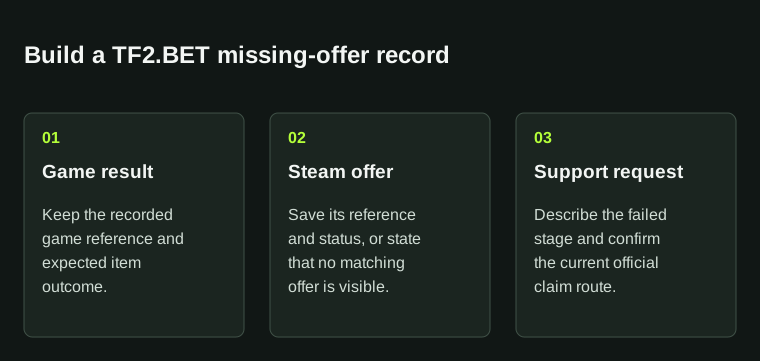
Keep the game result and the Steam offer together. This is an evidence checklist, not a screenshot of TF2.BET's live controls.
03
Check the current claim route
The indexed FAQ points to support tickets through a Discord reached from the operator’s website. The indexed terms give 24 hours to report a loss caused by a software or network issue during a game. Check the current terms and support route promptly; indexed wording may lag the live rules.
Keep the ticket reference and submission time. If an offer or refund has already arrived for this event, include it in your report so support can see the resolution so far.
04
Describe the expected items
TF2.BET’s indexed terms distinguish displayed item values from real-money winnings. For a missing TF2 offer, name the items you expected instead of describing it as a bank cashout.
If you quote a marketplace price, explain how it differs from the site’s recorded value. Keep any proposed resolution with the original event record and ask which items or claim it covers.
BEFORE YOU CONTINUE
Quick checklist
- Write one timeline for one affected event.
- Keep the game reference and Steam offer status together.
- Check the current claim terms and official support route promptly.
- Disclose any offer or refund already received for that event.
Indexed operator documents
The FAQ’s indexed text was reported as crawled 2.9 years earlier; the terms were reported as crawled four months earlier. Direct page reads returned no usable body text.
Confirm current account instructions with the operator. A support checklist does not show a claim deadline or refund entitlement.
Need the details for a particular website?
The code directory records each partner’s code, referral method and offer status. Use the relevant partner page when your question also involves one of those details.
Partner pages may include affiliate links. A listing does not confirm a reward or account eligibility.