
THE QUICK ANSWER
Read the restriction in the Account tab and note which balance you selected. Ask support whether the request needs an account check or has already been sent to the network.

01
Read the Account notice
500 Casino directs restricted users to the notice in the Account tab. Its help lists unverified email, unverified Steam, KYC limits and antifraud checks as possible reasons. Save the full wording, when it first appeared and which actions are blocked.
Ask which requirement remains open. Historical csgo500.com Trustpilot reports describe access and withdrawal disputes; a June 2026 reviewer said some access returned after verification while other features remained restricted. These individual reports do not identify the cause of your account’s notice.
02
Identify the balance and withdrawal method
500 Casino documents a MAIN balance and a separate balance for each cryptocurrency. Its help says MAIN can withdraw any supported cryptocurrency or skins; a named crypto balance can withdraw that cryptocurrency or skins. The selected balance matters as well as the total shown.
Record the balance, amount, currency, method and request reference. Ask support whether that balance supports the unavailable method. If the notice mentions wagering, ask for the condition and its calculation. Another deposit or more play will not explain the existing restriction.
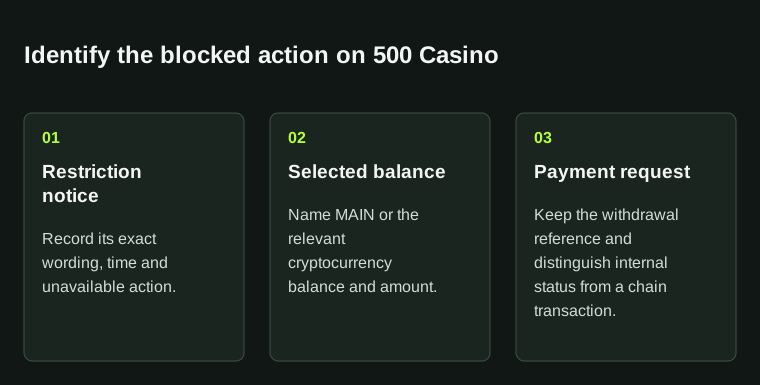
A restriction, a selected balance and a queued payment provide different evidence. Send the three relevant records to official support.
| Balance | MAIN or the named cryptocurrency balance |
|---|---|
| Request | Amount, currency, method and request reference |
| Restriction | Exact text, date and unavailable action |
03
Check what Queued means here
500 Casino’s published crypto help defines Queued as sent and awaiting network confirmation. It also says some withdrawals are flagged for review. That definition belongs to this operator’s article; do not apply it to another site.
Look for a transaction hash on the correct network’s explorer. If none is supplied, ask whether the request has been broadcast or remains under review. Keep any hash with the destination and confirmation state so support can locate the same transfer.
04
Give support the right reference
Keep a frozen round or disputed result under its game ID and a withdrawal under its payment reference. Explain whether you need an account check, a round investigation or the status of a specific payment.
Send one dated timeline through support opened from the official site. Ask what remains required and save the ticket number and any follow-up date. Use only the confirmed private upload route for identity documents; support does not need your Steam authenticator or recovery code.
BEFORE YOU CONTINUE
Quick checklist
- Keep the complete restriction notice.
- Identify MAIN versus a specific cryptocurrency balance.
- Record a transaction hash if one is provided.
- Separate game IDs from withdrawal references.
Official help and player reports
Operator documents explain the published process; public player reports explain why this topic was selected. The troubleshooting sequence is StrikePot’s editorial advice.
- 500 Casino: account restrictions
- 500 Casino: separate balance types
- 500 Casino: cryptocurrency withdrawal status
- Player reports: historical csgo500.com profile
Public reports describe individual experiences; they do not measure how often the problem occurs or establish its cause. The operator must resolve the account-specific decision.
Need the details for a particular website?
The code directory records each partner’s code, referral method and offer status. Use the relevant partner page when your question also involves one of those details.
Partner pages may include affiliate links. A listing does not confirm a reward or account eligibility.