
A Rust wipe can remove the rifle in your storage box without removing the rifle skin from your Steam inventory. These are different records. One belongs to a particular server world; the other gives an account access to a cosmetic. To understand a reset, first identify which record has changed.
This distinction becomes especially useful when you return after a break. An empty base location, a missing crafting unlock and an absent Steam item can look like one large loss. They need different explanations, and the server's announcement determines only some of them.
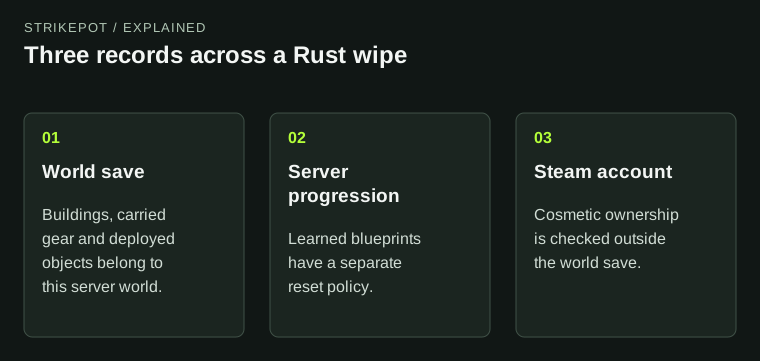
The diagram separates the evidence needed for a lost base, a reset recipe and an account cosmetic.
Three places where progress can live
Think of a normal session as involving a world, a progression record and an account. The world contains the objects you built, carried or stored there. The progression record contains what that server knows about your character's learned crafting options. The account holds qualifying cosmetics and purchases outside that individual world.
The Facepunch-hosted server documentation describes world saves separately from player blueprint files. That is the technical reason a map reset and a blueprint reset are separate questions. The page is community-maintained and old; use it for this storage distinction, rather than as a promise about every current server's reset policy.
| What you are checking | Useful evidence | What it answers |
|---|---|---|
| A built base or stored weapon | The same server and its wipe notice | Whether that world still exists |
| A learned crafting option | The server's blueprint policy and current crafting screen | Whether that progression was retained |
| An owned cosmetic | The owning account's Steam inventory or purchase record | Whether the account still has access |
What a map wipe means for a skinned object
Suppose, hypothetically, you finish a session with a decorated door on your base and a skinned weapon in a box. When that world is replaced, those individual world objects do not become permanent keepsakes because they had an appearance applied. Their cosmetic treatment does not change the kind of record they are.
The reverse is also true. Losing the world object does not establish that the account's cosmetic record was transferred or consumed. The Nomad Outfit product description provides a clear account-level example: it identifies a Hazmat Suit appearance and says it remains bound to the Steam account. That is an entitlement to an appearance, rather than a promise to preserve a particular suit in a server.
This does not make every Rust cosmetic account-bound. Item restrictions differ. The point is that a world reset and a Steam ownership change must be checked in their respective places. The existing Item Store and Market guide explains those product restrictions in more detail.
A blueprint wipe changes the rebuilding task
When a server also resets learned blueprints, rebuilding can require more than replacing materials. A player may need to learn an item again before crafting it. Whether that applies depends on the specific server and reset; a monthly label alone is not a complete blueprint policy.
Ask two separate questions before organizing your next session: will the world reset, and will learned recipes reset? If a group splits those questions between different messages, save the answers together. A screenshot of an old crafting tree is evidence of what existed then, not evidence that the operator retained it through a later reset.
Once you know the progression state, use the current blueprint-resource guide for the actual learning route. An explanation of persistence should not become a copied list of crafting costs, especially when progression systems change.
Changing servers is another boundary
A second server is another world, even when its map looks familiar or its operator uses a similar name. Plan the move as a new gameplay context. Confirm the server address, rules and progression policy instead of assuming that the character state on one server describes the other.
Consider a group that has spent a week learning recipes on Server A and wants to join friends on Server B. The useful preparation is to ask what Server B provides and retains. Comparing the two islands' landmarks will not answer that. Equally, opening Steam and finding the group's cosmetics still present will not prove their new characters already have the ingredients or crafting access they need.
Server-specific perks, saved kits or migration arrangements require that operator's own instructions. Treat an advertised transfer as a named service with a defined scope, not as a general rule of Rust.
Investigate the missing thing at its own level
If the base is gone, confirm the server and wipe notice. If a recipe is unavailable, read the current progression screen and ask whether blueprints were reset. If an appearance is missing from the owning account, inspect Steam and the relevant receipt. These checks narrow the problem before you alter settings or contact support.
An owned appearance that is present in Steam but absent from the crafting selector is a further, separate case. The DLC crafting guide covers matching the pack to its base item. There is no need to describe that selector issue as a wipe deleting the purchase.
Keep a short record of the server, observation time, exact missing object and account involved. That description gives the operator or support team a question they can answer. After a reset, the practical goal is to identify what must be rebuilt, what must be relearned and what can be checked directly in the account.