
Rust Premium-server access is an account eligibility check based on qualifying Rust inventory value. It is not determined by how expensive your current in-game equipment looks or how much time you have spent on a server. Use the game's eligibility panel to check the account's status.
Facepunch's current support article sets the threshold at $15 and explains which items count. That rule has important boundaries: some permanently bound store items qualify, while certain standalone downloadable content packs do not. Adding up every Rust-related purchase receipt is therefore the wrong calculation.
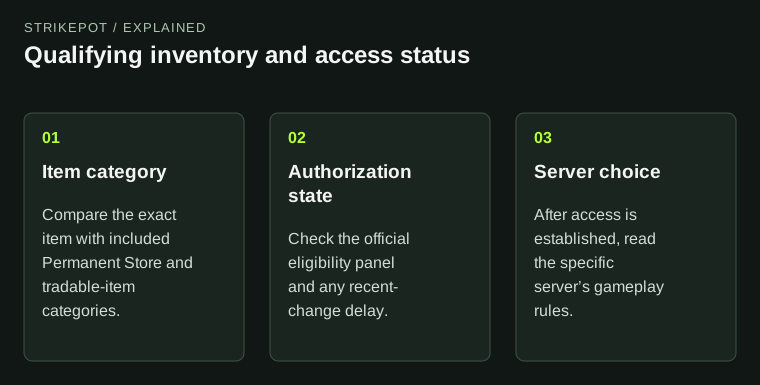
An inventory purchase, a valuation and an access result are separate parts of the Premium check.
Start with the eligibility result
The Premium Servers support page, updated on 28 October 2026, describes a clickable Premium tag that opens the eligibility panel. It also identifies a manual refresh beside the player's name, limited to once every 60 seconds, and a Premium indication on the main-menu avatar.
Read the panel's current result before comparing outside inventory estimates. It is the interface for this access decision. A third-party total might be useful for a different task, but it does not establish that the Premium authorization process has recognized the same items or valuation.
If the main-menu indication and the server view seem inconsistent, keep both observations with the time you checked. This produces a more useful description than assuming that a visible skin proves the threshold has been met.
Which inventory items are included?
Facepunch includes Permanent Store items such as building appearances, decor packs and Hazmat appearances, alongside other tradable Rust items with an attached value. Its support page currently excludes the standalone Instruments, Sunburn and Voice Props packs and says the rules may change.
That is a classification rule, not a judgment about which pack is more useful. An excluded pack can work for its gameplay purpose without contributing to this separate eligibility check. An included permanently bound item can contribute without becoming a tradable asset.
The Rust store and Market guide explains why product ownership and resale rights differ. Here the narrower question is whether the product belongs to a category the Premium rule counts. Keep its exact name with that question.
Purchase spending is not the same as qualifying value
Consider a hypothetical player who remembers spending more than $15 on Rust-related content. That memory does not settle eligibility. Some of the total might be the game itself, excluded standalone DLC or something outside the specified Rust inventory categories.
Likewise, the amount on an old purchase receipt and the valuation used for today's eligibility check answer different questions. The published support instructions do not provide a full formula that lets a reader reconstruct every account's assessment from receipts. Do not invent one by mixing historical spending, external offers and current Steam listings.
Write down the items you believe should count, then compare them with the official category descriptions and the actual panel. If the mismatch remains, that list is evidence for a support question. It is not a reason to assume another purchase is required.
A recent trade can leave a temporary mismatch
Facepunch says new purchases or skin trades can take up to 20 minutes to be reflected in Premium authorization, depending on Steam traffic. Treat this as a documented processing allowance, rather than proof that an individual change will appear after an exact number of minutes.
Record when the relevant inventory change completed and when you checked eligibility. Repeatedly pressing refresh cannot demonstrate that the underlying authorization has caught up, and the manual control has its own limit.
If the item itself is absent from Steam, investigate that earlier stage first. The inventory-missing guide helps separate a missing asset from a service that has not recognized an asset already present. Premium status and item delivery are different records.
What the Premium label does not promise
Facepunch's 2026 retrospective describes the inventory gate as part of its effort to reduce cheating. That explains the intended purpose. It does not supply an account-specific guarantee about every future encounter or the behavior of every person you meet.
Eligibility also does not explain a server's entire rule set. Before building, check the selected server's group limits, reset schedule and mode just as you would for another server. The Premium label answers an access question, not every question about the experience.
Keep the access result separate from your cosmetic plans as well. Having Premium status does not show that every appearance is compatible with every base item or that an account-bound product can be sold later.
Make the support question concrete
If the discrepancy persists, preserve the account's current eligibility result, the exact qualifying item names, the completed acquisition times and the time of the last manual check. Hide unrelated account information in any supporting images.
Describe the outcome precisely: the panel says ineligible, the avatar shows Premium but a particular server is absent, or a recent item change has not appeared in the assessment. Each description points to a different stage. If all servers are missing, use the server-browser guide rather than treating the entire list as a Premium-only problem.
You can check all of this using items and account records already available. The useful next step is to resolve the eligibility evidence. The current threshold and listed categories explain the rule; the official panel shows how that rule is being applied to the account.