
Choosing a Rust server means choosing a set of rules, a reset schedule and an operator. Population and ping matter, but they cannot tell you whether your group is allowed, whether a base can be raided overnight or whether your learned progress will survive the next wipe.
The server browser is a useful shortlist. Finish the decision by reading the specific server's description and established rules. A few minutes spent matching those rules to your plans can prevent an evening of progress on a server your group never intended to play.
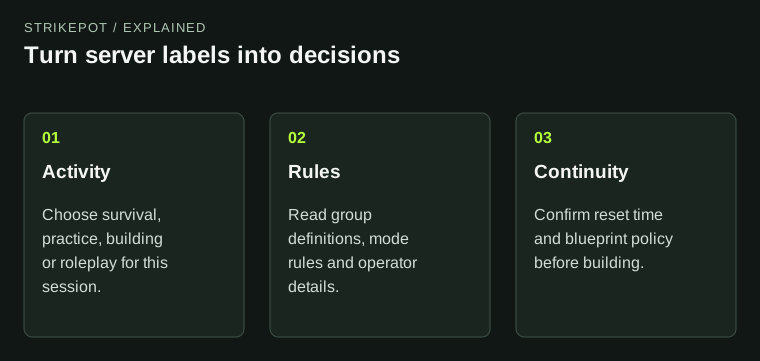
Labels narrow the list; the server-specific answers determine whether the session fits.
Use tags to ask better questions
The Facepunch-hosted tag reference separates labels such as wipe frequency and difficulty from activity labels such as PvE, roleplay and training. Tags help you filter the list. They compress information and are configured by the server; they are not a full handbook.
A Weekly label gives you a reason to investigate the weekly schedule. It does not, by itself, tell you the reset hour, time zone, blueprint policy or whether an exceptional update will change the plan. A PvE label calls for the server's rules about damage, stealing and events. It does not answer every interaction that a plugin might allow.
Only some tags are displayed together, so a missing visible label is weak evidence. Open the server details and operator's published rules before deciding that an activity is unrestricted.
Separate the operator from the experience
Official, community and modded are useful starting categories, but they answer different questions from a player's immediate goal. You still need to identify who operates the particular server and what has been changed. Familiar branding does not replace its current rule page.
Facepunch's community-server guidelines require unofficial servers to be fairly labelled and not presented as Facepunch itself. For a player, the practical implication is to find an established operator identity and use its own documented support route. A server name containing an impressive adjective is not enough.
Facepunch’s March 2026 plugin guidelines make the Community boundary more precise. Gameplay-changing and interface-changing plugins belong outside that category, while specified administrative and moderation uses are permitted. Custom maps and changes to vanilla configuration variables can remain in Community. A Community listing therefore does not prove every setting is at its default.
Modification has several possible meanings. Faster gathering, an altered loot table, a custom map and an administrative tool affect different parts of play. Ask about the change that affects your session instead of treating every modified server as the same experience. The category helps locate the experience; the operator’s explanation supplies the detail.
Match the rules to a real session
Imagine a hypothetical trio with two hours available on a weekday evening. They want to build together and attempt one monument run. Their useful comparison is not simply which server has more players. They need a group limit that permits three cooperating players, a schedule compatible with their evening and rules they can follow during that run.
Another player wants to practise electrical builds without maintaining a competitive base. A training or build environment may fit that task better, but the player should still inspect whether objects persist and whether other people can alter them. The correct choice comes from the activity, rather than a universal ranking of server types.
| Your intended session | Question to settle first |
|---|---|
| Play with a fixed group | How does the operator define the cooperation limit? |
| Return over several evenings | When do the map and blueprints reset? |
| Build or practise | What is saved, and who can interact with it? |
| Use a special mode | Which mode rules and server overrides apply? |
Read group limits as behavior rules
A numerical team limit can describe more than the number of names visible in a team interface. An operator may define cooperation, alliances, shared bases or rotating members in its own rules. Read those definitions before inviting another friend or agreeing to help a neighbor.
If the wording is unclear, resolve that point through the operator's existing public explanation or support process before committing to the arrangement. A screenshot showing a small team list would not necessarily describe all of the cooperation taking place.
This is also why group convenience features should be considered separately from the server's rules. An interface permitting an invitation does not establish that a particular arrangement complies with the chosen server's limits.
Check persistence and cosmetic expectations separately
Decide how much continuity you need. Some sessions are useful even if everything resets soon; others depend on returning to the same base and project. Record the next reset and any progression policy alongside the address so you can find the intended server again.
For cosmetics, the community-server guidelines distinguish purchased Facepunch content from unapproved custom content. Do not treat access on a special testing server as evidence of Steam ownership. The Rust cosmetic guide explains where account access is checked, while the reskinning guide handles the normal object-specific controls.
A skin list is therefore a poor way to judge the whole server. It cannot establish reset reliability, moderation responsiveness or whether the rule set fits your available time.
Make a small commitment before a large one
Once the rules fit, join and confirm the basics you can observe: the intended server, the visible mode information, the current map and the controls relevant to your task. This is a scope check, not proof of every advertised quality. Keep an observation separate from a conclusion about long-term reliability.
If the browser is empty or the server cannot be reached, use the server-list troubleshooting guide. That connection problem is different from deciding whether an available server suits you.
A useful final note is short: server identity, next wipe, blueprint policy, group rule and support location. With those facts in one place, your group can spend its session playing the agreed version of Rust instead of discovering incompatible assumptions after building a base.