
Before following Rust instructions, identify the edition they describe. Rust on Steam and Rust Console Edition share a game identity, but their support routes, published schedules and product records are not interchangeable. A familiar item name does not make a guide valid for both.
You can settle many apparent contradictions by recording four facts: the exact game edition, platform, release or test environment, and server. Only then compare the action you want with documentation written for that context.
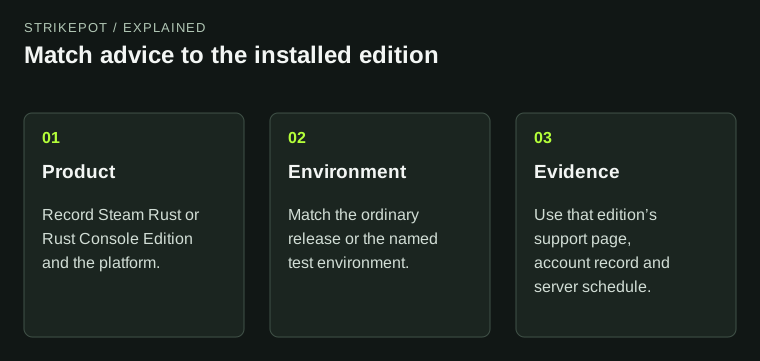
The diagram compares documentation scope without implying that accounts or servers are interchangeable.
Start with the publisher and support route
The current Rust Console Edition FAQ identifies Double Eleven as its developer and publisher and lists PlayStation 5 and Xbox Series X|S. Facepunch's support notice directs Console Edition questions to Double Eleven.
That division matters when a player has a missing purchase, a server problem or an unfamiliar menu. Sending a detailed console report to the wrong game's support team adds an unnecessary handoff. Start from the official support link for the edition actually installed.
Older articles may name earlier console hardware or describe a previous generation of the product. Keep their publication date in view. Historical platform information is not sufficient evidence of the current supported platform or the version running in front of you.
Compare schedules with their edition attached
Wipe advice is an especially clear example. Double Eleven's FAQ describes weekly Console Edition wipes on Thursdays at 18:00 UTC and monthly wipes on the last Thursday at that time. The PC wipe-timer reference describes a different configurable system, including a first-Thursday monthly default in London time.
These statements need not contradict each other. They describe different contexts. Neither should be stripped of its edition and turned into a universal sentence saying that all Rust servers reset on one date and hour.
Community servers add another scope check: their operator can publish a specific schedule. Confirm the actual server's policy, the time zone and what is being reset. A console monthly schedule pasted into a Steam group's calendar would be poor evidence even if it came from a genuine official page.
Product names do not prove shared ownership
A cosmetic can have familiar branding across product listings without those listings proving that one account purchase covers another platform. Read the specific product and account record for the edition where you want to use it.
For example, a Steam receipt is evidence of a Steam transaction. It is not, by itself, a record in a console account's purchase history. If a product explicitly offers a cross-platform entitlement, its own terms must establish that scope. Do not infer it from matching promotional artwork.
The Steam Rust cosmetic guide covers Item Store and Market distinctions in that ecosystem. Keep those Steam-specific transfer and inventory terms attached to it rather than applying them automatically to a console store.
Crossplay and progress transfer are separate questions
Being able to play with someone and being able to move an account's progress are different capabilities. A platform feature label about multiplayer cannot establish the transfer of cosmetics, purchases or a character's history.
Double Eleven's FAQ explicitly says Xbox-to-PlayStation progress transfer is unavailable. That is a precise answer about a particular transfer, not a general description of every possible multiplayer pairing. If your goal is to join a friend, verify the supported pairing and server for that goal separately.
This distinction prevents a familiar chain of assumptions: someone sees a cross-platform label, assumes every platform is included, then expects their existing inventory and progress to follow. Each link in that chain requires its own published support. A single label cannot supply all of it.
Test environments need their own labels
The Console Edition FAQ describes its Public Test Branch as a separate version for trying upcoming content. A feature shown there should retain that label when discussed. A video from a test environment can be accurate footage without demonstrating the current ordinary release.
The same reading habit helps with any Rust preview. Find the edition and environment before copying controls, costs or availability. A creator saying a feature “works” might be describing a genuine test that does not match the viewer's installed version.
| What you want to verify | Information that must match |
|---|---|
| A wipe date | Edition, server, dated event and time zone |
| A cosmetic entitlement | Product listing, platform and owning account |
| A menu action | Edition, current release and input context |
| A multiplayer plan | Supported platform pairing and selected server |
Keep a useful part of an old guide without importing its assumptions
An older explanation can still teach a concept such as reading an exchange or understanding a resource dependency. Its exact button labels, schedule or platform scope may need fresh verification. Use the conceptual explanation and check those operational details against the current edition.
For Steam players, the PC server-browser guide is a better next step for an empty list than console-specific server instructions. For a report, the support-message guide helps organize the edition, platform and observed result without claiming that the same fix applies everywhere.
The most useful correction is often small: add the edition to the claim. “This is the schedule listed for Console Edition” is clear and checkable. Keeping that scope lets players reuse good information while avoiding a plan built from incompatible versions of Rust.