
Check what your verification page says
If Roobet verification is still pending, start with the status in your account’s verification settings. You need to know whether the document was submitted, rejected or never uploaded successfully. Those states need different follow-ups.
Roobet’s Level 2 help article, dated 23 July 2026, lists a passport, driving licence or government-issued identity document. It directs uploads through account verification and describes front-and-back screenshots. Follow the request in your account for the document and format you need.
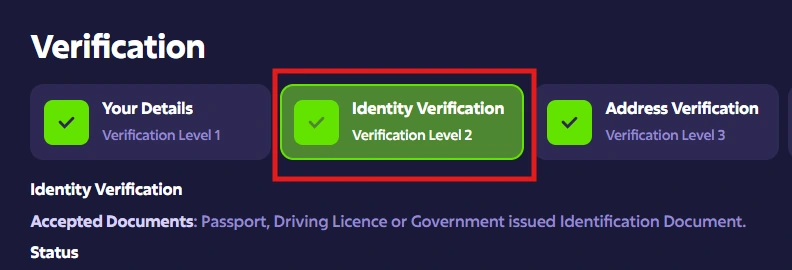
Roobet’s official reference for Identity Verification / Verification Level 2. Follow the document request and status in your own account.
Open the full-size image to read small interface details.The compliance team reviews documents daily and contacts players after manual review if more information is needed. That does not promise approval within one day. A timetable based only on your withdrawal amount would not tell you when this submission will be reviewed.
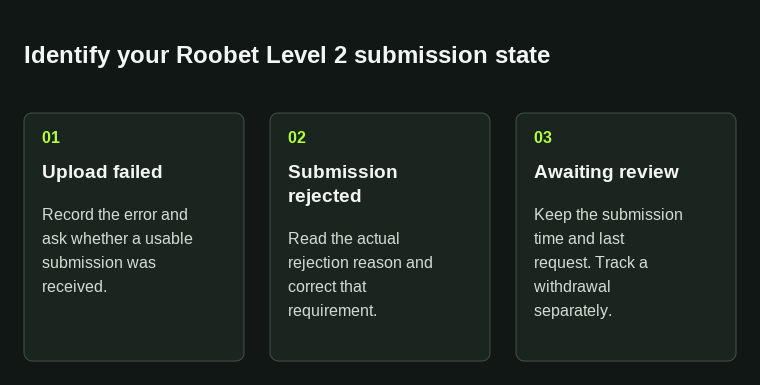
An uploader failure, a rejected document and a received submission awaiting review need different support questions.
Was the document received, or did the upload fail?
| What happened | What to check |
|---|---|
| The uploader will not open, or an error appears | Keep the exact message. Ask whether any submission reached the verification team. |
| The document was rejected | Read the reason and correct that issue before resubmitting. |
| The submission is awaiting review | Check for a request for more information. Keep the submission time and ticket reference. |
Uploading the same file repeatedly will not tell you whether the first copy was received. Another casino’s photo instructions may not match Roobet’s requirements.
Ask support one specific question
Use the route reached from roobet.com or help.roobet.com. Give the verification level shown, submission time and last message you received.
For example: “My account shows Level 2 verification awaiting review. I submitted the requested document at [time]. Has it been received, and is anything else required?” Add your existing ticket reference and ask when to follow up if nothing changes.
Keep identity documents inside the confirmed verification channel. Never send a password, one-time login code or recovery code to someone offering to speed up the review.
If a withdrawal is pending too
Keep its reference and status separate from the document submission. Ask whether it is waiting for verification or a different review. A completed upload does not prove that a payout has been sent.
If support gives an estimate, note which step it covers. Keep the original request and reply. Do not open a replacement account or make another payment to troubleshoot verification. Roobet’s account-help collection also covers limits and self-exclusion if you want to restrict account use while waiting; ask support if that route fails.
Useful next steps
Sources and scope
These instructions describe the general process. Your account notice and support reply determine what remains required in your case; the article cannot promise approval or a payout.