
An older skin image can differ from a current CS2 inspection because several things may have changed: the receiving model, the material renderer, the presentation pose or the finish itself. Those explanations should be separated before calling the image inaccurate or assuming the item has become a different collectible.
Valve's CS2 introduction explicitly distinguishes legacy finish support from upgraded stock weapon models. Inventory continuity and an identical visual presentation are therefore different claims.
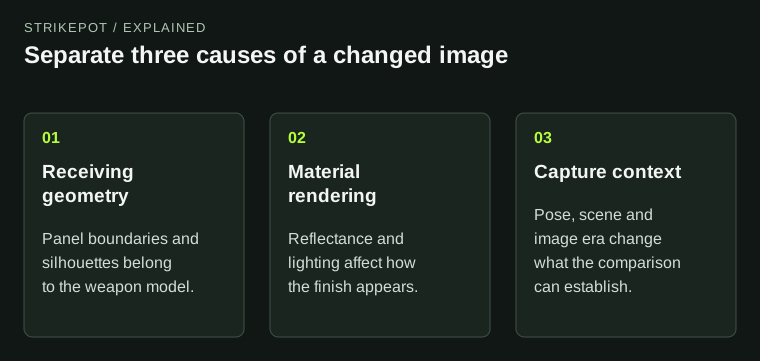
Inventory continuity does not make every historical image an identical current presentation.
The object and its presentation are not one layer
Think of a displayed weapon as a combination of geometry, material information and a view. Geometry provides the surfaces. The finish supplies appearance information for those surfaces. The camera and scene determine how the result is shown.
If a small edge looks different, investigate the geometry. If a broad region changes brightness, investigate materials and lighting. If a feature appears larger or partly hidden, investigate the pose before concluding that the artwork moved.
These are starting hypotheses, not rules that identify every change from a screenshot. A careful comparison may reveal more than one cause. A new model and a new renderer can affect the same visible region in different ways.
Legacy support does not mean every finish uses identical geometry
On the official CS2 introduction, Valve describes keeping existing items while supporting legacy models and finishes, and notes that some finishes use upgraded models. Read that as a distinction between supported applications, not a promise that every old image should match the new stock weapon silhouette.
A hypothetical illustration placed precisely around an older model's panel boundaries may depend on that layout. Another finish may suit a revised receiving model. The fact that both belong to the same base weapon category does not prove that their geometry is interchangeable for artwork.
This is particularly relevant to creators following old tutorials. A texture layout is tied to a receiving model. The artwork can be excellent and still fail to align when applied to a different surface layout.
Use the correct resource as a working reference
Valve's resource page lists CS2 weapon geometry separately from older Workbench materials. That distinction deserves attention before a creator spends hours painting a model-specific illustration.
Record which receiving model and resource set you are using. Keep the reference with the project rather than relying on an unlabeled mesh copied from another folder. If collaborators use different references, a discussion about misaligned artwork can become a discussion about two different surfaces without anyone realizing it.
Valve's June 2023 notes also documented a preview fix involving legacy models and new finishes. That is historical evidence that preview context matters; it is not a claim that the same bug exists now.
Compare stable features before subtle materials
Choose a few structural landmarks visible in both images: a panel corner, a component boundary or the outline of a large part. Keep the general view similar. If the landmarks differ, note that before discussing the exact shade of a painted region.
Then examine the material under comparable lighting. A model comparison made with a bright old side render and a dark current held view is confounded by presentation. You may still learn something from it, but it cannot isolate a subtle material change cleanly.
The current-item inspection guide helps when the actual question is what a particular copy looks like today. Historical images provide context; they should not displace the current individual item evidence.
Keep an image history rather than a single “true” screenshot
For an archive, preserve the publication date, the game era and the original context. Label a Workshop preview as a proposal and an official release illustration as release material. If the source is a repost with no date, say that the context is unknown.
Imagine an older image showing a graphic sharply aligned to a panel and a current image showing a softer-looking boundary. Possible explanations include a different model, different image resolution, altered materials or a different item application. Do not select the most dramatic explanation before checking the ordinary ones.
The wear and pattern guide covers another source of difference: individual properties. A historical model discussion does not establish that two screenshots show the same generated copy.
Animation can change the frame without changing the mesh
Valve's July 2025 animation update replaced first-person deploy, firing, reload and inspect animations. That gives historical comparisons another layer: the weapon can be presented at a different point in a movement, exposing a different amount of the same surface.
When a detail seems newly hidden or unusually stretched in a still image, check the pose before concluding that the geometry was rebuilt. Compare a recognizable structural landmark through several frames if a recording is available. A single image taken halfway through a motion is a poor reference for the neutral held shape. Keep animation context alongside the model and renderer notes, especially when the source is an old demonstration video rather than a deliberately matched pair of inspections.
Make the claim match the comparison
You might be able to conclude that two images use different silhouettes. You might only be able to conclude that they were captured in different contexts. Either is more useful than a blanket claim that the entire finish was redesigned.
For creators, resolve the receiving model before revising layout. For owners, inspect the current object before relying on an old promotional picture. For researchers, retain both the earlier image and its date. A historical appearance can be accurate in its own context while requiring care when used to explain the current one.