
Your CS2 inventory records items you own. Your loadout organizes the weapon choices and cosmetic selections you bring into the game's buying system. Owning several finishes for a rifle does not create several different rifle types, and owning a finish does not by itself explain which weapon choice is currently selected for a team.
The easiest way to understand the interface is to separate two decisions: which base weapon you want available and how that selected weapon should look.
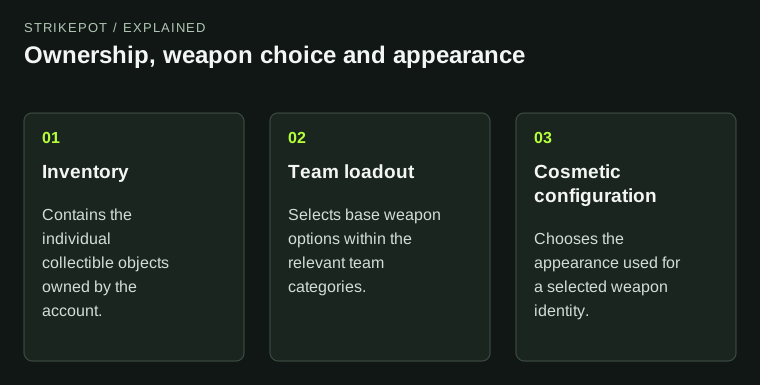
Several finishes can share one base weapon without becoming additional gameplay weapon types.
The base weapon is the gameplay choice
Valve's June 2023 loadout introduction replaced the older buying layout with team-specific choices organized into weapon categories. Its structure included a starting pistol, four additional pistol slots, five mid-tier slots and five rifle slots per team.
The underlying idea is a curated selection from the weapon roster. The loadout is not an unlimited display of every inventory object. A choice within a category determines the base weapon represented there, subject to the team's available options.
For a hypothetical player planning a match, the first question might be whether both desired rifle types are included. That is different from choosing between two appearances for one of those rifles. Resolve the gameplay choice first so an attractive finish does not distract from an absent weapon option.
A finish is a configuration of that weapon identity
Imagine an inventory with three ordinary finishes for the same rifle. They are three collectible objects with different appearances, but they share the base weapon name. Choosing the finish you want is a cosmetic selection within that identity.
Now imagine a second rifle with a similar name. It remains another base weapon. A finish does not convert the first rifle into the second, even when the artwork or naming theme looks related. Keep the weapon field separate from the finish field when reviewing the loadout.
The StatTrak swap guide provides another example of why the distinction matters: same-weapon compatibility is more specific than visual similarity. A tool or cosmetic relationship should not be used to blur the underlying weapon identities.
Review T and CT contexts separately
A selection should be checked in the team context where you intend to use it. Valve's loadout structure is per team and uses side-appropriate weapon choices. Seeing an item selected in one context is not complete evidence of the other team's setup.
Use a short pre-match review based on the decisions you care about. Check the starting pistol, the few mid-tier choices you actually expect to buy and the intended rifles. Then check the cosmetic presentation of those selected weapons. You do not need to reorganize every slot to answer one missing-option question.
If a tile looks wrong, identify whether the issue is the base weapon, the selected finish or the displayed team. Those are different problems. A clear description avoids unnecessary inventory actions when the actual issue is only the selected configuration.
Shuffle adds a selection layer, not new ownership
Valve's September 2023 notes added favorite and shuffle support for loadout items. When reviewing an unexpected appearance, keep any enabled selection behavior in mind rather than immediately concluding that the item itself changed.
The distinction is between a collection of eligible appearances and the particular one shown at a moment. A selector can change what is displayed without creating another inventory object or changing the base weapon identity.
For a precise visual comparison, use the actual item inspection rather than inferring its properties from whichever appearance appears on the menu character. The inspection guide keeps the individual object attached to its own record.
Settle the plan before entering the queue
Valve's February 2024 notes explicitly restricted changes while searching for Premier, Competitive or Wingman. The practical habit is straightforward: review the intended setup before starting a search.
If you are following an older video, distinguish the historical interface from the options actually available in your current client. A guide showing a weapon roster explains an arrangement; it is not evidence that every control remains in the same position or that every mode behaves identically.
Do not treat a disabled loadout control as proof that a skin has disappeared. First check the current context and any displayed message. Inventory ownership and permission to change a match setup are separate questions.
The loadout is also separate from the round you are in
A weapon appearing in the loadout means it is part of the selected plan. It is not the same observation as carrying that weapon at a particular moment in a round. Keep the buying interface, the weapon currently held and the inventory item as separate contexts when describing a problem.
For a hypothetical missing-rifle report, first establish whether the rifle is absent from the team setup, absent from the available buying choices or simply not currently held. Then add the selected cosmetic if its appearance is relevant. A screenshot of the inventory alone cannot answer every stage. Naming the first context that differs from your expectation makes the question much easier to investigate without changing unrelated slots.
Use the right record for the question
| Question | Record to inspect |
|---|---|
| Do I own this item? | The individual inventory entry |
| Which weapon can I choose here? | The relevant team and category in the loadout |
| Which appearance will represent it? | The selected cosmetic and any enabled selection behavior |
| What does this exact copy look like? | Its individual inspection and properties |
The item comparison record can preserve those properties without turning the loadout into an ownership ledger. Once the layers are separate, a missing buying option, an unexpected finish and an absent inventory item stop looking like the same problem.