THE QUICK ANSWER
Identify the provider and affected round first. Evolution can issue a Case ID for a handoff to Stake support.

01
Preserve the affected round
Write down the provider, game, time with time zone, currency and any bet or round ID. Describe what happened after the last accepted action: an error message, a frozen result or a balance change.
A screenshot of an animation does not by itself identify the settled record. Keep the original reference and avoid starting more rounds to see whether the missing amount returns.
Who holds the first case?
Evolution
In-game help; keep the Case ID if handed to Stake
Pragmatic Play Live
In-game headset or chat
Other provider
Stake support with game and Bet ID
Provider choice changes the support route.
Original explanation · not an account screenshot02
Choose the support route for the provider
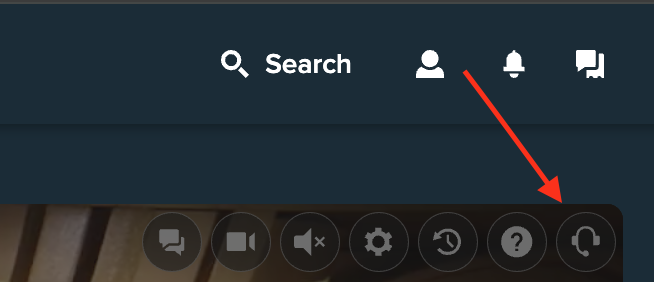
Stake’s published 2024 example marks Evolution’s help control. This is an operator reference, not a test in a StrikePot account.
Open the full-size image to read small interface details.| Evolution | Use the headset icon in the lobby or in-game chat. If directed to Stake, request the provider’s Case ID. |
|---|---|
| Pragmatic Play Live | Use the headset at the top right of the game or in its chat window. |
| Other providers | Send Stake the time, game, currency pair and Bet ID where available. |
03
Keep both references in the same report
- If the provider sends you back to Stake, copy its Case ID exactly.
- Open official Stake live support or write to [email protected]. Include the provider case, bet ID and a short description.
- Ask whether the round is complete, still open or corrected, and which transaction represents its final settlement.
A complete round handoff
Bet ID
Identifies the affected wager
Provider Case ID
Identifies the provider investigation
Time and currency
Helps match the same record
Final settlement
The transaction or decision to check
The bet reference and support case reference serve different purposes.
Original explanation · not an account screenshot04
Check the reply against the round record
Save the support reference and any stated investigation stage. If support reports a correction, compare its currency, amount and time with your own record.
If there is no bet ID because the game failed before accepting the action, say so. Distinguish “I clicked” from “the game accepted my stake”. Keep passwords, security codes and unrelated payment details out of the evidence.
BEFORE YOU CONTINUE
Quick checklist
- Name the provider and game.
- Save the exact bet or round reference.
- Request Evolution’s Case ID for a handoff.
- Match any correction to the affected round.
Official sources
Official help describes the feature. StrikePot’s checks explain how to read the account record and report a mismatch.
Public documentation reviewed on 26 October 2026 (America/Toronto). No account login, claim, deposit, gameplay, withdrawal or recovery test was performed. Account controls and available options can change; follow the current official screen.
Need the details for a particular website?
The code directory records each partner’s code, referral method and offer status. Use the relevant partner page when your question also involves one of those details.
Partner pages may include affiliate links. A listing does not confirm a reward or account eligibility.