THE QUICK ANSWER
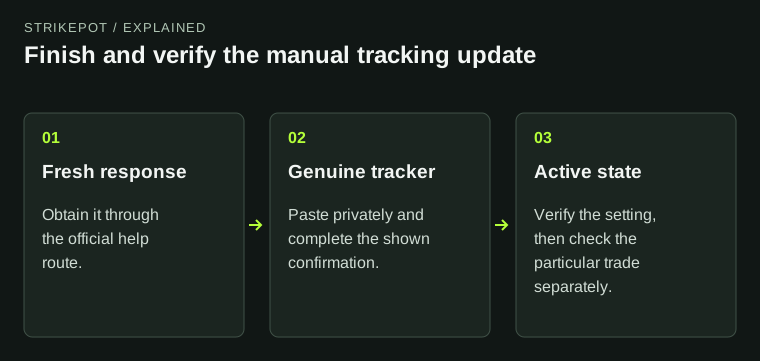
CSGOEmpire says a manually supplied tracking token resets every 24 hours. Fetch a fresh response through its official instructions, paste it only into the genuine Trade Tracking control and check for Active.
01
Tracking checks trade history; it does not accept offers
CSGOEmpire uses Trade Tracking to check a Steam trade's completion. Its API documentation explicitly says the feature does not send, accept, reject or confirm offers for you. A tracker showing Active is therefore a setting status, not proof that a particular item was delivered.
Start with the tracking state if an existing trade needs this history check. Keep actual Steam offer acceptance and the site's pending-trade record separate. For a missing or wrong item, follow the related pending-trade guide and its dispute instructions while you investigate the tracker.
Three states answer different questions
Tracking state
Is the history-checking feature enabled?
Steam offer
Was the intended item exchanged?
Site trade record
Which stage remains pending?
This explanation separates the optional tracker from delivery and payment records. It does not depict account controls.
StrikePot illustration02
Use the official route to obtain a fresh token response
- Open the official CSGOEmpire mobile or desktop Trade Tracking help article and use its Trade Tracking instructions for your device.
- On the manual mobile route, open Trade Tracking on CSGOEmpire, then use the Steam Token Page link supplied in the official article.
- Read the response before copying it. The documented successful example contains a webapi_token value; the empty response does not.
- Copy the complete response the official procedure requests and return to the genuine CSGOEmpire input field. Keep its contents out of messages, public screenshots and unrelated pages.
03
If Steam returns an empty data response
Both help articles show the empty response as {"success":1,"data":[]}. For this case, they direct you to sign in to Steam Community and try the token page again. The word success in that response does not mean a token was supplied.
Check the Steam account you are signing in to before repeating the official step. Do not fill the missing value with your password, Steam Guard code or a token copied from another account. If the response stays empty, report the empty-response state without exposing any later token-bearing response.
Read the response before pasting
Empty data
Follow the official Steam sign-in instruction and retry.
Token present
Use the complete response only in the genuine tracker.
Still empty
Report the state without sharing token contents.
An empty response contains no usable token even when its success field is 1. No real token is shown or requested.
StrikePot illustration04
Save the setting and check the resulting state
The desktop help instructs users to select Confirm after entering the response. The mobile help says Active appears when setup works. Check the saved state rather than assuming the paste alone completed the setting.
Both articles describe a 24-hour token reset for manual updates. Desktop help also offers a Chrome trading extension that updates the token automatically. If you consider that separate option, follow the store link from official help; this guide has not installed or audited an extension. A manual update remains the procedure described above.
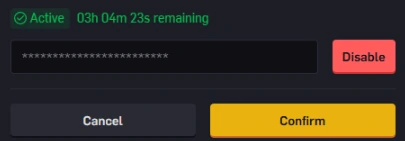
CSGOEmpire’s official example: Active tracking, a masked token and Confirm to save. The displayed remaining time is an example.
Open the full-size image to read small interface details.05
If tracking is active but the trade is still pending
Give support the trade reference, the observed tracking state, update time and actual Steam offer status. Describe whether the setting fails to save or whether a saved tracker has not reconciled a particular trade. Those observations let the team investigate the correct stage without receiving your token.
The official desktop article describes an eight-day protection period, while the mobile article says seven days. Both are dated 12 July 2026. This guide cannot resolve that inconsistency into a payout promise. Read the restriction on the actual trade and ask support which pending stage applies; refreshing a token does not establish that a protection period has ended.
BEFORE YOU CONTINUE
Quick checklist
- Use official help to reach the token procedure.
- Distinguish a token-bearing response from empty data.
- Paste privately into the genuine tracker and check Active.
- Keep tracking status separate from Steam delivery and payout timing.
Official sources
Official guidance checked on 27 October 2026. Dated updates below explain changes to earlier instructions.
Need the details for a particular website?
The code directory records each partner’s code, referral method and offer status. Use the relevant partner page when your question also involves one of those details.
Partner pages may include affiliate links. A listing does not confirm a reward or account eligibility.