
THE KEY POINT
Set up 2FA while you still have access, then save its recovery code somewhere you can reach without the authenticator device.
01
Start in your account profile
Click your account name to open the profile, then find Two-Factor Authentication (2FA) and choose Enable. Follow the setup prompt in your authenticator app, enter its six-digit code and confirm. The screenshot identifies the profile control; it does not show a login code to copy.
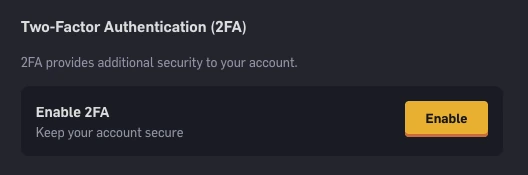
Step 1 — The official help screenshot shows Enable inside the Two-Factor Authentication section.
Open the full-size image to read small interface details.02
Save the recovery code before leaving setup
Use Save Code to download the recovery text file, or Copy to store it securely. CSGOEmpire’s help names the downloaded file CSGOEmpire_2FA_Recovery. Keep it outside screenshots or messages sent to others; someone helping you locate the button does not need your code.

Step 2 — Save Code and Copy are the two recovery actions shown in the official instructions.
Open the full-size image to read small interface details.03
If the authenticator is unavailable
First check the authenticator app you originally used and its configured accounts. Losing access to a phone and forgetting which app contains the entry are different problems. If you already saved the recovery file, find that copy before requesting a reset.
CSGOEmpire offers Lost access to 2FA for accounts that meet its recovery requirements. The screenshot shows the reset link available to an eligible account; it is not a button every account will display. Follow your own account’s prompt. If neither the recovery code nor that option is available, contact CSGOEmpire support through its official help centre.

Step 3 — An eligible account sees click here to reset 2FA. The message above it explains that this account can use the reset route.
Open the full-size image to read small interface details.BEFORE YOU CONTINUE
Quick checklist
- Confirm that 2FA is enabled in your profile.
- Save the recovery code before closing setup.
- Keep authentication secrets out of screenshots.
- Use the official recovery route for your account.
Official sources
Read the official documents below for the service’s rules and account instructions.
Need the details for a particular website?
The code directory records each partner’s code, referral method and offer status. Use the relevant partner page when your question also involves one of those details.
Partner pages may include affiliate links. A listing does not confirm a reward or account eligibility.