THE QUICK ANSWER
Start from the actual item in CS2 and review the contract before completing it. A higher rarity describes the result category; it does not promise the finish or value you want.
01
Start from the skin you actually own
Open your CS2 inventory and select the intended skin. Valve documents the action Use With Trade Up Contract on eligible weapons. Review the item’s collection and rarity before assembling the remaining inputs; matching weapon names or exterior labels alone do not establish a matching recipe.
Keep a short input list with each full item name, quality and collection. This is especially useful when your inventory contains both ordinary and StatTrak versions of the same finish. Leave any personal craft out of the selection unless you intend to exchange that exact item.
02
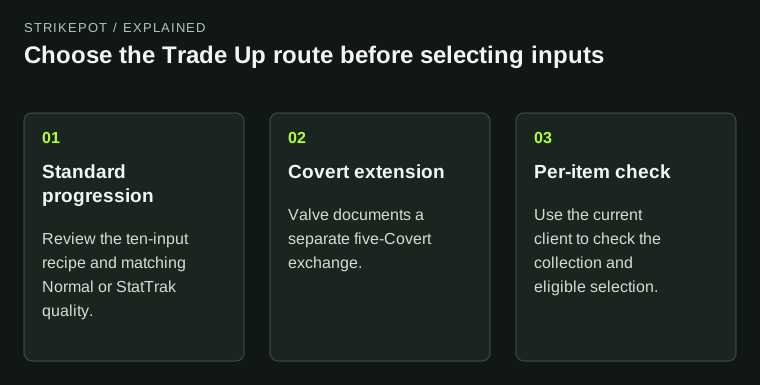
Separate the ten-skin recipe from the Covert extension
Valve’s standard recipe exchanges ten skins at one rarity for one skin at the next rarity from a contributed collection. Normal and StatTrak inputs belong to separate recipes. Rarity is the item grade, such as Mil-Spec or Restricted; Factory New and Field-Tested describe wear.
The 22 October 2025 update added a separate five-Covert route. Valve describes five StatTrak Covert inputs yielding a StatTrak knife, and five regular Covert inputs yielding a regular knife or gloves, from a collection represented by an input. Read the current client’s eligible selection for your exact items.
03
Souvenir inputs lose their Souvenir attributes
The May 2026 update allows Souvenir inputs alongside normal items. It says their Souvenir attributes are removed and the resulting item has normal quality at the next grade. A contract containing a souvenir therefore does not preserve that item’s souvenir identity in its result.
Before choosing one, decide whether you want the original souvenir as a collectible. Compare its full name and attributes with your input list. A recipe that now accepts an item can still be the wrong action if your aim is to keep that particular item.
What the Souvenir input rule changes
Before selection
An owned item has its own Souvenir identity.
During review
Confirm you accept exchanging that exact item.
Result rule
Valve describes normal quality after the Souvenir attributes are removed.
Original explanation of the documented conversion; no item result is illustrated.
StrikePot illustration04
If a skin is absent from the selection
Check the recipe you opened, the item grade, its Normal or StatTrak quality, and the collection printed on the item. Valve’s FAQ also excludes weapons already at the top of their collection from the ordinary progression. Do not buy another copy until you understand which condition your original selection fails.
There is a documentation conflict: the current FAQ still contains a blanket Covert exclusion, while Valve’s October 2025 release notes explicitly add the five-Covert exchange. Use those notes to distinguish the routes, and treat the actual client’s eligibility notice as the check for your item. This guide does not infer eligibility for every collection from its colour alone.
05
Review the complete exchange before submitting
Completing the exchange gives up the selected skins for its result. Treat the last review as a decision about those items, rather than as an inspection preview. Neither a collection name nor a screenshot of someone else’s result establishes the finish you will receive or a future resale amount.
- Read every selected input and remove anything you intended to keep.
- Check the quantity, item quality and recipe shown by CS2.
- Review the stated result category and the collections represented.
- If the selection or consequence is unclear, leave the contract before completing it.
- After a completed exchange, identify the received item and keep its details separately from the inputs.
Finish the review before the exchange
Exact inputs
These are the skins you will give up.
Recipe shown
Check its quantity and accepted item quality.
Decision
Complete only if the stated exchange is the action you want.
Original review diagram. It shows the decision point without imitating the CS2 interface.
StrikePot illustrationBEFORE YOU CONTINUE
Quick checklist
- Identify every selected skin and its collection.
- Check which recipe the client accepts.
- Understand the loss of Souvenir attributes where applicable.
- Keep valued personal items out of the final input selection.
- Read the result category before completing the exchange.
Official sources
Official guidance checked on 27 October 2026. Dated updates below explain changes to earlier instructions.
- Steam Support · CS2 Trade Up Contracts · reviewed The FAQ’s blanket Covert exclusion conflicts with Valve’s dated five-Covert update below.
- Valve · Five-Covert Trade Up extension, 22 October 2025 · reviewed
- Valve · Souvenir inputs in Trade Up Contracts, May 2026 · reviewed
Keep exploring skins & trading
Find practical guides for inspecting CS2 skins, understanding Rust cosmetics and comparing TF2 items.