
THE KEY POINT
A CS2 weapon rental is temporary access inside the game. Steam inventory is not the place to check its remaining time or list it for sale.
01
Look in CS2 before troubleshooting Steam
Open your CS2 inventory and check the rental’s remaining time there. Valve says rented weapons do not appear in Steam inventory. That explains why a third-party site reading your Steam inventory cannot show them as ordinary owned items.
First establish whether the item was rented or obtained as an owned skin. Refreshing a market inventory or changing a referral code addresses neither that distinction nor the rental timer.
02
Open to Rent and Open to Keep give different results
Valve’s rental option consumes the case and key for seven days of access to the case’s weapon skins, excluding the exceedingly rare special item. Open to Keep gives an owned item instead. Read the option before confirming rather than assuming that every case opening produces a saleable skin.
If you are documenting an inventory issue, keep the opening option, case name and time of the action together. Those details make a clearer support question than an estimate of what the weapons would cost to buy.
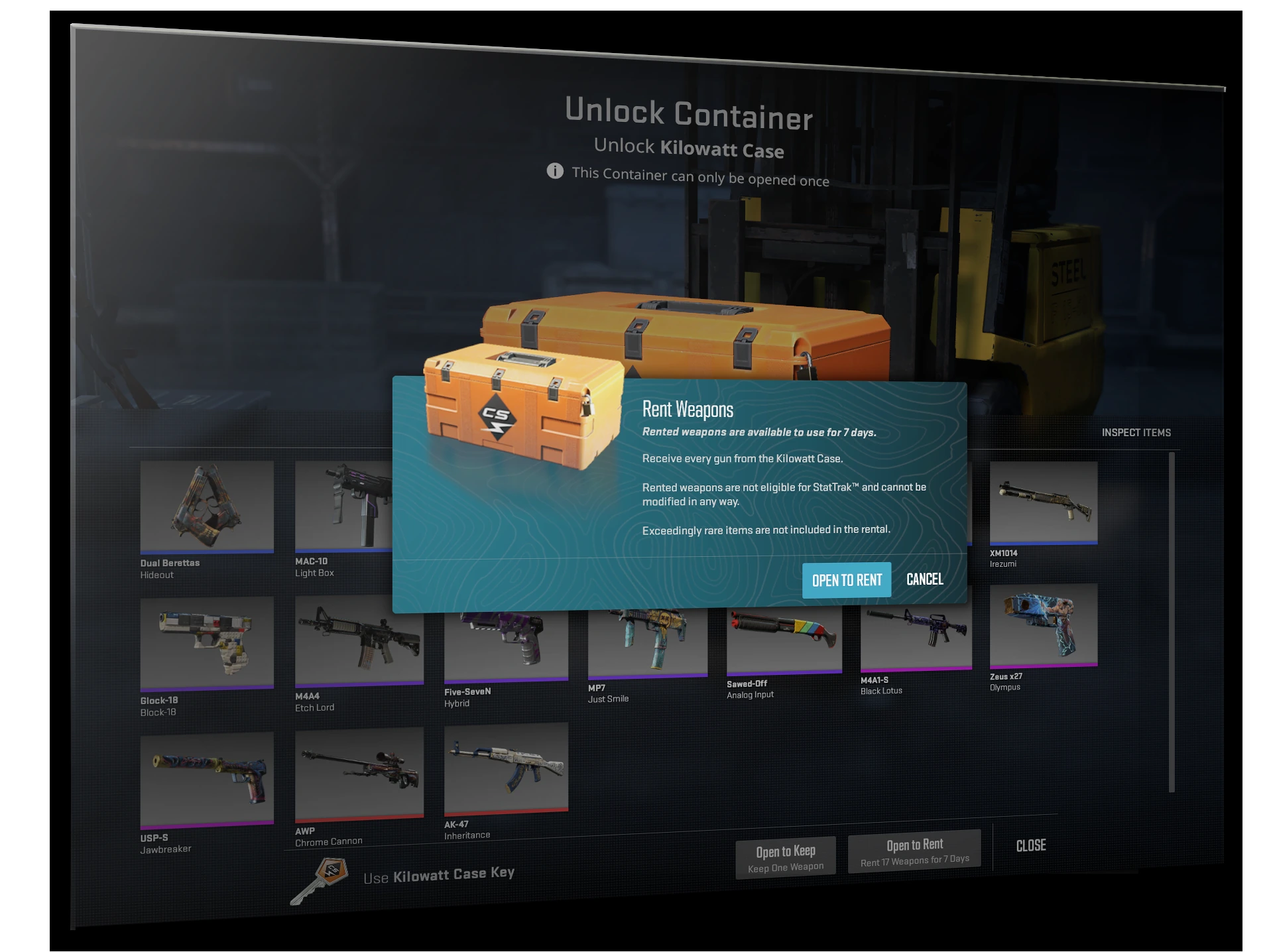
Valve’s 2024 Kilowatt example — Open to Rent is the blue confirmation action; Open to Keep is a separate choice. This historical screenshot illustrates the distinction, not a current case catalog.
Open the full-size image to read small interface details.
A rental is temporary in-game access, not an owned Steam inventory item. Check its timer in CS2 instead of refreshing a third-party market.
03
Check the timer before relying on a loadout
When the rental ends, an equipped rental is replaced by the stock weapon. Rental weapons cannot be customized with stickers or name tags. These limits belong to the rental; they do not describe a fault in the trading site.
For an owned item that is genuinely missing, use the separate inventory guide below. For a rental, record what CS2 displays and use Steam Support if its timer or availability needs investigation. Do not send Steam credentials to someone offering to convert it into an owned skin.
BEFORE YOU CONTINUE
Quick checklist
- Establish whether the weapon is rented or owned.
- Check rental time inside CS2, not Steam inventory.
- Read Rent or Keep before confirming a case opening.
- Keep account credentials out of any support conversation.
Official sources
Read the official documents below for the service’s rules and account instructions.
Keep exploring skins & trading
Find practical guides for inspecting CS2 skins, understanding Rust cosmetics and comparing TF2 items.