
Rust+ can operate a paired Smart Switch, but a successful remote action does not by itself prove that the rest of your base performed the job. The server must be reachable, the intended device must be paired, and the in-world circuit still needs to work.
Plan remote control around an observable result. “Turn this switch on” is a command. “Run the equipment connected to this branch” is an outcome with more dependencies. Keeping those two statements separate makes both setup and troubleshooting much clearer.
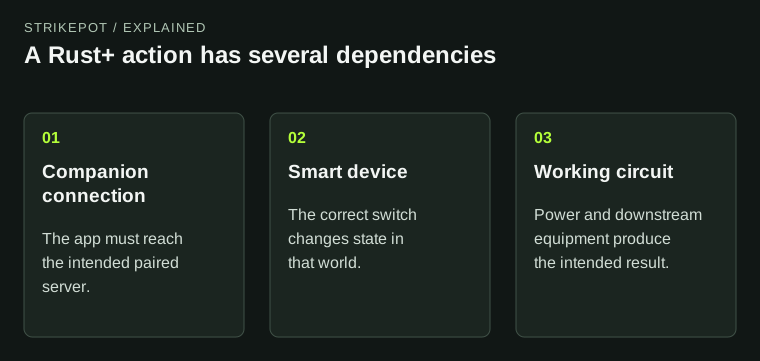
The diagram shows why an app state change is less evidence than an observed equipment result.
The app adds a connection to the world
The official Rust+ overview describes server pairing, map information, team communication and remote smart devices. Smart Switches control electrical setups; Smart Alarms send notifications when they receive the relevant signal. Those features operate on a running server world rather than moving it into the phone or browser.
Choose the server first. An old pairing or a similarly named server can lead you to the wrong context. Confirm the displayed world and device before interpreting a state change as evidence about the base you intended to control.
The app is also a companion to the game, not an ownership receipt for everything shown on its map. A vending-machine listing, a teammate's location and a device state each describe a different kind of information. None should be treated as a guarantee that a planned action has completed.
Write the control path from end to end
Before relying on an action remotely, describe the whole path in ordinary words: the paired app reaches the chosen server, controls the intended Smart Switch, sends power through the connected circuit and produces the desired result.
The Smart Switch item reference shows separate power and control connections. A command that changes the switch's state does not create the electrical supply the downstream equipment needs. Treat the switch as one component in the path.
For a hypothetical lighting setup, the required result is that the intended room becomes lit. Check that result while a teammate is present or while you can observe it in game. A switch indicator alone confirms less. This example illustrates a verification method; it is not a report of a tested build.
Keep alarms meaningful
An alarm is useful when its message describes the signal that actually triggers it. A circuit can notify you that an input activated without establishing everything you might infer from that input.
For example, label a fictional sensor alert “Workshop sensor active” rather than “Base definitely raided” unless the broader evidence justifies that conclusion. The more specific label helps you interpret an event when you are away and cannot immediately inspect the base.
Also decide what action the message should prompt. It may be a reason to check the game or tell the group where to look. A notification should not be treated as a complete incident report, particularly when power, damaged components or a changed circuit could affect what is detected.
Game access and companion access can fail separately
The Facepunch-hosted Rust+ server guide explains that the companion service uses its own connection. A player can pair with a server and still see it as offline when that endpoint is not working. Operators can also disable the feature.
If nobody can view that server in Rust+ but people can play on it, preserve that distinction. It points to a different scope from a server that is genuinely unavailable to the game. An ordinary player does not need to start changing router ports based on instructions intended for the server operator.
The server-browser guide is relevant when the game itself cannot find or reach servers. A Rust+ connection problem deserves a report naming the app or web view, selected server and visible error instead of being folded into that separate symptom.
Check the first dependency that fails
Use a small comparison when the outcome is missing. Can the app show current information from the intended server? Does it show the intended smart device? Does the switch change as expected? Does the equipment work when operated locally?
| Observation | Next useful check |
|---|---|
| Whole server looks offline in Rust+ | Whether the operator's companion service is enabled and reachable |
| Server appears, intended device does not | The device and pairing context |
| Device state changes, equipment stays inactive | Power and the downstream circuit |
| Local equipment works, remote outcome does not | The exact remote device and action being used |
A camera can sometimes provide an additional observation, but it also has its own dependencies. The CCTV guide explains why a correct identifier is separate from a powered live feed. Avoid building one unverified assumption on top of another.
Design remote actions for the people sharing the base
A group should agree which circuits can be controlled remotely and how device names are used. “Main switch” may become ambiguous after the base expands. A name tied to a room or function makes accidental operation less likely.
After a rebuild, verify the result again. The familiar label might remain in your notes while the actual wiring has changed. Record the new function and keep any private base information out of public screenshots.
Rust+ is most useful when it gives you a clear, limited view into a system you understand. Establish the server connection, identify the smart device and confirm the physical result. Those checks turn a remote button from an assumption into a control your group can interpret.