
A connected pipe is only one requirement for a Rust industrial network. The conveyor must be powered and enabled, the item must pass its filter, and the receiving storage must be able to accept it. Diagnose those requirements in order before rebuilding the entire system.
The most useful first test is small: one known source, one intended item and one destination with room. Once that path works, you can add the complexity back and see which added condition changes the result.
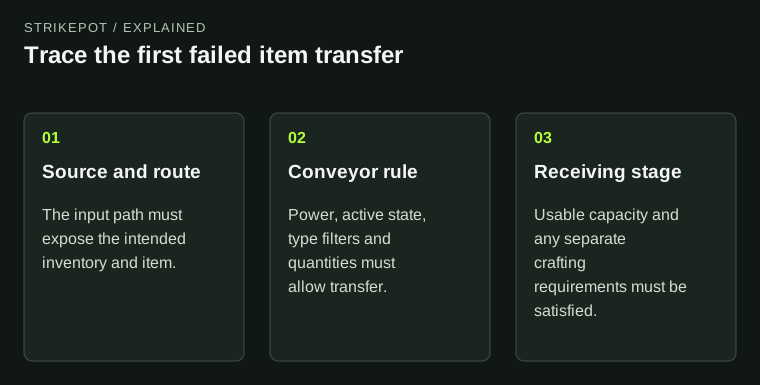
The diagram follows an item across the network instead of treating visible pipes as proof of flow.
Follow the item rather than the pipe's appearance
Facepunch's Industrial Update explanation describes Storage Adaptors as the connection between compatible storage and the industrial system. Conveyors perform movement; splitters and combiners shape the route. Each component has a role, so a visually complete network can still be missing the component that moves the items.
Write the intended journey as a sentence: this container supplies this item through this conveyor to that container. Then inspect the actual input and output ports along that journey. A connection to a nearby object is not enough if it leads to the wrong side of the intended flow.
Keep electrical wiring, item pipes and any fluid system distinct in your notes. They can all support one production area while carrying different things. Color and tidy routing can help you read the build, but neither proves the connections have the intended function.
Separate power from the enabled state
The conveyor item reference lists a power input, enable and disable controls, and separate industrial ports. These describe different requirements. Power arriving at the device does not establish that its active state and control signals allow movement.
Check the device state directly. If another part of the circuit controls it, identify that condition as well. A conveyor that behaves correctly when operated alone may stop because a control input changes, rather than because its item pipe is broken.
In a hypothetical sorting room, an alarm circuit might be wired near a conveyor without being intended to control it. If a later edit connects the wrong control path, the symptoms could appear only during a particular event. Naming the connection makes that kind of problem easier to describe and reproduce.
Read filters as rules, including their quantities
A filter answers which items may move and under what configured limits. A matching item name is therefore only the beginning of the check. Inspect the minimum and maximum conditions shown for the intended transfer.
For example, imagine a fictional filter is configured to send only when a minimum batch is available. A smaller source stack can remain in place even though the item type is correct. That is consistent with the rule, not evidence that the network has ignored it.
A maximum can produce the reverse situation: enough material exists in the source, but the destination already meets the configured target. Before changing the filter, decide whether the current result is actually the one the rule requests. Preserve the old values so you can restore an intentional stock limit after the test.
Inspect the destination's useful space
A container can exist and still be the wrong destination. It might be full, or the relevant input might accept only certain slots or materials. Facepunch's launch explanation gives furnaces and lockers as examples where adaptor access has a defined scope.
Check the inventory that the connection actually exposes. A free slot elsewhere in a larger object is not proof that the particular path can use it. This matters when a group expands a simple box sorter into a production line with several different types of equipment.
| Observed stop | Question to answer |
|---|---|
| Nothing moves from a known source | Is the conveyor active, powered and looking at the correct input? |
| One item moves, another does not | Which filter or destination rule differs? |
| Movement stops after some stock arrives | Is a target quantity reached or usable storage full? |
| Materials arrive but production stops | Are the production requirements satisfied separately? |
Crafting is another stage after transport
The Industrial Crafter reference distinguishes blueprint ports from item transport ports and identifies its workbench attachment. Moving ingredients into that machine does not, on its own, prove that the required blueprint, workbench context and active state are correct.
Keep personal learning separate from the machine's physical inputs. If the question is how to learn an item for ordinary crafting, use the blueprint-resource guide. If the question is why materials are sitting in a machine, inspect that machine's own requirements and slots.
Historical industrial announcements also include limits and launch default timings. Treat those as historical context unless verified for your current server. A gradual transfer or a constrained large network does not justify promising a universal throughput figure.
Make the smallest successful route your reference
After one simple transfer works, add one branch, filter or destination at a time. Keep the source stack and expected result clear. That approach reveals which requirement changes behavior without requiring a complete rebuild.
If the server uses custom rules, retain its identity with the observation. The server identity and connection guide is useful if you cannot return to the same environment; a test on a different server does not necessarily reproduce the original conditions.
A useful report names the source, item, conveyor state, filter condition and intended destination. “The pipes stopped” describes the appearance. A trace of the first failed transfer gives the player or operator a concrete system to inspect.