
A reference board and a submitted CS2 texture should do different jobs. References help you understand a subject, mood or material. The submission contains the original artwork you are proposing for the game. Keeping those roles separate from the first sketch makes the final work easier to review and explain.
Valve's submission policy is the relevant boundary here. This article is about preparing work for that process, not deciding the legal status of every image on the internet.
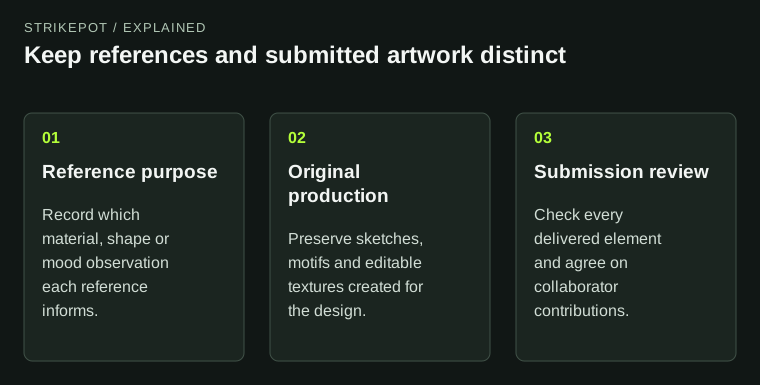
The workflow makes asset origin understandable without treating a reference board as finished artwork.
Write the idea before collecting a pile of images
A clear concept reduces the temptation to borrow a finished visual solution. Describe what you want to communicate in your own words: perhaps a quiet industrial palette, an original imaginary plant or a graphic inspired by the geometry of folded paper.
Then gather references for separate questions. One reference might explain how a material reflects light; another might help you understand the structure of a leaf; another might show a useful color relationship. Avoid treating a single existing illustration as the layout you must reproduce.
This approach supports originality because it asks you to synthesize observations into a new design. It also makes the board more useful to collaborators. Each reference has a stated purpose rather than serving as an unexplained instruction to make something similar.
Keep inspiration outside the production assets
Valve's style guidance permits explanatory inspiration material while requiring submitted elements to be original. A practical working arrangement is therefore to separate reference files from the artwork and textures that will be delivered.
Name the groups clearly. Keep a note beside a reference explaining what you learned from it. Keep sketches, hand-built motifs and texture revisions in the production group. This prevents an image placed temporarily in a concept file from accidentally becoming part of a later export.
Imagine a hypothetical finish based on an original mountain creature. References might help study fur direction or animal movement, but the creature's silhouette, composition and marks should be developed as your own artwork. Redrawing another artist's finished creature with a new palette does not turn it into the independent concept the process calls for.
Build reusable patterns from your own components
Repeating textures are easy places to lose track of origin because a small shape may be duplicated hundreds of times. Make the source components first and preserve them. If a pattern uses original leaves, keep the original leaf drawings alongside the assembled tile.
The record does not need to be elaborate. A few stages showing the motif, its arrangement and its application can explain how the result was constructed. Useful process files are stronger than a folder full of screenshots with no relationship to the delivered texture.
Also examine the quiet parts of a design. A background texture, a small emblem or a decorative border is still part of the submission. Do not apply an originality standard only to the large illustration while importing the supporting elements without review.
Make collaboration responsibilities explicit
Valve's FAQ describes collaboration settings and excludes submissions using other parties' intellectual property under its rules. Before publishing, agree on who made the illustration, who prepared the material and who is responsible for the final asset package.
A useful collaboration note identifies contributions and current files. It should not rely on assumptions such as “the pattern person must have checked the source” or “the uploader knows which version is final.” Each contributor should be able to point to what they created and what remains to be reviewed.
This is also the right time to resolve names and credits. Do not postpone basic authorship questions until a submission attracts attention. Technical completion and an agreed contribution record are different tasks, and both benefit from being settled before publication.
Review the whole package, including presentation art
A polished thumbnail can accidentally introduce material that is absent from the weapon itself: a borrowed background, a third-party character or a logo used to suggest a theme. Review promotional images with the same attention to origin as the textures.
For a hypothetical illustrated finish, a simple original presentation frame and clear game views may communicate more than an elaborate scene assembled from unrelated assets. The presentation's job is to explain your work. It should not create a new authorship question that the design did not previously have.
Likewise, do not treat a free download label as proof that it meets Valve's original-work requirement. Check the actual submission rules rather than inferring eligibility from the price of an asset or from permission described for a different purpose.
Before the final export, review the layers that are hidden as well as those currently visible. An unused reference embedded in a working document can confuse a handoff even when it does not appear in the rendered texture. Keep the submission package focused on the files needed to understand and reproduce your original work.
Keep a version trail that answers ordinary questions
Preserve the concept note, original motifs, editable artwork and final exported files. Add a brief revision note when a material or composition changes. This helps the next collaborator understand the work and gives you a reliable source for future adjustments.
The Workshop status guide explains the separate path from submission to official integration. A complete originality record does not guarantee acceptance; it makes your own production process clearer.
For a final review, ask three concrete questions: which files are inspiration, which files are submitted work, and can every submitted element be explained through the production record? Once those answers are clear, the artwork can be judged for its actual idea and execution. If you are examining an issued item instead, the item inspection guide addresses its present configuration rather than the creator's source assets.