
A finished illustration is the beginning of a CS2 skin production process, not the end. The artwork must work on the receiving weapon, behave as a material, survive the intended wear treatment and be presented clearly enough for review. Publishing that work to the Workshop creates a submission. Official selection, integration and release remain later decisions.
Thinking in stages makes the work easier to manage. It also gives followers of a promising design a more accurate vocabulary: a concept, a playable preview, a published proposal and a released inventory item are different states.
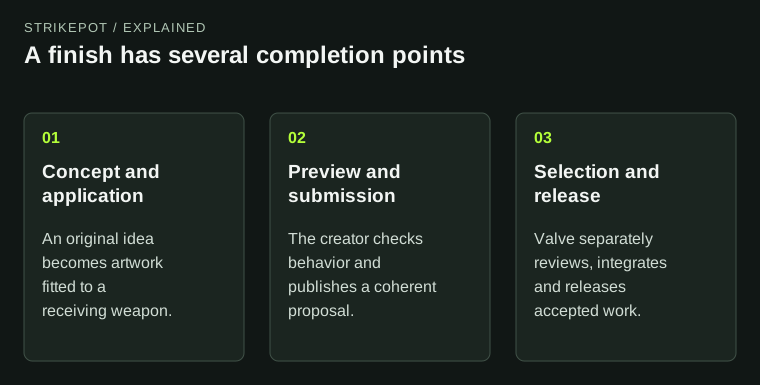
Completing a creator stage does not imply that the next stage has happened.
Write a concept that makes a design decision
A useful concept does more than list colors. It explains the intended idea and why it belongs on this weapon. For example, a hypothetical finish might use an original folded-paper illustration that follows the receiver's long planes, with quiet secondary marks on the visible upper surface. That gives the artist decisions to test.
By contrast, a brief such as “make it red and expensive looking” does not explain composition, material or viewing perspective. It is difficult to evaluate because almost any red image could satisfy it. State what the player should recognize and where that recognition should happen.
Keep references and submitted assets separate from the outset. A mood board can help communicate a direction, but it is not the finished texture. Preserve sketches and source files as the concept develops so later changes remain traceable.
Turn the picture into an application on a weapon
Valve's Workshop FAQ outlines a progression from concept and design through preparation, application and publication. The central production lesson is that a texture has to be evaluated on the object it will actually decorate.
Plan where the main image begins and ends. Check what the player's hand covers, which panels face the camera and which areas disappear around a curve. If the idea depends on reading a face or a word, a break between surfaces may change the expression or split the text. That is an application problem, even when the flat artwork looks polished.
Use the receiving model and current tools as the working reference. Historical tutorials may still explain a useful concept while showing an older interface or file pipeline. Do not copy an old command sequence merely because it appears on a page with an official header.
Preview the behavior as well as the image
The current finish guide provides separate inspection and in-game preview controls in the Item Editor. Those views have practical production roles. Inspection helps you find local problems; the normal held view shows whether the composition works at the size and angle players commonly see.
Make a short review brief before adjusting parameters. Does the main feature remain readable? Do metallic and painted areas feel coherent? Does the design still communicate its idea when the view is less flattering? This keeps revision tied to a problem rather than to endless preference changes.
Try several representative conditions. A design that works only in one promotional pose may need another pass. You are not trying to prove that every viewer will prefer it. You are checking whether the intended design survives ordinary changes in context.
Prepare a submission someone else can understand
A review package should connect the concept, the actual preview and the source assets. Give the work a consistent name and make its current version unambiguous. If a collaborator reviews an older texture while you capture a newer one, feedback can become impossible to reconcile.
Imagine two versions of the hypothetical paper design. Version A has delicate marks that vanish in hand. Version B simplifies those marks and moves the main shape toward a visible surface. Keep the comparison and the reason for the change. That is more useful production evidence than retaining twenty unnamed exports.
The Workshop and inventory guide explains why publishing, following or voting does not issue a skin to an account. The submission page is the record of a proposal, even if its screenshots look indistinguishable from an ordinary inventory inspection.
Selection is a separate editorial decision
Valve's selection guidance makes two limits clear: acceptance is not guaranteed, and the weapon roster planned for a case influences which designs fit. Treat that as a boundary on the process rather than a judgment you can reverse engineer from every vote count.
A strong design can exist without a suitable release slot. A visually loud proposal and a restrained one can also serve different roles. Repeatedly escalating saturation or detail does not resolve a mismatch between the intended role and the work.
For creators, the productive next decision is usually concrete: fix a technical issue, improve a weak view or develop another original idea. For followers, the useful distinction is between evidence that a submission exists and an official announcement that it has been released.
Define what “finished” means at each stage
Call a concept finished when it supports the planned artwork. Call a preview finished when the design behaves as intended on the model. Call a submission finished when its assets and presentation are complete. Reserve “released” for an official integration into the game.
That language prevents two common mistakes: waiting for selection before considering any production work complete, and treating a completed proposal as an item already available to own. If you are comparing an issued skin rather than creating one, start with the exact inventory-item checks. The creative history and the present object can then support each other without being confused.