
A bright red, green and blue CS2 pattern image may be technical data rather than the finished color scheme. In some finish styles, the channels store masks that tell the game where separate colors belong. Looking at the combined image as if it were a normal illustration can therefore produce the wrong conclusion about the skin.
The first question when opening a source texture is not “why are these colors so ugly?” It is “what job does this texture perform?” That determines how its pixels should be read and edited.
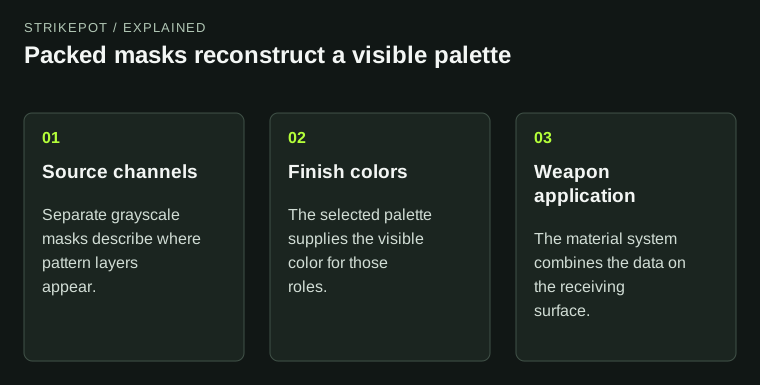
The source image can encode placement rather than the final color picture.
A color image and a mask image can use the same channels
In an ordinary full-color image, red, green and blue values combine to describe the color of a pixel. In a packed mask, those channels can instead act as separate grayscale instructions. The combined preview still displays colors, but those colors are a side effect of how the data is being shown.
Valve's pattern-channel explanation describes this separation. Its practical value is that three sets of placement information can travel together while the finish definition supplies the visible palette.
Imagine an original pattern with broad stripes, scattered small marks and a narrow border. A creator might assign those shapes to different masks. The artwork's structure can remain the same while the final palette changes. A red-looking shape in the packed source need not appear red on the weapon.
The base color has a separate role
Valve's layer overview describes a base coat followed by additional patterned layers. This is different from treating every source pixel as a ready-made final color. The order and coverage of layers can matter to the result.
Think of the hypothetical stripe design as a set of stencils. One stencil controls the broad band; another controls the small marks; another controls an accent. Changing the color assigned to one stencil changes that part of the finish without requiring the artist to redraw all of its edges.
The metaphor is useful but limited. The actual receiving weapon, finish style and current editor settings still determine the application. A mask by itself is not a complete skin. It does not contain every material property, surface boundary or wear decision needed for the final appearance.
Full-color artwork solves a different problem
The Custom Paint style uses a full-color image. That supports a different way of thinking: an artist can create a detailed illustration whose colors are carried in the artwork rather than rebuilding that illustration as a small palette of separate masks.
Neither approach is universally superior. A limited-color repeating design may be easy to adjust through masks. A complex original painting may benefit from full-color authoring. Choose according to the design requirement and the supported style, not according to whether the flat preview resembles a finished skin.
Problems arise when the workflows are mixed unintentionally. A beautifully painted image passed into a mask-based role may not preserve its intended colors. A packed mask displayed as ordinary artwork may look garish even though its placement information is perfectly usable.
Inspect each channel before editing
Use your image editor's individual channel view to understand the source. Ask what each channel controls, whether its edges are intentional and whether shapes overlap in a meaningful way. Give the channels names in your working notes that describe their role, such as broad stripe or fine accent.
Then make a deliberately obvious preview palette. Contrasting colors can reveal whether the layers land where you expect. Once the structure is clear, return to the intended palette. Do not try to diagnose a coverage problem using several nearly identical dark colors.
This is a proposed creator workflow. It does not claim that a particular issued skin was constructed with the hypothetical stripe pattern. Its purpose is to make the meaning of a file legible before changes are made.
Do not assign a universal meaning to alpha
An optional alpha channel often invites another misunderstanding: readers assume it must always mean transparency. In technical textures, a channel's role depends on the material system. Treat it as data whose meaning must be checked for the selected style.
Before copying an alpha channel from another project, read the relevant finish documentation and inspect the current editor's supported controls. A channel created for one material purpose can produce an unintended result in another. Keeping the color artwork, masks and material notes together makes this easier to audit.
The inventory-property guide discusses the separate fields used to describe issued objects. A pattern number in an item record is not one of these image channels. Similar vocabulary does not make the two forms of data interchangeable.
A handoff note should name the channel roles and the palette version together. If the mask structure stays constant but a collaborator changes the assigned colors, call that a palette revision. If the shapes move between channels, call that a structural revision. The distinction helps explain why two previews differ without treating every export as a wholly new design.
Evaluate the reconstructed material
The final check belongs on the weapon. Confirm the visible palette, the placement of the major shapes and the way the design behaves in ordinary views. A source texture can look strange and still perform its intended technical job; a pleasant flat image can still be the wrong input for that job.
Keep a simple record of which file feeds which role. That helps collaborators avoid editing a packed mask as if it were the beauty image. If you publish the design, the Workshop submission guide keeps that proposal distinct from an officially issued item.
Understanding the file's purpose is the useful skill. Once you know whether you are looking at colors or instructions, both the source image and the finished skin become easier to interpret.