THE QUICK ANSWER
Use the Bet ID and the complete wager record. A single leg’s status does not always describe the whole combo.

01
Find the existing wager
Thunderpick documents My Bets in the right menu and a fuller list through the profile. Open and Settled are the main tabs; Cash Out and Live sit under Open.
Start with the wager’s time and event. If the side panel is too short, use See more to open the profile list. Keep the original stake, currency and complete set of legs when checking a combo.
Find the scope of the status
Whole wager lost
Check which leg caused the result
One leg void
Check whether the other legs remain open
Player action
Keep the accepted cashout/cancel confirmation
Admin void
Ask which settlement rule applies
Leg status and overall wager status are separate checks.
Original explanation · not an account screenshot02
Read the whole wager and each leg
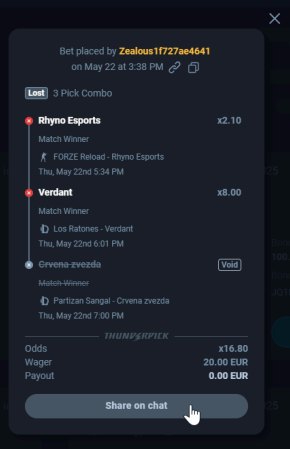
Thunderpick’s 2025 Share Bet example. Its displayed record is illustrative; use the Bet ID from your own history.
Open the full-size image to read small interface details.| Lost combo | A losing leg can mark the whole combo lost; the view identifies the responsible leg. |
|---|---|
| Void leg | A void leg can leave the rest of the combo open. |
| Cashed out | The interface can use this label for a player cashout or cancellation. |
| Void wager | The guide distinguishes an admin cancellation from a player action. |
03
Copy the Bet ID for private support
- Open the info control in My Bets, or the share control on the profile’s My Bets page.
- Read the Share Bet detail view and copy the Bet ID.
- Send the ID to official support with the event, selected market and exact settlement question. You do not need to post the bet to public chat.
Turn a status question into a specific case
My Bets record
Find the time and event
Detail view
Copy the Bet ID
Private support
State the disputed status
Reply
Match the decision to that wager
Publicly sharing the wager is unnecessary for a support handoff.
Original explanation · not an account screenshot04
If the status changed unexpectedly
Record the earlier and current status with timestamps. Ask whether the change affects one subwager or the whole bet, and request the settlement rule applied to that reference.
If the question concerns an accepted cashout or cancellation, keep its confirmation and amount. A button having been visible does not establish that a request was accepted. This guide only reads existing records; it does not place, cash out or cancel a bet.
BEFORE YOU CONTINUE
Quick checklist
- Find the wager in Open or Settled.
- Keep combo and leg statuses separate.
- Copy the Bet ID from the detail view.
- Retain confirmations for an accepted player action.
Official sources
Official help describes the feature. StrikePot’s checks explain how to read the account record and report a mismatch.
- Thunderpick · Update to My Bets · reviewed
Public documentation reviewed on 26 October 2026 (America/Toronto). No account login, claim, deposit, gameplay, withdrawal or recovery test was performed. Account controls and available options can change; follow the current official screen.
Need the details for a particular website?
The code directory records each partner’s code, referral method and offer status. Use the relevant partner page when your question also involves one of those details.
Partner pages may include affiliate links. A listing does not confirm a reward or account eligibility.