THE QUICK ANSWER
Gamdom says a common linking failure means the external account is already attached elsewhere. Unlink it from Gamdom's Connections page; disconnecting only inside Twitch or Discord does not release that association.
01
Check the account that already holds the connection
Start with the Twitch or Discord identity named by the error. Gamdom's dedicated linking article identifies an existing link to another Gamdom account as the usual cause. This is a reason to inspect the earlier association, not proof that every failed attempt has that cause.
If you recognise the older Gamdom account, use its original sign-in method to reach it. Gamdom's troubleshooting page distinguishes password, Google, Steam and Telegram access. A Twitch or Discord connection is not a substitute for identifying the sign-in method used to create the casino account.
Identify both sides of the connection
Gamdom account
Use the original sign-in method to identify it.
Twitch or Discord identity
Match the external account named by the linking error.
Connections
This Gamdom page holds the association to change.
These are account relationships, not screenshots of current controls. A social connection does not identify the Gamdom login method.
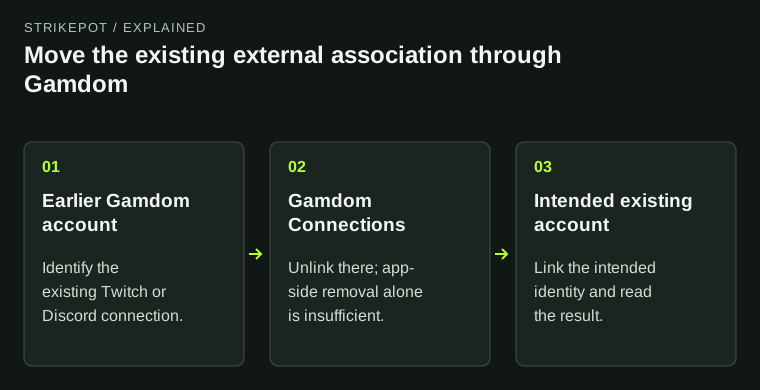
StrikePot illustration02
Remove the old link on Gamdom
- Sign in to the earlier Gamdom account that holds the Twitch or Discord association.
- Open Gamdom's Connections page using the link in the official help article, and identify the intended external account.
- Unlink that association there. Removing Gamdom from the Twitch or Discord application alone is not the procedure the operator documents.
- Return to the intended existing Gamdom account and use Connections to link the correct external identity. Read the result before making further changes.
03
Check the verification request you actually see
Gamdom's linking article also asks for phone and email verification on the accounts involved. It does not publish every verification control or explain which account a particular error means. Check the displayed notice; if its scope is unclear, ask support which account and check remain outstanding.
For a Gamdom email update, its troubleshooting guide documents Profile, then Save, followed by the verification email. Follow that flow only if the registered address actually needs correcting. A linking failure by itself is not a reason to change a working account email or phone number.
05
Confirm the intended identity was linked
Reopen Connections and check the external identity shown. Keep the original error and the result of the attempted move so you can describe what changed. If the link still fails, tell support where unlinking was performed and the exact message now displayed.
Share account identifiers privately through official support. Leave passwords, login codes and authenticator recovery material out of the message. If you reach the wrong account or see an identity you do not recognise, stop changing connections and ask support to investigate that mismatch.
BEFORE YOU CONTINUE
Quick checklist
- Identify the external account named in the error.
- Unlink the old association in Gamdom Connections.
- Check the actual email and phone verification notices.
- Use official support if the older account is inaccessible.
Official sources
Official guidance checked on 27 October 2026. Dated updates below explain changes to earlier instructions.
Need the details for a particular website?
The code directory records each partner’s code, referral method and offer status. Use the relevant partner page when your question also involves one of those details.
Partner pages may include affiliate links. A listing does not confirm a reward or account eligibility.