THE QUICK ANSWER
An accepted code does not make all payment routes equivalent. Check the chosen method and the event that credits the bonus, especially when skin funds are held.
01
Check the payment route before its percentage
CSGORoll's FAQ documents its standard referral benefit for card, bank-transfer and crypto top-ups, while excluding CS2 skin trades and gift-card redemptions. G4Skins instead documents skin-payment bonuses, but ties credit to funds moving from Piggy Bank to the wallet.
These are different conditions. One route may be excluded from a named offer; another may be eligible but credited later. Distinguish those states before assuming that code acceptance means every deposit should have the same result.
Excluded or waiting for the credit event?
Method excluded
The named CSGORoll top-up benefit does not apply to skin trades or gift-card redemption.
Method included, funds held
Follow the platform's stated credit event and the offer's validity.
Record conflict
Ask about the existing payment; a second one may consume a one-off offer.
Specific examples of different bonus states, based on the named platforms' rules.
Original explanation · not an account screenshot02
Compare exclusion, delayed credit and offer consumption
| CSGORoll standard referral top-up benefit | Documented for cards, bank transfer and crypto, with a published $100 total cap per 24 hours. |
|---|---|
| CSGORoll skin trades and gift cards | Explicitly excluded from that standard top-up benefit; this is different from a delayed bonus. |
| G4Skins skin payment | Current help says the deposit bonus credits when the funds move from Piggy Bank to wallet. |
| G4Skins time-limited coupon | The coupon must still be active at that credit event; an earlier successful code entry does not settle this condition. |
| G4Skins another payment | The FAQ says another method can consume the bonus before held skin funds move; permanent promo-code bonuses are an exception. |
03
Record authorization and credit as different times
For a held skin payment, retain when the Steam trade was accepted and when the platform says the funds become usable. Add the offer's expiry separately. A countdown attached to held credit is not the same deadline as a coupon's validity.
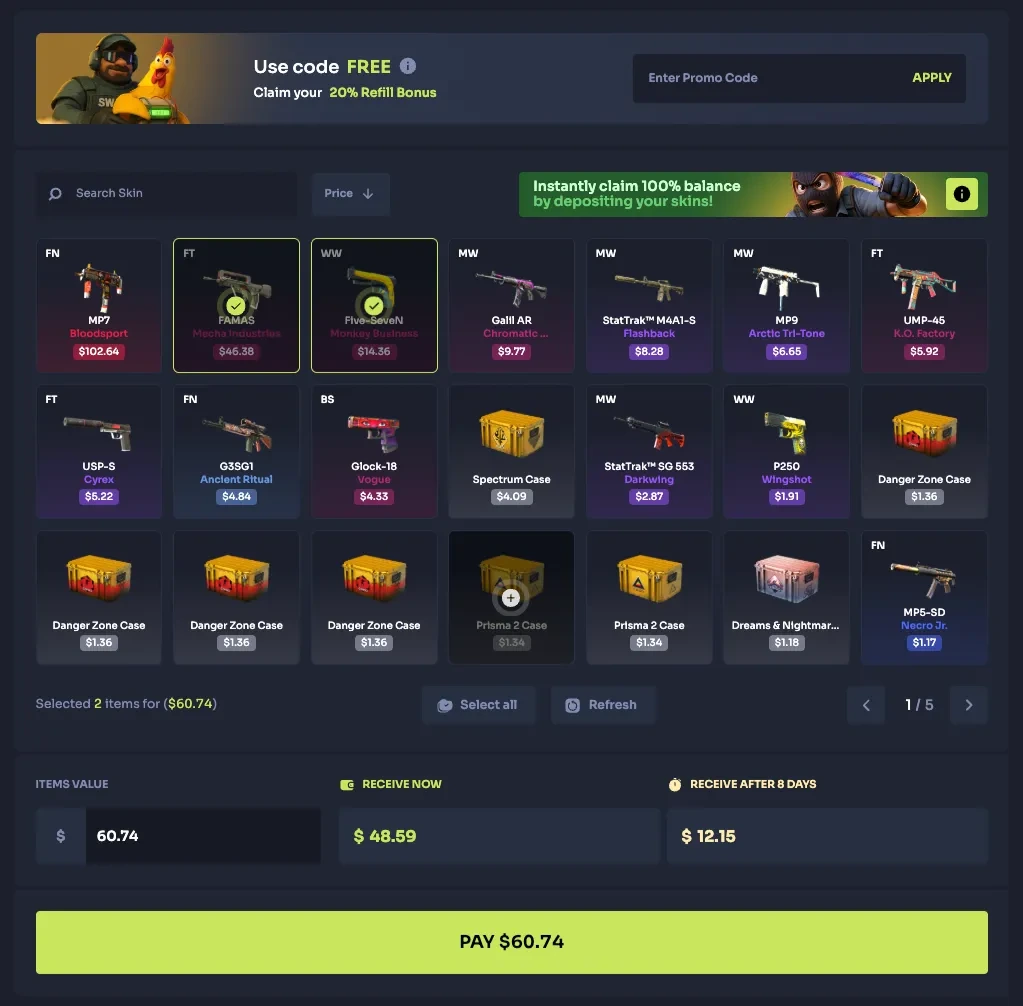
The direct G4Skins page on this review described conditions at the Piggy Bank-to-wallet event. An older indexed extract still referred to an eight-day delay. Do not replace the current account's release notice with a fixed number from that older extract.
- Selected payment method
- Accepted code and named offer
- Trade or payment reference
- Held-funds release event
- Coupon expiry and whether another payment used it
A coupon and held skin funds have separate clocks
Code active
Record the offer and its expiry.
Skin payment
Record the accepted transfer and held-funds notice.
Intervening payment
It can consume the offer first; the permanent-code exception is separate.
Wallet credit
G4Skins says a limited coupon must still be valid when Piggy Bank funds move.
No fixed skin-credit duration is inferred from an older indexed extract.
Original explanation · not an account screenshot04
A second payment can change the comparison
When the official terms say another payment can use an offer first, sending another deposit to see if the code works can produce a different event instead of diagnosing the original one. Read the existing record and ask which payment consumed the offer.
Compare your intended payment method's final quote, not a method-independent percentage banner. Keep the actual payment amount, bonus credit and any held portion separate. This page supplies no universal conversion, completion time or withdrawal right.
05
Choose the correct explanation for a missing bonus
- Confirm whether the named offer includes the chosen payment method.
- If included, find the documented credit event and offer expiry.
- Check whether a different payment used a one-off benefit first.
- Give support the existing payment and offer references if the records disagree.
BEFORE YOU CONTINUE
Quick checklist
- Check method eligibility before comparing rates.
- Separate exclusion from delayed credit.
- Record the credit event and coupon expiry.
- Use the existing payment record before attempting another one.
Official sources
Official public documentation reviewed on 26 October 2026 (America/Toronto). Publication dates and source-access limits are recorded below.
- CSGORoll — standard top-up method eligibility and cap · reviewed
- G4Skins — current skin-payment, coupon-validity and other-payment rules · reviewed
Current direct CSGORoll and G4Skins help was read. G4Skins returned conditional Piggy Bank credit wording while an older indexed extract still mentioned eight days; this guide does not impose that older duration on a current account. No skin payment, cash top-up, code redemption, coupon consumption or credit release was tested.