
THE KEY POINT
The amount under Receive after 8 days is delayed credit. Compare it with your deposit record before treating the difference as a missing payment.
01
Open the skin payment page
In My Account, choose Add Funds, then Pay By Skins. Select the items you intend to transfer. Before continuing, read Items value, Receive now and Receive after 8 days together. The last two fields divide the payment into immediate and delayed credit.
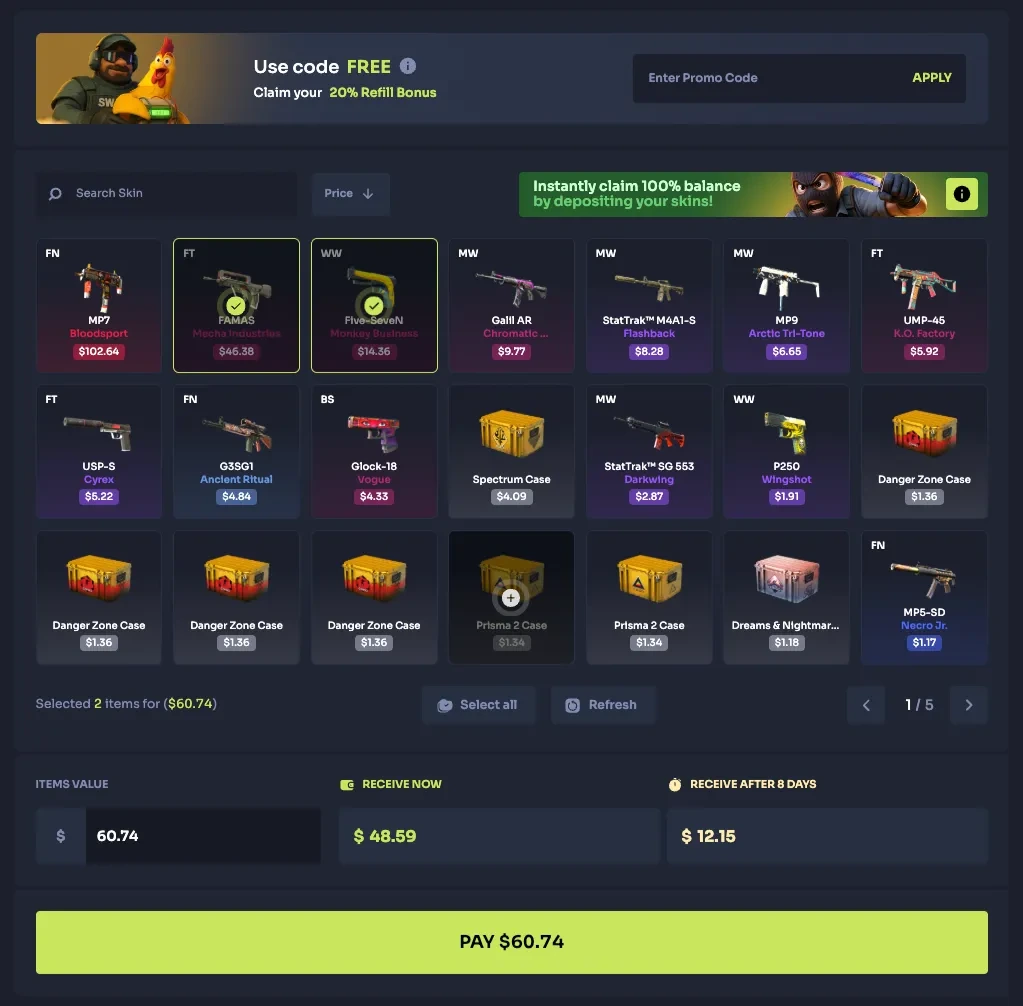
Step 1 — Select the intended skins, then read the three amount fields above PAY. Selected items have green check marks in this official example.
Open the full-size image to read small interface details.02
Match the amount to the correct field
In the screenshot, $60.74 is split into $48.59 now and $12.15 after eight days. These are example amounts. CaseHug links the delay to Steam’s trade protection; its help page places the held amount in the Pay By Skins tab and below the balance beside a padlock.
Keep a copy of your own breakdown and the accepted trade reference. Those two records let support compare the items transferred with the credit recorded. Crop screenshots to the relevant fields before sharing them.

Step 2 — Receive now and Receive after 8 days are separate amounts. Use your own transaction figures when checking the balance.
Open the full-size image to read small interface details.03
A delayed balance does not require another deposit
CaseHug also describes Instant Deposit: an additional payment at least equal to the held amount can release the credit early. Waiting for the stated release date is the alternative. The extra payment is optional; it is not a support fee.
When contacting support about a discrepancy, include the trade reference, transfer time, immediate amount, delayed amount and the exact status shown. Ask which entry accounts for the difference. Do not send an unrelated second trade to correct an unclear first one.
BEFORE YOU CONTINUE
Quick checklist
- Read the immediate and delayed amounts before confirming.
- Save the accepted trade reference and your payment breakdown.
- Check the recorded release date before escalating delayed credit.
- Keep passwords, login codes and personal information out of screenshots.
Official sources
Read the official documents below for the service’s rules and account instructions.
Need the details for a particular website?
The code directory records each partner’s code, referral method and offer status. Use the relevant partner page when your question also involves one of those details.
Partner pages may include affiliate links. A listing does not confirm a reward or account eligibility.